
JavaScript getElementById IFrame
|
|
We can also use document.getElementById() method with the IFrame. In this example we have created an html page into which we have one IFrame window which takes another HTML page. We have to pass the text field values from the IFrame html page to the main HTML page's text fields.
Description of code :
We have created two pages. One is "inputForm.html" and another is "getDataIframe.html". In getDataIframe.html we have included inputForm.html page as :
<iframe id="iframe_id" src="inputForm.html" height="275" > </iframe> |
In the inputForm.html page we have created three text fields and one button. When "Submit" button is clicked all these three fields values are passed to the input() function of the parent component page. This input() function is defined in the getDataIframe.html( parent of inputForm.html ) page.
 function input(string1,string2,string3){
    var name=string1;
    var age=string2;
    var clss=string3;
    document.getElementById('nameAnchor').value=name;
    document.getElementById('ageAnchor').value=age;
    document.getElementById('classAnchor').value=clss;
   }
|
In first three line of the input function we have created three variables name, age, class which holds the value inserted into the text fields of "inputForm.html". These values are further set to the text fields by using the method document.getElementById() method.
Here is the full example code :
inputForm.html
<html>
 <head>
  <title>IFrame Example</title>
</head>
<body>
  <form name="frm2" >
   <center>
     <h1><font color="#000099">Input Form of IFrame</font></h1>
     <p>Name : <input type="text" name="resp1" id="input" value=""/></p>
     <p>Age : <input type="text" name="resp2" id="input" value=""/></p>
     <p>Class : <input type="text" name="resp3" id="input" value=""/></p>
     <input type="button" onclick="parent.input(this.form.resp1.value,
       this.form.resp2.value,this.form.resp3.value);" value="Submit" />
   </center>
  </form>
</body>
</html>
|
getDataIframe.html
<html>
 <head>
  <title>getElementById IFrame Example</title>
  <script language="javascript">
    function input(string1,string2,string3){
    var name=string1;
    var age=string2;
    var clss=string3;
    document.getElementById('nameAnchor').value=name;
    document.getElementById('ageAnchor').value=age;
    document.getElementById('classAnchor').value=clss;
   }
 </script>
</head>
 <body>
 <div>
   <div style="float:left;">
    <iframe id="iframe_id" src="inputForm.html"
                               height="275" >
    </iframe>
   </div>
   <div>
     Name : <input type="text"  id="nameAnchor" >
     Age   :<input type="text"  id="ageAnchor" >
     Class: <input type="text"  id="classAnchor">
   </div>
 </div>
 </body>
</html>
|
Output :
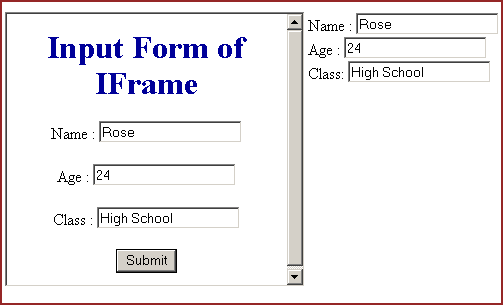
The output will look like:
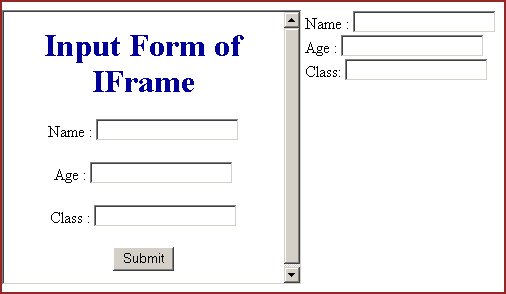
Insert values into the IFrame form and click on the "Submit" button.
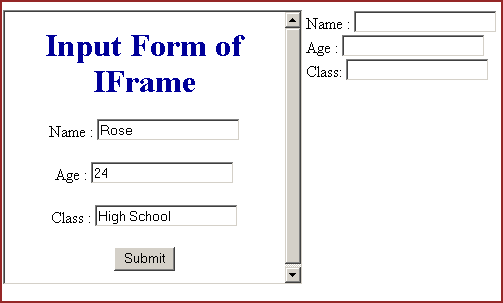
As you can see in the following output that these values are passed to the parent text fields.


Tutorials
- Clear cookie example
- JavaScript getElementById innerHTML
- JavaScript getElementById Style
- Javascript Examples
- JavaScript add row dynamically to table
- New Page 1
- JavaScript Change link
- JavaScript Checkbox getElementById
- javascript clear textarea
- JavaScript Clock Timer
- JavaScript Cookies
- JavaScript Date Difference
- JavaScript duplicate string
- JavaScript Email Validation
- javascript focus input
- JavaScript get excel file data
- JavaScript getAttribute Href
- JavaScript getAttribute Style
- JavaScript getElementById div
- JavaScript getElementById Iframe
- JavaScript getElementById select
- JavaScript Hide Button
- JavaScript Hide Div
- JavaScript hide image
- JavaScript Hide Table Column
- JavaScript Hide Table Rows
- JavaScript Key Event
- JavaScript link
- JavaScript method location
- JavaScript move div
- JavaScript move file
- JavaScript move image
- JavaScript Navigate Back
- JavaScript navigate to page
- JavaScript Navigate to URL
- JavaScript indexOf substring
- JavaScript onkeypress event
- JavaScript Open file
- JavaScript Open link in new window
- JavaScript Open Modal Window