
JavaScript sort table
|
|
In this section, we are going to sort the table using the JavaScript.
To sort the table, we have created two files:
1) sort.js
2) sortTable.html
In sort.js file, we have created a for loop which iterates through the rows of the table in the function sortTable() and populates the array 'columns' with the contents of selected column. Then, we created for loop to loop through the array 'column' and copy the array columns[i] to array[i]. The method columns.sort() sorts the column items. After that, we have created for loop to loop through the sorted array and the old array. When the item in the old and sorted array match, place the current row number in the proper position in the new order array so that the rows can be moved.
After sorting, following code adds new row to the base of the the table:
| for (i=0; i<index.length; i++) { newRow = myTable.insertRow(); for (k=0; k<myTable.cols; k++) { newCell = newRow.insertCell(); newCell.innerHTML = myTable.rows(index[i]).cells(k).innerHTML; } } |
Following code moves sorted rows to the top of the table:
| for (i=1; i<totalRows; i++){ myTable.moveRow((myTable.rows.length -1),1); } |
Following code delete the old rows from the bottom of the table:
| for (i=1; i<totalRows; i++){ myTable.deleteRow(); } |
Here is the code of sort.js file:
| function sortTable(col, myTable){ var cell = col + myTable.cols; var totalRows = myTable.rows.length; var tSort = 0; var columns = new Array(); var index = new Array(); var indexArray = new Array(); var array = new Array(); var newRow; var newCell; var i,j,k; for (i=1; i < myTable.rows.length; i++) { columns[i - 1] = myTable.cells(cell).innerText; cell = cell + myTable.cols; } for (i=0; i < columns.length; i++){ array[i] = columns[i]; } columns.sort(); for (i=0; i < columns.length; i++){ indexArray[i] = (i+1); for(j=0; j < array.length; j++){ if (columns[i] == array[j]){ for (k=0; k<i; k++){ if ( index[k] == (j+1) ){ tSort = 1; } } if (tSort == 0){ index[i] = (j+1); } tSort = 0; } } } for (i=0; i<index.length; i++) { newRow = myTable.insertRow(); for (k=0; k<myTable.cols; k++) { newCell = newRow.insertCell(); newCell.innerHTML = myTable.rows(index[i]).cells(k).innerHTML; } } for (i=1; i<totalRows; i++){ myTable.moveRow((myTable.rows.length -1),1); } for (i=1; i<totalRows; i++){ myTable.deleteRow(); } } |
The sortTable.html file includes the above js file using the 'src' attribute of script tag. Here, we have created a table with some data. When you load the html page, you will get the table with the data. On clicking the link of the particular column, the method sortTable() is called from the js file and table will get sorted according to that column. The following code works correctly on Internet Explorer.
Here is the code of sortTable.html:
| <HTML> <H2>JavaScript Sort Table</H2> <SCRIPT type="text/javascript" src="sort.js"></SCRIPT> <TABLE WIDTH="55%" BORDER="1" name="table" id="table" cols="4"> <TR><TD><A href="javascript:sortTable(0, table);"><FONT color="red"><B>ID</FONT></B></A></TD> <TD><A href="javascript:sortTable(1, table);"><FONT color="red"><B>NAME</FONT></B></A></TD> <TD><A href="javascript:sortTable(2, table);"><FONT color="red"><B>ADDRESS</FONT></B></A></TD> <TD><A href="javascript:sortTable(3, table);"><FONT color="red"><B>SPECIALIZATION</FONT></B></A> </TD></TR></FONT> <TR><TD>1</TD><TD>Angelina</TD><TD>Delhi</TD><TD>Computer Science</TD></TR> <TR><TD>2</TD><TD>Martina</TD><TD>Lucknow</TD><TD>Mathematics</TD></TR> <TR><TD>3</TD><TD>Tina</TD><TD>Chennai</TD><TD>English</TD></TR> <TR><TD>4</TD><TD>Simran</TD><TD>Mumbai</TD><TD>Biology</TD></TR> <TR><TD>5</TD><TD>Christina</TD><TD>Kolkata</TD><TD>Psychology</TD></TR> </TABLE> </HTML> |
Output will be displayed as:
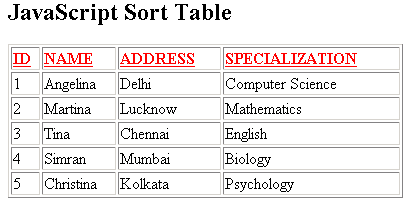
On clicking the link of particular column, the table gets sorted according to that column.


Tutorials
- Clear cookie example
- JavaScript getElementById innerHTML
- JavaScript getElementById Style
- Javascript Examples
- JavaScript add row dynamically to table
- New Page 1
- JavaScript Change link
- JavaScript Checkbox getElementById
- javascript clear textarea
- JavaScript Clock Timer
- JavaScript Cookies
- JavaScript Date Difference
- JavaScript duplicate string
- JavaScript Email Validation
- javascript focus input
- JavaScript get excel file data
- JavaScript getAttribute Href
- JavaScript getAttribute Style
- JavaScript getElementById div
- JavaScript getElementById Iframe
- JavaScript getElementById select
- JavaScript Hide Button
- JavaScript Hide Div
- JavaScript hide image
- JavaScript Hide Table Column
- JavaScript Hide Table Rows
- JavaScript Key Event
- JavaScript link
- JavaScript method location
- JavaScript move div
- JavaScript move file
- JavaScript move image
- JavaScript Navigate Back
- JavaScript navigate to page
- JavaScript Navigate to URL
- JavaScript indexOf substring
- JavaScript onkeypress event
- JavaScript Open file
- JavaScript Open link in new window
- JavaScript Open Modal Window