Core Java| JSP| Servlets| XML| EJB| JEE5| Web Services| J2ME| Glossary| Questions?

Hot Searches
struts-config.xml  web.xml  Java date format  read/write text file using javascript  ArrayList  Insert Data into Database Using Hibernat  create text file using java  insert data to text file using java  Visual Basic Date and Time Display the t  Create table and insert data by sql quer 

  JDO Tutorials
  EAI Articles
  Struts Tutorials
  Java Tutorials
  Java Certification
  Java Applet
Questions
Comments

Javascript array functions


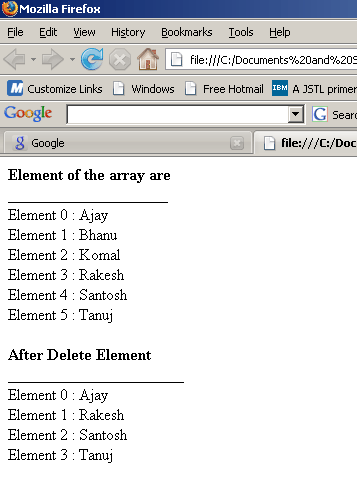
In this Tutorial we want to describe you a code that help you in understanding JavaScript array function, The code depicts that on loading a page invoke a function display ( ). The function includes an array variable that is used to instantiate an array. The array object hold the different element specified by array index from [0] -[5].The for loop execute and run the script till the length i is less than the length of an array. The document. write print the element of the array that it hold.
Method used-

1)array.splice(1,2)  -  This method remove and insert an element of array. This method remove the element from an array object from array[1],[2] index.

Finally the document. write print the list of element that an array object hold after delete an element.

function.html


<!DOCTYPE HTML PUBLIC "-//W3C//DTD HTML 4.01 Transitional//EN">
<html>
    <head>
        <title>Array Delete Element</title>
        <meta http-equiv="Content-Type" content="text/html; charset=UTF-8"/>
        <script>
            function display(){
                var array = new Array();
                array[0"Ajay";
                array[1"Bhanu";
                array[2"Komal";
                array[3"Rakesh";
                array[4"Santosh"
                array[5"Tanuj"
                document.write("<b>Element of the array are</b><br>");
                document.write("____________________<br>");
            
                for(i=0;i<array.length;i++){
                    document.write("Element "+i+" : "+array[i]+"<br>");
                }
            
                array.splice(1,2);
            
                document.write("<br><b>After Delete Element</b><br>");
                document.write("______________________<br>");
                
                for(i=0;i<array.length;i++){
                    document.write("Element "+i+" : "+array[i]+"<br>");
                }
            }
        </script>
    </head>
    
    <body onload="display();">
        
    </body>
</html>

Output

Download code


Leave your comment:

Name:

Email:

URL:

Title:

Comments:


Enter Code:

Audio Version
Reload Image
 

Note: Emails will not be visible or used in any way, and are not required. Please keep comments relevant. Any content deemed inappropriate or offensive may be edited and/or deleted.

No HTML code is allowed. Line breaks will be converted automatically. URLs will be auto-linked. Please use BBCode to format your text.

Add This Tutorial To:
  Del.icio.us   Digg   Google   Spurl   Blink   Furl   Simpy   Y! MyWeb 
Tell A Friend
Your Friend Name


Home | JSP | EJB | JDBC | Java Servlets | WAP  | Free JSP Hosting  | Search Engine | News Archive | Jboss 3.0 tutorial | Free Linux CD's | Forum | Blogs

About Us | Advertising On RoseIndia.net  | Site Map

India News

Indian Software Development Company | iPhone Development Company in India | Java Training Delhi | Java Training at Noida |

Send your comments, Suggestions or Queries regarding this site at roseindia_net@yahoo.com.

Copyright © 2008. All rights reserved.