
HTML Get Radio Button


HTML Get method in HTML is used to send the data as part of the URL. The get method is used for retrieving the data. In Get Method, the amount of data can be sent with a limited URL. Get method is used for sort forms. When a page is submiited,the value entered by the user is visible to the user in URL.
Understand with Example
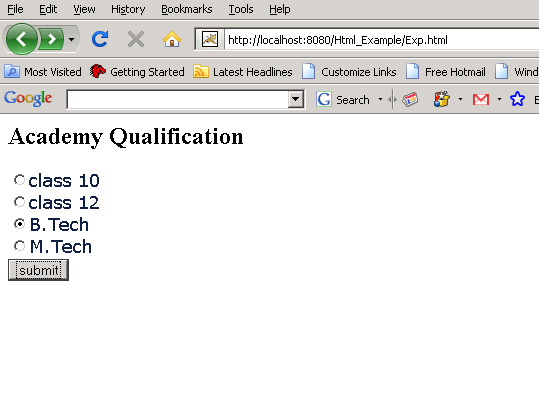
The Tutorial illustrates an HTML Get Radio Button example. In this Tutorial we create a radio button, which allows the user to select any one of radio button from the alternative option. When a submit button is clicked by the user, a new page get.html is open. The get method is used as attribute, which allows the user to see the data entered by the user in the encoded URL form.
| <html> <body> <h2> Academy Qualification </h2> <font size= 4 face="verdana" color=#112244> <form method = GET action ="get.html"> <input type="radio" name="r1" value="class 10" checked="false">class 10<br> <input type="radio" name="r1" value="class 12" checked="false">class 12<br> <input type="radio" name="r1" value="B.Tech" checked="false">B.Tech<br> <input type="radio" name="r1" value="M.Tech" checked="false">M.Tech<br> <input type="submit" name="b1" value="submit"> </form> </body> </html> |
Place the folder of above saved code in webapps folder of Tomcat(version installed) on your computer. Run the html code and output on browser is displayed as
 |
| <html> <body> <FORM ACTION=""> <P>Please Fill the Registration Form</p><br> Enter Your Name<input type="text" Value="username"><br> Enter Your Email Address<input type="text" value="Email-Address"><br> <input type="submit" value="send"> </FORM> </body> </html> |
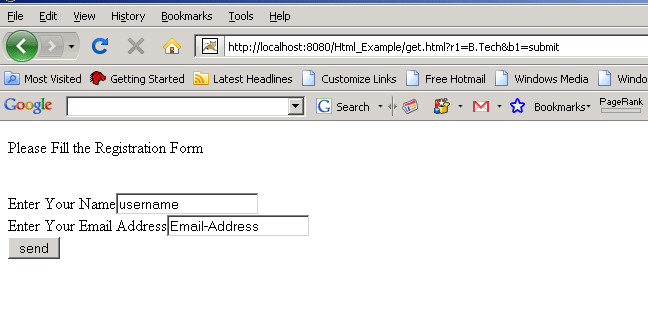
The form data ("query data") is appended to the end of the URL.
Output on Browser is displayed as
 |