Home Html Set Frame Inside HTML


Set Frame Inside HTML
Posted on: December 6, 2008 at 12:00 AM
The Tutorial helps you to understand how to set Frame Inside HTML.

Set Frame Inside HTML


The Tutorial helps you to understand how to set Frame Inside HTML. In this Tutorial, the code create a Inline frame inside a HTML page.

Understand with Example

The Example create a HTML page with Inline Frame inside it. For this we create a html page name iframe.htm. The code begin with <html> tag, Inside the html tag, we have <body> tag, which define 

<iframe src> : The <iframe src>  create a frame within a html page and src specifies the url,html of the document which moves into a frame.


<html>
<body>

<iframe src="cascading-style.html"></iframe>

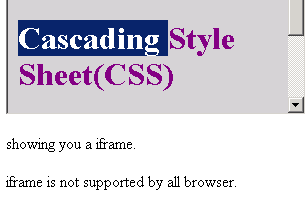
<p>showing you a iframe.</p>
<p>iframe is not supported by all browser.</p>


</body>
</html>
</HEAD>
</HTML>


On browser, the output code is displayed as


Download Source

Related Tags for Set Frame Inside HTML:
htmlcideiframepageinlinetutorialtagnamelineriathisidcreatedefineframeifforexamplewithtoramexameitliinmlbodymsidsideagemetorxawhichxampsginathtmishampleacodcodetutorssrithavbeginfinframpleplodeonl


More Tutorials from this section

Ask Questions?    Discuss: Set Frame Inside HTML  

Post your Comment


Your Name (*) :
Your Email :
Subject (*):
Your Comment (*):
  Reload Image


Ask Questions?

If you are facing any programming issue, such as compilation errors or not able to find the code you are looking for.

Ask your questions, our development team will try to give answers to your questions.