Development| HTML| JavaScript| Questions?


Search Tutorials

Latest Questions
Comments
 
Making Tab using Javascript 
 

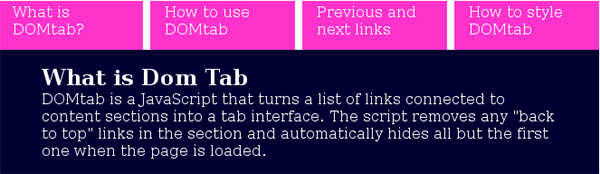
This Example describes the way to make Tab using javascript and css.For this we are going to make program named domtab.css, domtab.js, index.html.


Making Tab using Javascript


This Example describes the way to make Tab using javascript and css.For this we are going to make program named  domtab.css, domtab.js, index.html. The code involved in programs are described below:-


index.html

<html>
<head>
  <meta http-equiv="Content-Type" content="text/html; charset=utf-8"
  <title>Example of making Ajax tab</title>
  <style type="text/css">
    @import "domtab.css";
  </style>

  <script type="text/javascript" src="domtab.js"></script>
  <script type="text/javascript">
    document.write('<style type="text/css">');    
    document.write('div.domtab div{display:none;}<');
    document.write('/s'+'tyle>');    
    </script>
</head>
<body>
<h1><a name="top" id="top">Ajax-Tab Example</a></h1>
<p id="domtabprintview"></p>
<div class="domtab">
  <ul class="domtabs">
    <li><a href="#what">What is DOMtab?</a></li>
    <li><a href="#how">How to use DOMtab</a></li>
    <li><a href="#pr">Previous and next links</a></li>
    <li><a href="#style">How to style DOMtab</a></li>
  </ul>
  <div>
    <h2><a name="what" id="what">What is Dom Tab</a></h2>
    <p>DOMtab is a JavaScript that turns a list of links connected to content
    sections into a tab interface. The script removes any "back to top" links 
    in the section and automatically hides all but the first one when the 
    page is loaded.</p>
    </div>
  <div>
    <h2><a name="how" id="how">How to use DOMtab</a></h2>
    <p>Applying DOMtab to your pages is easy, all you need is to call the 
    script in the head of the document:</p>
  </div>
  <div>
    <h2><a name="pr" id="pr">Previous and next links</a></h2>
    <p>In this version I added the option to have previous and next links 

<p>DOMtab then generates the
 following link list in each of the sections, automatically 

removing the previous link in the first and the next in the last section:</p>
</pre>
<p>Both labels are set via innerHTML rather than the proper method :-).
 This allows you to
use images if wanted:</p>
  </div>
  <div>
    <h2><a name="style" id="style">How to style DOMtab</a></h2>
    <p>Using the mandatory classes domtab for the main DIV of each menu, 
    and domtabs for the menu list, you can pretty much style your menus 
    any way you want to.</p>
    </pre>
    </div>
  </body>
</html>

domtab.css
*{
      margin:0;
      padding:0;
      list-style:none;
      border:none;
    }
    ul.domtabs li{
    float:left;
    padding:0 .5em 0 0;
    }
    ul.domtabs a:link,
    ul.domtabs a:visited,
    ul.domtabs a:active,
    ul.domtabs a:hover{
      width:8em;
      padding:.2em 1em;
      display:block;
      background:#FF33CC;
      color:#fff;
      height:3em;
      text-decoration:none;
    }
      div.domtab div{
      clear:both;
      width:35.5em;
      background:#000033;
      color:#fff;
      padding:1em 3em;
    }
      h1{
      padding:1em 2;
      background:#fff;
      }

domtab.js
domtab={
  tabClass:'domtab',
  listClass:'domtabs',
  contentElements:'div',
    init:function(){
    var temp;
    if(!document.getElementById || !document.createTextNode){return;}
    var tempelm=document.getElementsByTagName('div');    
    for(var i=0;i<tempelm.length;i++){
      if(!domtab.cssjs('check',tempelm[i],domtab.tabClass)){continue;}
      domtab.initTabMenu(tempelm[i]);
      domtab.removeBackLinks(tempelm[i]);
      if(domtab.cssjs('check',tempelm[i],domtab.prevNextIndicator)){
        domtab.addPrevNext(tempelm[i]);
      }
      domtab.checkURL();
    }
    if(document.getElementById(domtab.printID) 
       && !document.getElementById(domtab.printID).getElementsByTagName('a')[0]){
      var newlink=document.createElement('a');
      newlink.setAttribute('href','#');
      domtab.addEvent(newlink,'click',domtab.showAll,false);
      newlink.onclick=function(){return false;}
      newlink.appendChild(document.createTextNode(domtab.showAllLinkText));
      document.getElementById(domtab.printID).appendChild(newlink);
    }
  },
  
  initTabMenu:function(menu){
    var id;
    var lists=menu.getElementsByTagName('ul');
    for(var i=0;i<lists.length;i++){
      if(domtab.cssjs('check',lists[i],domtab.listClass)){
        var thismenu=lists[i];
        break;
      }
    }
    if(!thismenu){return;}
    thismenu.currentSection='';
    thismenu.currentLink='';
    var links=thismenu.getElementsByTagName('a');
    for(i=0;i<links.length;i++){
      if(!/#/.test(links[i].getAttribute('href').toString())){continue;}
      id=links[i].href.match(/#(\w.+)/)[1];
      if(document.getElementById(id)){
        domtab.addEvent(links[i],'click',domtab.showTab,false);
        links[i].onclick=function(){return false;}
        domtab.changeTab(document.getElementById(id),0);
      }
    }
    id=links[0].href.match(/#(\w.+)/)[1];
    if(document.getElementById(id)){
      domtab.changeTab(document.getElementById(id),1);
      thismenu.currentSection=id;
      thismenu.currentLink=links[0];
      domtab.cssjs('add',links[0].parentNode,domtab.activeClass);
    }
  },
  
  
  changeTab:function(elm,state){
    do{
      elm=elm.parentNode;
    while(elm.nodeName.toLowerCase()!=domtab.contentElements)
    elm.style.display=state==0?'none':'block';
  },
  showTab:function(e){
    var o=domtab.getTarget(e);
    if(o.parentNode.parentNode.currentSection!=''){
      domtab.changeTab
        (document.getElementById(o.parentNode.parentNode.currentSection),
0);
      domtab.cssjs
  (
'remove',o.parentNode.parentNode.currentLink.parentNode,domtab.activeClass);
    }
    var id=o.href.match(/#(\w.+)/)[1];
    o.parentNode.parentNode.currentSection=id;
    o.parentNode.parentNode.currentLink=o;
    domtab.cssjs('add',o.parentNode,domtab.activeClass);
    domtab.changeTab(document.getElementById(id),1);
    document.getElementById(id).focus();
    domtab.cancelClick(e);
  },

  getTarget:function(e){
    var target = window.event ? window.event.srcElement : e ? e.target : null;
    if (!target){return false;}
    if (target.nodeName.toLowerCase() != 'a'){target = target.parentNode;}
    return target;
  },
  
  addEvent: function(elm, evType, fn, useCapture){
    if (elm.addEventListener) 
    {
      elm.addEventListener(evType, fn, useCapture);
      return true;
    else if (elm.attachEvent) {
      var r = elm.attachEvent('on' + evType, fn);
      return r;
    else {
      elm['on' + evType] = fn;
    }
  },
  cssjs:function(a,o,c1,c2){
    switch (a){
      case 'swap':o.className=!domtab.cssjs
            (
'check',o,c1)?o.className.replace(c2,c1):o.className.replace(c1,c2);
      break;
      case 'add':
        if(!domtab.cssjs('check',o,c1)){o.className+=o.className?' '+c1:c1;}
      break;
      case 'remove':
        var rep=o.className.match(' '+c1)?' '+c1:c1;
        o.className=o.className.replace(rep,'');
      break;
      case 'check':
        var found=false;
        var temparray=o.className.split(' ');
        for(var i=0;i<temparray.length;i++){
          if(temparray[i]==c1){found=true;}
        }
        return found;
      break;
    }
  }
}
domtab.addEvent(window, 'load', domtab.init, false);


Output of the program:-


Download Source Code


» View all related tutorials
Related Tags: html c object objects sed graph tag line app horizontal to lines between e li paragraph use ul apply in

Leave your comment:

Name:

Email:

URL:

Title:

Comments:


Enter Code:

Audio Version
Reload Image
 

Note: Emails will not be visible or used in any way, and are not required. Please keep comments relevant. Any content deemed inappropriate or offensive may be edited and/or deleted.

No HTML code is allowed. Line breaks will be converted automatically. URLs will be auto-linked. Please use BBCode to format your text.

Add This Tutorial To:
  Del.icio.us   Digg   Google   Spurl   Blink   Furl   Simpy   Y! MyWeb 
Training Courses
Tell A Friend
Your Friend Name
Software Solutions
Least Viewed
Most Rated
Recently Viewed
Search Tutorials


Home | JSP | EJB | JDBC | Java Servlets | WAP  | Free JSP Hosting  | Search Engine | News Archive | Jboss 3.0 tutorial | Free Linux CD's | Forum | Blogs

About Us | Advertising On RoseIndia.net  | Site Map

India News

Indian Software Development Company | iPhone Development Company in India | Flex Development Company in India | Java Training Delhi | Java Training at Noida |

Send your comments, Suggestions or Queries regarding this site at roseindia_net@yahoo.com.

Copyright © 2008. All rights reserved.