Table Heading in HTML


The Tutorial illustrates an example to create a Table in HTML. To create a Table, we define the table inside the <table> tag. A Table consists of heading enclosed within <th> tag. It consists of rows ,which are enclosed within the <tr> tag. Each row is further branched into data cells, enclosed with the <td> tag. The td stand for "table data", which is content of a data present in cell. This data can contain text,images,lists,form,horizontal rule,frame,tables,etc.
Understand with Example
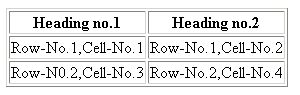
The Tutorial illustrates an example from Table Heading in HTML. In this Tutorial we create a table, which show its column heading.
The <tr> tag :This is used to define rows in a table.
Within a <tr> tag, The <th> tag define a heading of the table column.
<td> tag : This stand for "table data" content data present in a cell.
| <html> <head>11 <title> Table in HTML </title> </head> <body> <table border="1"> <tr> <th>Heading no.1</th> <th>Heading no.2</th> </tr> <tr> <td>Row-No.1,Cell-No.1</td> <td>Row-No.1,Cell-No.2</td> </tr> <tr> <td>Row-N0.2,Cell-No.3</td> <td>Row-No.2,Cell-No.4</td> </tr> </table> </body> </html> |
The above code is saved with .html extension. Place the path of html saved code in URL of browser. Run the code in your browser.
Output is Displayed as