Table Empty Cell in HTML


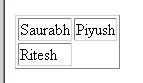
The Table Empty Cell in HTML define no content inside a cell of table. The code is not able to display border around the empty cell in a table. Table cells with no content are not displayed very well in most browsers. When you run the code in browser, the code display you a border around the empty cell.
Understand with Example
The Tutorial illustrates an example from Table Empty Cell in HTML. In this Tutorial we create a Empty cell in HTML. The code create a html page ,which shows you a table with empty cell.
<tr> tag :The <tr> tag is used to define a row in table.
<td> tag : The <td> tag is used to define a table cell.
<td> </td> tag : This specific no content inside a cell of table.
| <html> <head> <title> Table Empty Cell </title> </head> <body> <table border="1"> <tr> <td> Saurabh </td> <td> Piyush</td> </tr> <tr> <td> Ritesh</td> <td></td> </tr> </table> </body> </html> |
The code is saved with .html extension. Paste the path of saved code in URL of browser and execute it.
Output of code is displayed as