
HTML Post Form


The HTML process the submission of form in two different ways. In HTML, the method is declared inside a FORM element. The form method is used to send the form data in the form of message. The Post method in HTML is used for storing, updating, storing and sending E-mail. When a user process the submit request in a browser, The request form is submitted in the encoded form, which depends on the encrypted attribute.
Understand with Example
The Tutorial illustrates an example from HTML Post Form. In this Tutorial, the code explain you a post method in HTML. For this we create a html page name post.html. In this html page, When a user click on the submit button, a new page is displayed i.e post.htm. The attribute used in form action is post method. The post method in this code is used to transfer the data in encoded form and the user is not able to see the data that was sent. The post method is used for sending the data in a bulk amount.
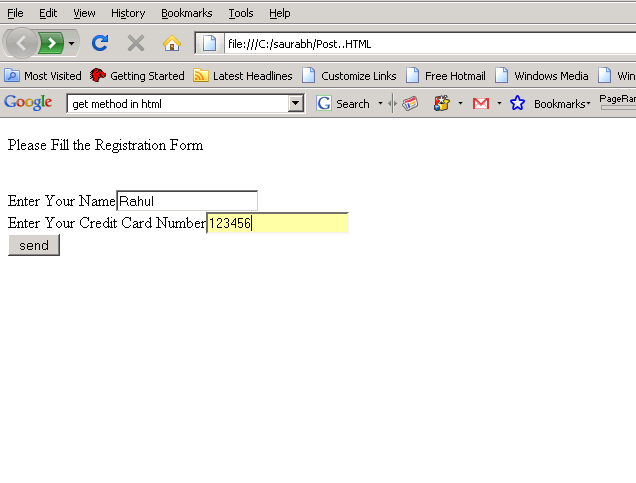
The post.html code is saved in the webapps folder of Tomcat(version installed in your computer). When a user enter the information and click on a send button of post.html, the <form action> redirect to the get.html page.
| <html> <body> <FORM ACTION="get.html" METHOD=POST> <P>Please Fill the Registration Form</p><br> Enter Your Name<input type="text" name="username"><br> Enter Your Credit Card Number<input type="text" name="credit Number"><br> <input type="submit" value="send"> </FORM> </body> </html> |
When a user enter the information and click on a send button of post.html.the output on the browser is displayed as below-
 |
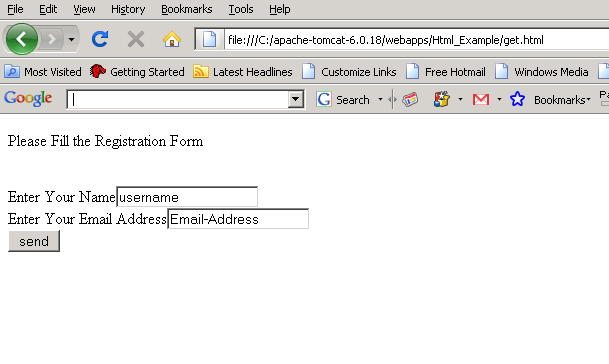
The <form action> redirect to the get.html page. The get.html show you a html page on the browser which shows you a requested form is submitted in the encoded form. The data sent to the get.html is not visible in the browser to the user.
| <html> <body> <FORM ACTION=""> <P>Please Fill the Registration Form</p><br> Enter Your Name<input type="text" Value="username"><br> Enter Your Email Address<input type="text" value="credit Number"><br> <input type="submit" value="send"> </FORM> </body> </html> |
Output is displayed as
 |