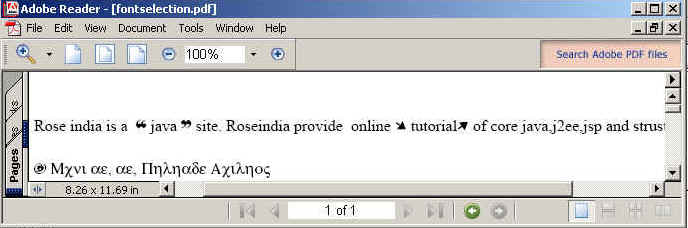
Here, you will learn by trying the following example that is given ahead. This example uses the static font name for the pdf content particularly by using addFont() method of the FontSelector class.

Font Selection


In this section, you will learn how to design some text according to you. That means if you want to keep some text in different font like "Times TIMES_ROMAN", "ZAPFDINGBATS" etc. particularly. When you create a pdf through the Java Program then you have to decide the specific font name for the specific text from the pdf content and the font name has to be mentioned in the java code during the creation of the pdf whether it is static (hard-coded) or dynamic.
Here, you will learn by trying the following example that is given ahead. This example uses the static font name for the pdf content particularly by using addFont() method of the FontSelector class.
Code Description:
To select font iText provides a constructor named as FontSelector() and the addFont() method of the FontSelector class to add the fonts for selecting and change it's font by the specified font name.
There some package used in the program for the purpose. These are as follows:
- import com.lowagie.text.Font;
- import com.lowagie.text.pdf.FontSelector;
- import com.lowagie.text.Phrase;
In this example, we have taken a String type variable input that is initialized with some text and Unicode. The input variable is passed through the process() method of the FontSelector class for applying the specified font name and size on the pdf content. The Unicode is converted into symbol after processing.
All the APIs used in the code of the program are derived here:
FontSelector: This is the class of iText
api used for selecting fonts for the text it extends Object class. FontSelector
class comes under com.lowagie.text.pdf package.
addFont(Font f): The addFont(Font f) method is used to add
font into font selector object its return type is void.
process(String input) method: The process(String
input) is use to process the font on the text .Its return type is Phrase.
Phrase: The class Phrase is used as render of process. This
class comes under the com.lowagie.text.Phrase.
The code of the program is given below:
import java.io.FileOutputStream;
|
The output of the program is given below: