In this section, you will learn how to design some text according to our need by use of Phrase. We can format our pdf by using Phrase() constructor.
Phrase


In this section, you will learn how to design
some text according to our need by use of Phrase. We can format our pdf by
using Phrase() constructor.
We can add the text, Chunk and set the font size , name and
style of the font.
Code Description:
All the APIs used in the code of the program are
derived here:
Phrase: The class Phrase is used as render of process. This
class comes under the com.lowagie.text.Phrase. The
Phrase extends ArrayList
and it implements the TextElementArray . A Phrase is a
series of Chunks. A Phrase has a main Font,
but some chunks within the phrase
can have a Font that differs from the main Font.
All the Chunks in a Phrase have the same leading.e.g.
// Passed as a parameter with the default leading = 16
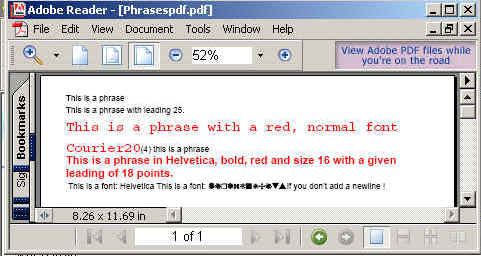
 Phrase phrase0 = new Phrase(25, "this is a phrase with leading 16");
//Default Constructor
 Phrase phrase1 = new Phrase();
//Passing String
 Phrase phrase2 = new Phrase("this is a phrase");
  // Font is passed (explicitely or embedded in a chunk), the default leading = 1.5 * size of the font
 Phrase phrase3 = new Phrase("this is a phrase with a red, normal font Courier, size 12",
FontFactory.getFont(FontFactory.COURIER, 12, Font.NORMAL, new Color(255, 0, 0)));
//Passing Chunk
 Phrase phrase4 = new Phrase(new Chunk("this is a phrase"));
//Passing Chunk,Font with the default leading = 18
 Phrase phrase5 = new Phrase(18, new Chunk("this is a phrase", FontFactory.getFont(FontFactory.HELVETICA,
 16, Font.BOLD, new Color(255, 0, 0)));
The code of the program is given below:
import java.awt.Color;
|
The output of the program is given below: