--Ads--
In this program we are going to tell you how you can make lists into a pdf files. You can make lists and also make sublist You can make ordered list or symbolic list. iText API,s provides facility to make list. List may be ordered or list may be unorde

Creating Multiple Lists
In this program we are going to tell you how you
can make lists into a pdf files. You can make lists and also make
sublist You can make
ordered list or symbolic list. iText API,s provides facility to make
list. List may be ordered or list may be unordered. Depending on our
requirement we can create both types of list. We can add a symbols as
list.
Code Description:
There some package used in the program for the
purpose. These are as follows:
- import com.lowagie.text.Listt;
- import com.lowagie.text.Listitem;
List:
List class is used to create the object of
the list. In List constructor we can pass two arguments List(boolean
value,sizeOfList).If Boolean value is true then the list is
ordered. If we want to make unsolder list or we want to add a symbol
then the Boolean value must be false.
ListItem: ListItem class is used to add
the items.
setListSymbol(): This method is used to
set the symbol for list. We can pass two arguments with in setListsymbol()
method.The deatails are:
1.public void setListSymbol(Chunk symbol)
- In this the parameters passed are chunk.
-
2.public void setListSymbol(String symbol)
- In this the parameters passed are string. This
is a shortcut for
setListSymbol(Chunk symbol).
setFirst(Char c):

             This method is used to set
          the starting value of unordered list.
The code of the program is given below:
	import java.io.FileOutputStream;

	import java.io.IOException;


	import com.lowagie.text.Chunk;

	import com.lowagie.text.Document;

	import com.lowagie.text.DocumentException;

	import com.lowagie.text.Font;

	import com.lowagie.text.FontFactory;

	import com.lowagie.text.List;

	import com.lowagie.text.ListItem;

	import com.lowagie.text.Paragraph;

	import com.lowagie.text.pdf.PdfWriter;

	public class Lists

	 {

	public static void main(String[] args)throws Exception

	  {

	 System.out.println("Create List object");

	 Document document = new Document();

	 PdfWriter.getInstance(document, new FileOutputStream("lists.pdf"));

	 document.open();

	  List list = new List(true, 20);

	  list.add(new ListItem("First line"));

	  list.add(new ListItem("The second "));

	  list.add(new ListItem("Third line"));

	  document.add(list);

	  document.add(new Paragraph("Tutorials Provided By Roseindia.net"));

	  ListItem listItem;

	  list = new List(true, 15);

	  listItem = new ListItem("Core Java", FontFactory.getFont

   (FontFactory.TIMES_ROMAN, 13));

	 listItem.add(new Chunk(" by rose india", FontFactory.getFont(


FontFactory.TIMES_ROMAN, 13, Font.ITALIC)));

	 list.add(listItem);

	 listItem = new ListItem("J2EE", FontFactory.getFont

  (FontFactory.TIMES_ROMAN, 12));

	 listItem.add(new Chunk(" by rose india",

  FontFactory.getFont(FontFactory.TIMES_ROMAN, 13, Font.ITALIC)));

	 list.add(listItem);

	 listItem = new ListItem("JSP", FontFactory.getFont

   (FontFactory.TIMES_ROMAN, 12));

	 listItem.add(new Chunk(" by rose india", FontFactory.getFont(


FontFactory.TIMES_ROMAN, 13, Font.ITALIC)));

	 list.add(listItem);

	 document.add(list);

	 Paragraph paragraph = new Paragraph("Some open source project");

	 list = new List(false, 10);

	  list.add("chat server");

	  list.add("pie chart");

	  list.add("online shopping");

		 paragraph.add(list);

		 document.add(paragraph);

	 document.add(new Paragraph("Some iText Example"));

	  list = new List(false, 20);

	list.setListSymbol(new Chunk("\u2021", FontFactory.getFont(


FontFactory.HELVETICA, 21, Font.BOLD)));

	 listItem = new ListItem("Generates a simple 'Hello World' PDF"+"


 file");

	  list.add(listItem);

	  List sublist;

	  sublist = new List(false, true, 10);

	sublist.setListSymbol(new Chunk("", FontFactory.getFont(


FontFactory.HELVETICA, 7)));

	  sublist.add("Creating Paragraph using iText");

	  sublist.add("Creating Section using iText");

	  sublist.add("Creating A4 PDF using iText.");

	  sublist.add("Create size(509,50,50,50) A4 PDF Using iText");

	  list.add(sublist);

	  listItem = new ListItem("Craeting  table object using iText");

	    list.add(listItem);

	  sublist = new List(false, true, 10);

	  sublist.setFirst('a');

	sublist.setListSymbol(new Chunk("", FontFactory.getFont(

  FontFactory.HELVETICA, 7)));

	  sublist.add("Creating  list object using iText ");

	  sublist.add("Hotel New Hampshire");

	  sublist.add("Creating  list object using iText ");

	  sublist.add("Creating  list object using iText ");

	 list.add(sublist);

	 listItem = new ListItem("Creating  list object using iText ");

	 list.add(listItem);

	 sublist = new List(false, true, 10);

	 sublist.setListSymbol(new Chunk("", FontFactory.getFont(

  FontFactory.HELVETICA, 7)));

	 sublist.add("Creating  list object using iText ");

	 sublist.add("Creating  list object using iText ");

	 sublist.add("Creating  list object using iText ");

	 sublist.add("Creating  list object using iText ");

	 list.add(sublist);

	 document.add(list);

	 document.close();

	  }

}
|
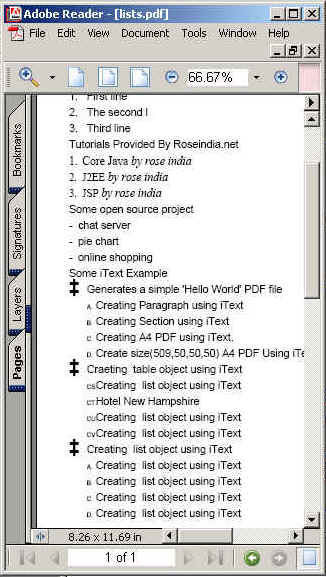
The output of the program is given below:
Download
this example.
