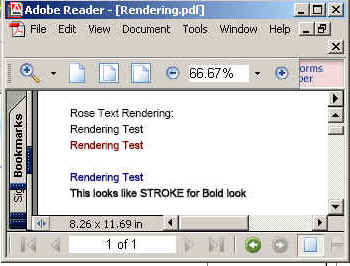
In this section, you will learn how to make a program by which you can make a render page. iText api provides a method setTextRenderMode(int mode,float strokeWidth,Color strokeColor).We can gives various color and int mode.

Rendering Example


In this section, you will learn how to make a program by which you can make a render page. iText api provides a method setTextRenderMode(int mode,float strokeWidth,Color strokeColor).We can gives various color and int mode.
Code Description:
In this example we are using setTextRenderMode(int
mode,float strokeWidth,Color strokeColor) method for define the
strokeWidth , stokeColor and the mode. We are giving more details about
this method following:
setTextRenderMode(int mode,Color strokeColor):
With the
setTextRenderMode(int mode,float strokeWidth,Color strokeColor) we can
change the outline of the text.We are passing here three parameters. First
is int mode it can be one of the following values:
- PdfContentByte.TEXT_RENDER_MODE_FILL:The mode is used for glyphs fontcolor, the strokeWidth and strokeColor don't play a role here.
- PdfContentByte.TEXT_RENDER_MODE_STROKE: We will only see the outline of the glyphs, with the given strokeWidth and strokeColor.
- PdfContentByte.TEXT_RENDER_MODE_FILL_STROKE: The glyphs will be filled with the fontcolor and will have an outline with the given strokeWidth and strokeColor.
- PdfContentByte.TEXT_RENDER_MODE_INVISIBLE: The glyphs will be invisible.
The second one
is stroke Color to set the color of the text.
setTextRenderMode(int mode,float
strokeWidth,Color strokeColor):
With the
setTextRenderMode(int mode,float strokeWidth,Color strokeColor) we can
change the outline of the text.We are passing here three parameters. First
is int mode it can be one of the following values:
- PdfContentByte.TEXT_RENDER_MODE_FILL:The mode is used for glyphs fontcolor, the strokeWidth and strokeColor don't play a role here.
- PdfContentByte.TEXT_RENDER_MODE_STROKE: We will only see the outline of the glyphs, with the given strokeWidth and strokeColor.
- PdfContentByte.TEXT_RENDER_MODE_FILL_STROKE: The glyphs will be filled with the fontcolor and will have an outline with the given strokeWidth and strokeColor.
- PdfContentByte.TEXT_RENDER_MODE_INVISIBLE: The glyphs will be invisible.
The second strokeWidth and the thread one is stroke Color to set the width of and color of the text.
The code of the program is given below:
import java.awt.Color;
|
The output of the program is given below: