
Home Jsf JSF panelGroup Tag


JSF panelGroup Tag
Posted on: June 6, 2007 at 12:00 AM
JSF panelGroup Tag is used to create a component that acts as a container to group a set of components.

JSF panelGroup Tag


This is used to create a component that acts as a container to group a set of components. All these components are under one component or can say one parent. So this can be useful when we want to nest two or more components into one parent panelGrid column. If we want to render two components without using this tag then these will be rendered in separate columns. This component renders its all children and count them as one component. So this fact of this tag can be useful for us in the case where a component allows only one child component.The program given below will make you clear this concept.

Code Description :

<%@ taglib uri="http://java.sun.com/jsf/html" prefix="h"%>
<%@ taglib uri="http://java.sun.com/jsf/core" prefix="f"%>

<f:view>
 <html>
  <body>
   <h:form>
<h:panelGrid columns="3" border="1" rules="all" title="This is panelGroup demo">
  <f:facet name="header">
  <h:outputText value="Submit Detail"/>
  </f:facet>
   <h:inputText/>
   <h:inputText/>
   <h:inputText/>
   <h:inputText/>
   <h:inputText/>
   <h:inputText/>
   <h:inputText/>
   <h:inputText/>
  <f:facet name="footer">
  <h:panelGroup>
   <h:outputText value="Leave Comment Here :" />
   <h:inputText/>
   <h:outputText value="Submit" />
   <h:commandButton value="SUBMIT" />
  </h:panelGroup>
  </f:facet>
</h:panelGrid> 
  </h:form>
  </body>
 </html>
</f:view>

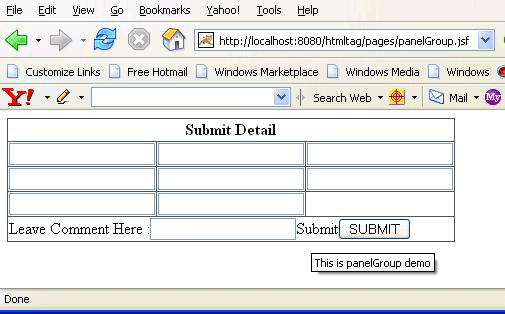
Rendered Output : In the above code we have taken 4 components in footer facet component. We have used panelGroup tag to render these 4 components in a single column. It happened because colspan has been set to 3 i.e. no of columns.
Html Source Code:

<html>
 <body>
  <form id="_id0" method="post" action="/htmltag/pages/panelGroup.jsf" enctype="application/x-www-form-urlencoded">
<table border="1" rules="all" title="This is panelGroup demo">
<thead>
<tr><th colspan="3" scope="colgroup">Submit Detail</th></tr>
</thead>
<tfoot>
<tr><td colspan="3">Leave Comment Here  :<input type="text" name="_id0:_id13" />Submit<input type="submit" name="_id0:_id15" value="SUBMIT" /></td></tr>
</tfoot>
<tbody>
<tr>
<td><input type="text" name="_id0:_id3" /></td>
<td><input type="text" name="_id0:_id4" /></td>
<td><input type="text" name="_id0:_id5" /></td>
</tr>
<tr>
<td><input type="text" name="_id0:_id6" /></td>
<td><input type="text" name="_id0:_id7" /></td>
<td><input type="text" name="_id0:_id8" /></td>
</tr>
<tr>
<td><input type="text" name="_id0:_id9" /></td>
<td><input type="text" name="_id0:_id10" /></td>
</tr>
</tbody>
</table>
  <input type="hidden" name="_id0" value="_id0" /></form>
 </body>
</html>

This tag is comprised of many attributes that are summarized below :

  • id : It is the component identifier that must be unique in the closest container. 
  • binding : It takes the value binding expression that is used to link the component to the property of the backing bean. 
  • rendered : Its a boolean attribute. Its default value is true. It determines whether this component should be rendered or not.
  • style : It is used to set the CSS style definition for the component. 
  • styleClass : It is used to set the CSS class for the component. 

Related Tags for JSF panelGroup Tag:
ccomcountcomponenttagthisrendercasecasforchildchildrenwhereldwseilitcanuseulinasmntcaemendaseallssoisllandactssrenthchifactndonlyonomonl


More Tutorials from this section

Ask Questions?    Discuss: JSF panelGroup Tag  

Post your Comment


Your Name (*) :
Your Email :
Subject (*):
Your Comment (*):
  Reload Image


Ask Questions?

If you are facing any programming issue, such as compilation errors or not able to find the code you are looking for.

Ask your questions, our development team will try to give answers to your questions.