Frameworks| Hibernate| Struts| JSF| JavaFX| Ajax| Spring| DOJO| JDO| iBatis| Questions?


Search Tutorials:
 

Software Solutions and Services


  JDO Tutorials
  EAI Articles
  Struts Tutorials
  Java Tutorials
  Java Certification
  Java Applet
Questions
Comments
 
JSF outputText Tag 
 

This is the section in which you can learn more about the tag named outputText tag.


JSF outputText Tag


This is the section in which you can learn more about the tag named outputText tag. This tag is used for creating component for displaying formatted output as text.

Here, you will get an example with complete source code that can be copied in your application for creating a JSF component that show the output of your program.


Code Description:

<%@ page contentType="text/html" %>
<%@ taglib uri="http://java.sun.com/jsf/html" prefix="h" %>
<%@ taglib uri="http://java.sun.com/jsf/core" prefix="f" %>

<f:view>
<html>
     <head><title>jsf h:message example</title></head>

     <body>
          <b><h:outputText value="This is the output text." /></b>
     </body>
</html>
</f:view>

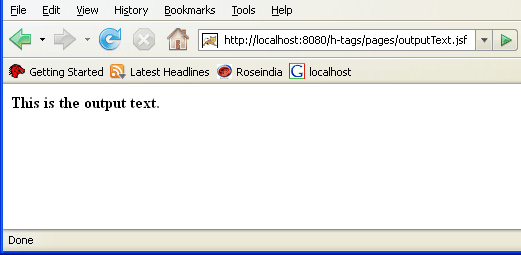
Above program shows the output text "This is the output text." that is specified as the value of the JSF HTML tag outputText.

Rendered Result:
HTML Source Code:

<html>
     <head><title>jsf h:message example</title></head>

     <body>
	  <b>This is the output text.</b>
     </body>
</html>

All attributes of the outputText tag are explained as follows:

  • binding: This attribute accepts a value-binding expression linked to a property in a backing bean.
  • converter: This attribute sets a converter instance to be registered for the component. This instance must match the converter-id value of a converter element that is defined in the faces-config.xml file.
  • escape: This attribute sets a boolean flag value that determines if sensitive HTML and XML characters should be escaped in the output generated by the component. It's default value is "true".
  • id: The value of this attribute identifies the component uniquely. So, value of the id attribute must be unique in the closest container.
  • rendered: This attribute sets a boolean flag value that determines the component should be whether or not rendered in the view.
  • style: If you want ot add any CSS with the component then you can put the style as the value of the attribute. Added CSS will be applied on for the component.
  • styleClass: This attribute holds the CSS class name which is defined in the external style sheet.
  • title: This attribute holds a string value that is shown as a tool-tip text of a component or element.
  • value: This attribute sets the current value for the component.


» View all related tutorials
Related Tags: c database jdbc data io method managed this action write tab for example with work to base exam bean e

Leave your comment:

Name:

Email:

URL:

Title:

Comments:


Enter Code:

Audio Version
Reload Image
 

Note: Emails will not be visible or used in any way, and are not required. Please keep comments relevant. Any content deemed inappropriate or offensive may be edited and/or deleted.

No HTML code is allowed. Line breaks will be converted automatically. URLs will be auto-linked. Please use BBCode to format your text.

Add This Tutorial To:
  Del.icio.us   Digg   Google   Spurl   Blink   Furl   Simpy   Y! MyWeb 

Current Comments

1 comments so far (
post your own) View All Comments Latest 10 Comments:

how to get the response on clicking the radioButton in JSF

Posted by KAPIL on Thursday, 08.14.08 @ 15:14pm | #72813

Training Courses
Tell A Friend
Your Friend Name
Website Designing Services
 
Web Designing Packages From $150!
 
Website Designing Company Web Hosting
 
Website Designing Quotation
 
Search Tutorials:


Home | JSP | EJB | JDBC | Java Servlets | WAP  | Free JSP Hosting  | Search Engine | News Archive | Jboss 3.0 tutorial | Free Linux CD's | Forum | Blogs

About Us | Advertising On RoseIndia.net  | Site Map

India News

Indian Software Development Company | iPhone Development Company in India | Flex Development Company in India | Java Training Delhi | Java Training at Noida |

Send your comments, Suggestions or Queries regarding this site at roseindia_net@yahoo.com.

Copyright © 2008. All rights reserved.