
JSF dataTable Tag


This tag is used to create table on the page. The component is rendered as an html <table> element. UIColumn child components are responsible for rendering columns of the table. In these columns you can put any type of component like input text box, output text, command button etc.<h:column> tag is used to create column. There can be many column tags within dataTable tag. You can set header and footer in this table. For this <f:facet> tag is used. data table component and its children column component can use header and footer facet.
We can associate this table element to backing bean. So we can obtain data from this backing bean and display it on the table. Association of backing bean can also be helpful for event handling purpose. Suppose we inserted command button in columns of the table then event handling can be applied here. If you want to customize the table then cascading stylesheet (CSS) can be used. This will help you to enhance the appearance of the table's headers, footer, rows, columns.
This section provides you the code to which uses this
tag and some of its attributes. It uses backing bean that supplies data to the
data table to be rendered to the cells of the columns of the table.
code description :
<%@ taglib uri="http://java.sun.com/jsf/html" prefix="h"%> |
Rendered Output :
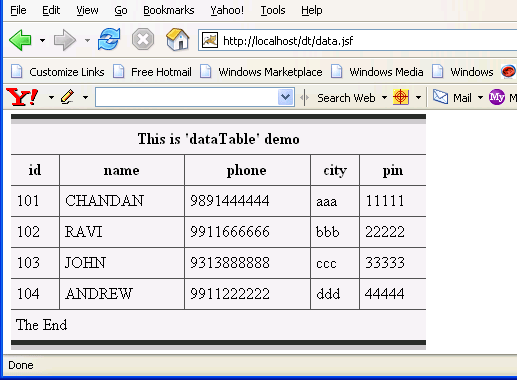
In this example we have used <h:dataTable>
tag. This <h:dataTable>
tag has many attributes to give form and shape to the table and getting data from backing
bean's attribute to display this data to the columns of the table. <f:facet>
tag is used to create a header and a
footer for a dataTable component and it can create the same for columns also. So
in this example we have used facet tag in dataTabe tag to create header
and footer of the table component and in column tag also to create header
for column. In this example, "This is 'dataTable' demo" is the
header and "The End" is the footer for the table and "id"
"name" "phone" "city" "pin" are
headers for columns. In his example we have populated data to the table
from bean named "TableBean". It contains an attribute "perInfoAll"
that is an array of objects of type "perInfo" class which
contains some attributes like id, name, phone, city, pin that is to be displayed on the
table. In the value attribute of dataTable tag, we have specified the binding
expression to bind this component to the bean (value="#{TableBean.perInfoAll}")
and value specified in var attribute is used to populate data to the column of
the table from attributes defined in class perInfo (value="#{item.id}").
The code for the bean has been given below (remember to specify it in faces-cocfig.xml
file) :
public class TableBean { |
HTML Source Code:
<html> <body> <form id="_id0" method="post" action="/dt/data.jsf;jsessionid =B95AF7B5F7D80BCB5638B91AC8154C33" enctype="application/x-www-form-urlencoded"> <br><br><br> <table id="_id0:dt1" bgcolor="#F1F1F1" border="10" cellpadding="5" cellspacing="3" dir="LTR" frame="hsides" rules="all" summary="This is a JSF code to create dataTable." width="50%"> <thead> <tr><th colspan="5" scope="colgroup">This is 'dataTable' demo</th></tr> <tr> <th scope="col">id</th> <th scope="col">name</th> <th scope="col">phone</th> <th scope="col">city</th> <th scope="col">pin</th> </tr> </thead> <tfoot> <tr><td colspan="5">The End</td></tr> </tfoot> <tbody> <tr> <td>101</td> <td>CHANDAN</td> <td>9891444444</td> <td>aaa</td> <td>11111</td> </tr> <tr> <td>102</td> <td>RAVI</td> <td>9911666666</td> <td>bbb</td> <td>22222</td> </tr> <tr> <td>103</td> <td>JOHN</td> <td>9313888888</td> <td>ccc</td> <td>33333</td> </tr> <tr> <td>104</td> <td>ANDREW</td> <td>9911222222</td> <td>ddd</td> <td>44444</td> </tr> </tbody> </table> <br><br> <input type="hidden" name="_id0" value="_id0" /> </form> </body> </html> |
This tag has some attributes. These are listed below :
- id : This is used to uniquely identify the table component. This must be unique within the closest parent component.
- value : It represents the value of the component. It represents the value over which iteration is to be done. It may be an array or any iterator object .
- var : This is the name of the variable created by the data table that represents the current item in the value. This attribute helps exposing the data in the rows of the table.
- bgcolor : This attribute is used to set the background color for the table.
- border : We can set the width of the table's border around the table.
- cellpadding : This sets the space between the content and the border of the cell.
- cellspacing : It specifies the amount of space to leave between cells.
- first : This is used to specify the row number of the first row from which displaying is to be started onwards. Suppose, this property is set to 3,displaying will be started from the third row of the underlying data.
- rows : This attribute specifies the number of rows to display. This displaying will be started from the index specified in the "first" attribute. If we set this attribute to zero then all rows will be displayed.
- width : This is used to set the width of the entire table. Its value is specified in %. Suppose we set it to 50% then this table will be shown in the 50% space of the width of your screen.
- dir : This attribute indicates the direction of the text to be displayed in the cell. It takes "LTR" (left-to-right) and "RTL" (right-to-left) values. If we don't specify this attribute then the content will be displayed in center.
- frame : This attribute specifyes which sides of the frame surrounding this table will be visible. This attribute can take some values shown below :
- none No side, Default Value
- above Top side only
- below Bottom side only
- hsides Top and bottom sides only
- vsides Right and left sides only
- lhs Left hand side only
- rhs Right hand side only
- box All four sides
- border All four sides
- rules : This attribute is used to draw lines between cells. It can take some values given below :
- none No rules, default value
- groups Between row groups
- rows Between rows only
- cols Between columns only
- all
Between all rows and columns
- summary : You can specify summary of the purpose of the table.
- rendered : It takes boolean value.This indicates whether or not this component should be rendered. Its default value is "true". If it is set to false then it prevents rendering of this component to the page.
- captionClass : Space separated list of CSS class or classes that will be applied to any caption generated for this table.
- captionStyle : It specifies CSS style or styles to be applied when this caption is rendered.
- columnClasses : Comma seperated list of CSS classes that will be applied to the columns of this table.
- footerClass : This attribute takes Space-separated list of CSS style class or classes that will be applied to aheaderter generated for this table.
-
headerClass : This attribute takes Space-separated list of CSS style class or classes that will be
applied to any header generated for this table. -
rowClasses : It is a list of CSS classes applied to the rows of the table.These classes should be
separated by comma. If we want to apply CSS class for individual rows then we can specify space separated list of CSS
classes. Style classes are applied to rows in the same order that they are
defined. If we have two CSS classes then first class is applied to the first row and the second one is applied to the second. Then again in the third row, the first CSS is applied and so on. This process goes on till the last row of the table. - lang : It sets the base language of an element?s attributes and text i.e. the language used in the generated markup for this component.
- styleClass : It sets the name of CSS classor classes that is applied at the time of rendering the element.
- title : The title attribute is used to set the tooltip text to display for the rendered component.Tooltip describes an element when rendered to the client.
- binding : It is a value binding expression that is used to link component to a property in a backing bean.
- onclick : It sets the JavaScript code to execute when a pointer button is clicked over this element.
- ondblclick : It sets the JavaScript code to execute when a pointer button is double clicked over this element.
- onkeydown : It sets the JavaScript code to execute when a key is pressed down over this element.
- onkeypress : It sets the JavaScript code to execute when a key is pressed and released over this element.
- onkeyup : It sets the JavaScript code to execute when a key is released over this element.
- onmousedown : It sets the JavaScript code to execute when a pointer button is pressed down over this element.
- onmousemove : It sets the JavaScript code to execute when a pointer button is moved within this element.
- onmouseout : It sets the JavaScript code to execute when a pointer button is moved away from this element.
- onmouseover : It sets the JavaScript code to execute when a pointer button is moved onto this element.
- onmouseup : It sets the JavaScript code to execute when a pointer button is released over this element.