
JSF Life Cycle


In this we will understand the life cycle of JSF application.
Life cycle of a JSF web application starts when user makes a request. On submission of a page various further tasks are performed like validation of data provided in components in the view,
data conversion according to types specified on server side etc. So series of steps that an application follows is called life cycle.
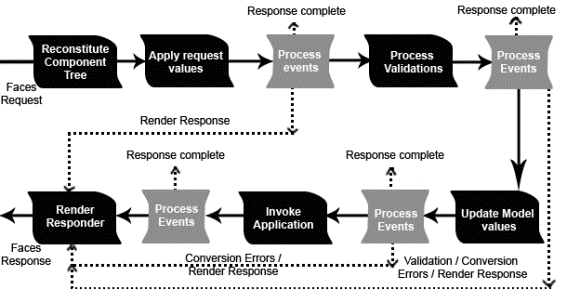
A JSF application typically follows six steps in its life :
1. Restore view phase :
This phase starts when a user requests a JSF page by clicking a link, button
etc. In this phase view generation of the page, binding of components to its event handlers and validators are performed and view is saved in the FacesContext object. The FacesContext object contains all the state information JSF needs to manage the GUI component's state for the current request in the current session. The FacesContext stores the view in its viewRoot property.All the JSF components are contained by viewRoot for the current view ID. Component tree of a page is newly built or restored.
A request comes through the FacesServlet controller. The controller checks the request and takes the view ID i.e. name of the JSP page. View ID is used to look up the components in the current view. JSF controller uses this ID if the view already exists . If the view doesn't already exist, the JSF controller creates it. The created view contains all components.
2. Apply request values phase :
The purpose of this phase is for each component to retrieve its current state. After restoring of component tree in previous phase each component in the tree retrieves its new value and store it
locally. Component values are typically retrieved from the request parameters.If immediate attribute of a component is set to true, then the validation, conversion, and events associated with the component is processed in this phase.
If a component's immediate event handling property is not set to true, the values are converted. Suppose field is bound to be an Integer property, the value is converted to an Integer. An error message associated with the component is generated if this conversion fails, and queued in the
FacesContext. This message will be displayed during the render response phase, along with any validation errors resulting from next process validation phase.
At the end of this phase, the components are set to their new values, and messages and events have been queued.
3. Process validations phase :
During this phase local values stored for the component in the tree are compared to the validation rules registered for the components.
If local value is invalid, an error message is added to FacesContext, and the component is treated invalid then JSF proceeds to the render response phase and
display the current view showing the validation error messages. If there were conversion errors from the apply request values phase, the messages for these errors are also displayed. If there are no validation errors, JSF proceeds ahead to the update model values phase.
4. Update model values phase :
After confirming that data is valid in the previous phase local values of components can be set to corresponding server side object properties i.e. backing beans. So bean properties will be updated .If the local data cannot be converted to the types specified by the bean properties, the life cycle proceeds directly to the render response phase and errors are displayed.
5. Invoke application phase :
Before this phase the component values have been converted, validated, and applied to the bean objects, so you can now use them to execute the application's business logic. Application-level code is executed such as submitting a form or linking to another page.For example user moves to the next page you will have to create a mapping in the faces-config.xml file. Once this navigation occurs, you move to the final phase of the lifecycle.
6. Render response phase:
In this phase JSP container renders the page back to the user,if jsp is used by application i.e. view is displayed with all of its components in their current state.If this is an initial request, the components will be added to the component tree. If this is not an initial request, the components are not added because they are already added to the tree.The state of the response is saved after rendering of the content of the view, so that subsequent requests can access it and it is available to the restore view phase.