--Ads--
Retrieve Image in JSF From MySQL Table Using NetBeans IDE


This application illustrates how to retrieve image and data from MySQL
table using NetBeans IDE.
In this application we create a jsp page to display image. In this JSP page
we are using <h:graphicImage> tag to access the servlet, here we are uses
servlet but as u wish u can access a jsp page also. To create the project in the
NetBeans IDE select File > click on "Create Project" then a New
Project window will be appear, select Web from Categories section and select Web
Application from Projects section. Click Next.

Put Project Name and click Next.

Choose JavaServer Faces and click Finish.

To create the jsp file right click on Web Pages select New and click JSP as
below:
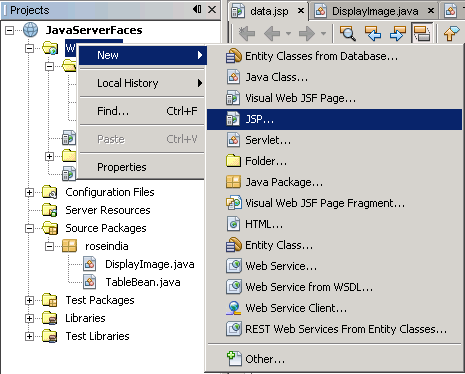
Here is the Source Code of data.jsp
<%@page contentType="text/html"%>

<%@page pageEncoding="UTF-8"%>


<%@taglib prefix="f" uri="http://java.sun.com/jsf/core"%>

<%@taglib prefix="h" uri="http://java.sun.com/jsf/html"%>


<!DOCTYPE HTML PUBLIC "-//W3C//DTD HTML 4.01 Transitional//EN"

 "http://www.w3.org/TR/html4/loose.dtd">


<f:view>

  <html>

  <head><h2>JSF Application</h2></head>

  <body>

  <center><br><br><br>

  <h:dataTable id="dt1" value="#{tableBean.perInfoAll}"


var="item" bgcolor="#F1F1F1" border="10" cellpadding="5"


cellspacing="3" rows="4" width="50%">

  <f:facet name="header">

  <h:outputText value="This is Table Data" />

  </f:facet>


  <h:column>

  <f:facet name="header">

  <h:outputText value="Emp Name" />

  </f:facet>

  <h:outputText value="#{item.name}"/>

  </h:column>


  <h:column>

  <f:facet name="header">

  <h:outputText value="Image" />

  </f:facet>

  <h:graphicImage value="DisplayImage"/>

  </h:column>


  <f:facet name="footer">

  <h:outputText value="The End" />

  </f:facet>

  </h:dataTable><br>

  </center>

  </body>

  </html>

</f:view>
|
To create the package right click on Source Package and select New >
Java Package..
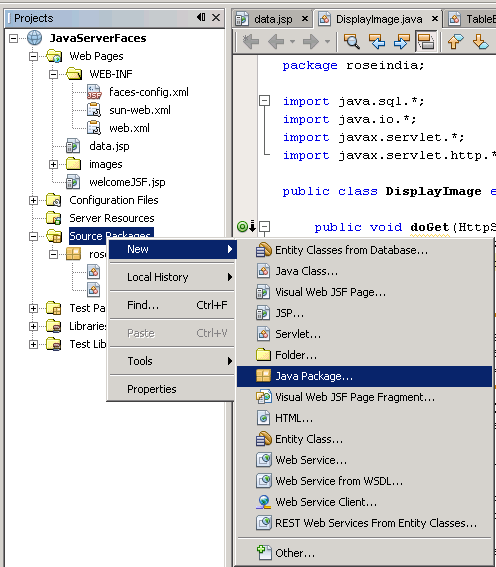
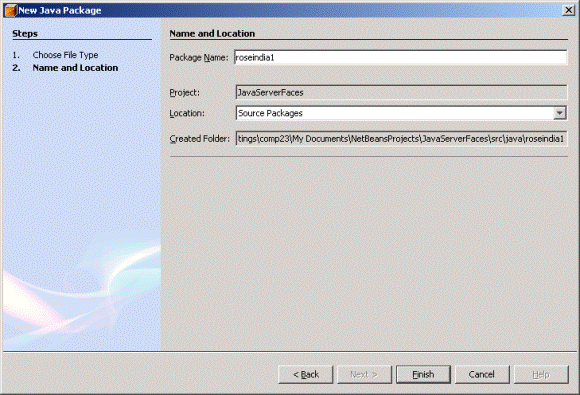
The following window will appear then put package name and click Finish.
To create the java class right click on newly created package and select New
> Java Class
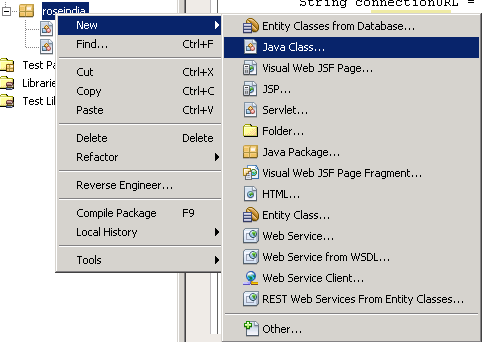
Put the Class Name and click Finish.
Source Code of DisplayImage.java
package roseindia;


import java.sql.*;

import java.io.*;

import javax.servlet.*;

import javax.servlet.http.*;


public class DisplayImage extends  HttpServlet{


  public void doGet(HttpServletRequest request,

	HttpServletResponse response)

   throws ServletException, IOException{

  String connectionURL = "jdbc:mysql://localhost:3306/test";

    java.sql.Connection con=null;

  Statement st1;

  try{

  Class.forName("com.mysql.jdbc.Driver").newInstance();

  con=DriverManager.getConnection   (connectionURL,"root","root");

  st1=con.createStatement();

  ResultSet rs1 = st1.executeQuery


	("select image from pictures where id = '2'");

  String imgLen="";

  while(rs1.next()){

  imgLen = rs1.getString(1);

  System.out.println(imgLen.length());

  int len = imgLen.length();

  byte [] rb = new byte[len];

  InputStream readImg = rs1.getBinaryStream(1);

  int index=readImg.read(rb, 0, len);

  System.out.println("index----------------"+index);

  response.reset();

  response.setContentType("image/jpg");

  response.getOutputStream().write(rb,0,len);

  response.getOutputStream().flush();


  }

  st1.close();

  response.getOutputStream().close();

 } catch (Exception e){

  e.printStackTrace();

  }

  }

}
|
Create Bean class to set and get the table column as below the source
code of TableBean.java
package roseindia;


import java.sql.*;

import java.util.*;

import java.io.*;


public class TableBean {

  Connection con ;

  Statement ps;

  ResultSet rs;

  private List perInfoAll = new ArrayList();


  public void setPerInfoAll(List perInfoAll) {

  this.perInfoAll = perInfoAll;

  }


  public List getPerInfoAll() {

  int i = 0;

  try{

 Class.forName("com.mysql.jdbc.Driver");

 con = DriverManager.getConnection("jdbc:mysql://localhost:3306/

   test","root","root");

 ps = con.createStatement();

 rs = ps.executeQuery("select name from emp");

 while(rs.next()){

 perInfoAll.add(i,new tableData(rs.getString("name")));

  i++;

  }

  } catch (Exception e) {

  System.out.println("Error Data : " + e.getMessage());

  }

  return perInfoAll;

  }


  public class tableData {

  private String name;


  public tableData(String name) {

  this.name = name;

  }


  public void setName(String name) {

  this.name = name;

  }


  public String getName() {

  System.out.println("Name: "+name);

  return name;

  }

  }

}
|
Servlet Mapping in web.xml
<servlet>
<servlet-name>DisplayImage</servlet-name>
<servlet-class>roseindia.DisplayImage</servlet-class>
</servlet>
<servlet-mapping>
<servlet-name>DisplayImage</servlet-name>
<url-pattern>/DisplayImage</url-pattern>
</servlet-mapping> |
Source Code of faces-config.xml
<?xml version='1.0' encoding='UTF-8'?>


<!-- =========== FULL CONFIGURATION FILE ================== -->


<faces-config version="1.2"

  xmlns="http://java.sun.com/xml/ns/javaee"

  xmlns:xsi="http://www.w3.org/2001/XMLSchema-instance"

  xsi:schemaLocation="http://java.sun.com/xml/ns/javaee http://j

	   ava.sun.com/xml/ns/javaee/web-facesconfig_1_2.xsd">


  <managed-bean>

  <managed-bean-name>tableBean</managed-bean-name>

  <managed-bean-class>roseindia.TableBean</managed-bean-class>

  <managed-bean-scope>request</managed-bean-scope>

  </managed-bean>


</faces-config>
|
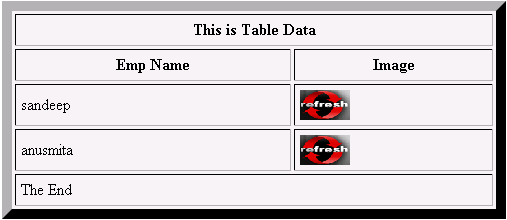
The Output shown on the Browser as below: 0
Download Complete Source Code
