
Tomahawk commandButton tag


This tag renders an HTML submit button. You can perform any operations at particular event by associating actionListener class for event handling. You can associate the component with the method of the backing bean which can return any static value that can be used to decide the next page to render. If you set the type attribute to reset then clicking the button will reset all the components in the form.
Code Description :
<%@ taglib uri="http://java.sun.com/jsf/html" prefix="h"%>
<%@ taglib uri="http://java.sun.com/jsf/core" prefix="f"%>
<%@ taglib uri="http://myfaces.apache.org/tomahawk" prefix="t"%>
<html>
<head>
<meta http-equiv="Content-Type" content="text/html; charset=iso-8859-1">
<title>t:commandButton example</title>
<script>
function show_confirm(){
var r=confirm(" Ready to enter ?");
if (r==false)
return false;
}
</script>
<style type="text/css">
<!--
body{
background-color:#fff2f2;
margin-top:30;
}
-->
</style>
</head>
<body ><center>
<f:view>
<h:form id="form1" >
<h:panelGrid id="pg" columns="2" style="background-color:#66CCFF;">
<t:outputText value="UserName" style="font-weight:bold"/>
<t:inputText id="txtUserName" />
<t:outputText value="Password" style="font-weight:bold"/>
<t:inputSecret id="txtPassword" />
<t:outputText value=" " />
<t:commandButton id="btnSubmit" value="Submit" action="welcome"
onclick="return show_confirm()"
style="border-color:#000000;font-weight:bold"/>
</h:panelGrid>
</h:form>
</f:view>
</center></body>
</html>
|
Rendered Output :
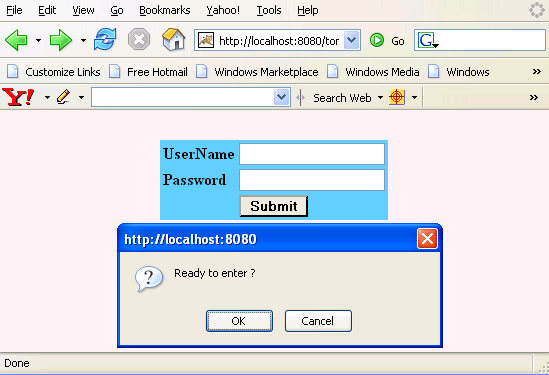
Html Source Code :
<html>
<head>
<meta http-equiv="Content-Type" content="text/html; charset=iso-8859-1">
<title>t:commandButton example</title>
<script>
  function show_confirm(){
    var r=confirm(" Ready to enter ?");
    if (r==false)
       return false;
    }
</script>
<style type="text/css">
<!--
body{
background-color:#fff2f2;
margin-top:30;
}
-->
</style>
</head>
<body ><center>
  <form id="form1" name="form1" method="post"
        action="/tomahawk_tags/pages/commandButton.jsf"
        enctype="application/x-www-form-urlencoded">
    <table id="form1:pg" style="background-color:#66CCFF;">
      <tbody>
        <tr>
          <td><span style="font-weight:bold">UserName</span></td>
          <td><input id="form1:txtUserName" name="form1:txtUserName"
                type="text" value="" /></td>
        </tr>
        <tr>
          <td><span style="font-weight:bold">Password</span></td>
          <td><input type="password" id="form1:txtPassword"
              name="form1:txtPassword" /></td>
        </tr>
        <tr>
          <td> </td>
          <td><input id="form1:btnSubmit" name="form1:btnSubmit"
            type="submit" value="Submit"
            onclick="return show_confirm();
               if(typeof window.clearFormHiddenParams_form1!='undefined')
                 {clearFormHiddenParams_form1('form1');}"
            style="border-color:#000000;font-weight:bold" /></td>
        </tr>
      </tbody>
    </table>
    <input type="hidden" name="form1_SUBMIT" value="1" />
    <input type="hidden" name="form1:_link_hidden_" />
    <input type="hidden" name="form1:_idcl" />
    <script type="text/javascript"><!--
	function clear_form1()
	{
		clearFormHiddenParams_form1('form1');
	}
	function clearFormHiddenParams_form1(currFormName)
	{
		var f = document.forms['form1'];
		f.elements['form1:_link_hidden_'].value='';
		f.elements['form1:_idcl'].value='';
		f.target='';
	}
	clearFormHiddenParams_form1();
        //--></script>
        <input type="hidden" name="javax.faces.ViewState"
           id="javax.faces.ViewState"
           value="rO0ABXVyABNbTGphdmEubGFuZy5PYmplY3Q7kM5YnxBzKWwCAAB4cAA
		  AAANzcgBHb3JnLmFwYWNoZS5teWZhY2VzLmFwcGxpY2F0aW9uLlRyZW
                  VTdHJ1Y3R1cmVNYW5hZ2VyJFRyZWVTdHJ1Y3RDb21wb25lbnRGWRfYn
                  Er2zwIABFsACV9jaGlsZHJlbnQASltMb3JnL2FwYWNoZS9teWZhY2Vz
                  L2FwcGxpY2F0aW9uL1RyZWVTdHJ1Y3R1cmVNYW5hZ2VyJFRyZWVTdHJ
                  1Y3RDb21wb25lbnQ7TAAPX2NvbXBvbmVudENsYXNzdAASTGphdmEvbGF
uZy9TdHJpbmc7TAAMX2NvbXBvbmVudElkcQB+AARbAAdfZmFjZXRzdAATW0xqYXZhL2xhbmcvT
2JqZWN0O3hwdXIASltMb3JnLmFwYWNoZS5teWZhY2VzLmFwcGxpY2F0aW9uLlRyZWVTdHJ1Y3R
1cmVNYW5hZ2VyJFRyZWVTdHJ1Y3RDb21wb25lbnQ7uqwnyBGFkKoCAAB4cAAAAAFzcQB+AAJ1c
QB+AAcAAAABc3EAfgACdXEAfgAHAAAABnNxAH4AAnB0ADRvcmcuYXBhY2hlLm15ZmFjZXMuY29
tcG9uZW50Lmh0bWwuZXh0Lkh0bWxPdXRwdXRUZXh0dAAHX2lkSnNwMHBzcQB+AAJwdAAzb3JnL
mFwYWNoZS5teWZhY2VzLmNvbXBvbmVudC5odG1sLmV4dC5IdG1sSW5wdXRUZXh0dAALdHh0VXN
lck5hbWVwc3EAfgACcHEAfgAOdAAHX2lkSnNwMXBzcQB+AAJwdAA1b3JnLmFwYWNoZS5teWZhY
2VzLmNvbXBvbmVudC5odG1sLmV4dC5IdG1sSW5wdXRTZWNyZXR0AAt0eHRQYXNzd29yZHBzcQB
+AAJwcQB+AA50AAdfaWRKc3AycHNxAH4AAnB0ADdvcmcuYXBhY2hlLm15ZmFjZXMuY29tcG9uZ
W50Lmh0bWwuZXh0Lkh0bWxDb21tYW5kQnV0dG9udAAJYnRuU3VibWl0cHQAKGphdmF4LmZhY2V
zLmNvbXBvbmVudC5odG1sLkh0bWxQYW5lbEdyaWR0AAJwZ3B0ACNqYXZheC5mYWNlcy5jb21wb
25lbnQuaHRtbC5IdG1sRm9ybXQABWZvcm0xcHQAIGphdmF4LmZhY2VzLmNvbXBvbmVudC5VSVZ
pZXdSb290cHB1cQB+AAAAAAADdXEAfgAAAAAABXVxAH4AAAAAAAdwcHBwcHBwc3IAEGphdmEud
XRpbC5Mb2NhbGV++BFgnDD57AIABEkACGhhc2hjb2RlTAAHY291bnRyeXEAfgAETAAIbGFuZ3V
hZ2VxAH4ABEwAB3ZhcmlhbnRxAH4ABHhw/////3QAAHQAAmVucQB+ACd0AApIVE1MX0JBU0lDd
AAYL3BhZ2VzL2NvbW1hbmRCdXR0b24uanNwc3IADmphdmEubGFuZy5Mb25nO4vkkMyPI98CAAF
KAAV2YWx1ZXhyABBqYXZhLmxhbmcuTnVtYmVyhqyVHQuU4IsCAAB4cAAAAAAAAAAAcHNyABNqY
XZhLnV0aWwuQXJyYXlMaXN0eIHSHZnHYZ0DAAFJAARzaXpleHAAAAABdwQAAAABdXEAfgAAAAA
AA3VxAH4AAAAAABZ1cQB+AAAAAAAHcQB+ACBwdAAQamF2YXguZmFjZXMuRm9ybXEAfgAgc3IAE
WphdmEudXRpbC5IYXNoTWFwBQfawcMWYNEDAAJGAApsb2FkRmFjdG9ySQAJdGhyZXNob2xkeHA
/QAAAAAAADHcIAAAAEAAAAAJ0AAxmb3JjZUlkSW5kZXhzcgARamF2YS5sYW5nLkJvb2xlYW7NI
HKA1Zz67gIAAVoABXZhbHVleHABdAAyamF2YXguZmFjZXMud2ViYXBwLlVJQ29tcG9uZW50VGF
nLkZPUk1FUl9DSElMRF9JRFNzcgARamF2YS51dGlsLkhhc2hTZXS6RIWVlri3NAMAAHhwdwwAA
AAQP0AAAAAAAAFxAH4AHnh4cHBwcHBwcHBwcHBwcHBwcHBwcHBwcHBwc3EAfgAuAAAAAXcEAAA
AAXVxAH4AAAAAAAN1cQB+AAAAAAAddXEAfgAAAAAAB3EAfgAecHQAEGphdmF4LmZhY2VzLkdya
WR0AAhmb3JtMTpwZ3NxAH4AND9AAAAAAAAMdwgAAAAQAAAAAnEAfgA2cQB+ADhxAH4AOXNxAH4
AOncMAAAAED9AAAAAAAAGcQB+ABxxAH4AD3EAfgAScQB+ABdxAH4AGXEAfgAUeHhwcHBwcHBwc
3IAEWphdmEubGFuZy5JbnRlZ2VyEuKgpPeBhzgCAAFJAAV2YWx1ZXhxAH4ALAAAAAJwcHBwcHB
wcHBwcHBwcHBwcHQAGWJhY2tncm91bmQtY29sb3I6IzY2Q0NGRjtwcHBwcHNxAH4ALgAAAAZ3B
AAAAAZ1cQB+AAAAAAADdXEAfgAAAAAAA3VxAH4AAAAAAAV1cQB+AAAAAAADdXEAfgAAAAAAB3E
AfgAPcHQAF29yZy5hcGFjaGUubXlmYWNlcy5UZXh0cHNxAH4AND9AAAAAAAAMdwgAAAAQAAAAA
XEAfgA2cQB+ADh4cHBwdAAIVXNlck5hbWVwdAAQZm9udC13ZWlnaHQ6Ym9sZHBwcHBwcHVxAH4
AAAAAAAN1cQB+AAAAAAAHdXEAfgAAAAAAG3VxAH4AAAAAAAl1cQB+AAAAAAADdXEAfgAAAAAAB
3EAfgAScHEAfgBNdAARZm9ybTE6dHh0VXNlck5hbWVzcQB+ADQ/QAAAAAAADHcIAAAAEAAAAAF
xAH4ANnEAfgA4eHBwcHBwc3EAfgA3AHBwcQB+ADhwcHBwcHBwcHBwcHBwcHBwcHBwcHBwcHBwc
HBwcHBwcHBwcHBwdXEAfgAAAAAAA3VxAH4AAAAAAAN1cQB+AAAAAAAFdXEAfgAAAAAAA3VxAH4
AAAAAAAdxAH4AFHBxAH4ATXBzcQB+ADQ/QAAAAAAADHcIAAAAEAAAAAFxAH4ANnEAfgA4eHBwc
HQACFBhc3N3b3JkcHEAfgBQcHBwcHBwdXEAfgAAAAAAA3VxAH4AAAAAAAZ1cQB+AAAAAAAcdXE
AfgAAAAAACXVxAH4AAAAAAAN1cQB+AAAAAAAHcQB+ABdwdAAZb3JnLmFwYWNoZS5teWZhY2VzL
lNlY3JldHQAEWZvcm0xOnR4dFBhc3N3b3Jkc3EAfgA0P0AAAAAAAAx3CAAAABAAAAABcQB+ADZ
xAH4AOHhwcHBwcHEAfgBZcHBxAH4AOHBwcHBwcHBwcHBwcHBwcHBwcHBwcHBwcHBwcHBwcHBwc
HBwcHB1cQB+AAAAAAADdXEAfgAAAAAAA3VxAH4AAAAAAAV1cQB+AAAAAAADdXEAfgAAAAAAB3E
AfgAZcHEAfgBNcHNxAH4AND9AAAAAAAAMdwgAAAAQAAAAAXEAfgA2cQB+ADh4cHBwdAABIHBwc
HBwcHBwdXEAfgAAAAAAA3VxAH4AAAAAAAR1cQB+AAAAAAAbdXEAfgAAAAAABXVxAH4AAAAAAAd
xAH4AHHB0ABlvcmcuYXBhY2hlLm15ZmFjZXMuQnV0dG9udAAPZm9ybTE6YnRuU3VibWl0c3EAf
gA0P0AAAAAAAAx3CAAAABAAAAABcQB+ADZxAH4AOHhwcHNyACtqYXZheC5mYWNlcy5jb21wb25
lbnQuX0F0dGFjaGVkU3RhdGVXcmFwcGVyRKvmQH3TT8QCAAJMAAZfY2xhc3N0ABFMamF2YS9sY
W5nL0NsYXNzO0wAE193cmFwcGVkU3RhdGVPYmplY3R0ABJMamF2YS9sYW5nL09iamVjdDt4cHZ
yAD9vcmcuYXBhY2hlLm15ZmFjZXMuc2hhcmVkX3RvbWFoYXdrLmVsLlNpbXBsZUFjdGlvbk1ld
GhvZEJpbmRpbmcAAAAAAAAAAAAAAHhwdAAHd2VsY29tZXBwdAAGU3VibWl0cHBwcHBwcHB0ABV
yZXR1cm4gc2hvd19jb25maXJtKClwcHBwcHBwcHBwcHB0ACVib3JkZXItY29sb3I6IzAwMDAwM
Dtmb250LXdlaWdodDpib2xkcHBwcHBwcHBweHh4cQB+ACo=" /></form>
</center><!-- MYFACES JAVASCRIPT --> </body> </html> |
This tag contains attributes given below :
- id : This is the value which is used to uniquely identify the component within the closest container like form or subview. The main thing to remember is that its value must be a static value.
- binding : This attribute is used to specify the property of the backing bean with which this component instance is to be bound.
- rendered : Its default value is true. If this attribute is set to true then this component is presented in the page to the user. If false, then this component is not rendered.
- immediate : This attribute is a boolean attribute that is used to identify the phase during which the value change event should be fired. In normal processing of the event, if immediate attribute is not set to true, the value change event is fired during the invoke application phase but if immediate attribute is set to true then the event is fired at the end of apply request value phase.
- action : This attribute takes method binding EL expression that specifies which backing bean method is to be invoked when the user submits the form. The outcome of the method calling decides next page to display. This attribute can also take static value that is used to decide the next page to display.
- actionFor : The actionFor attribute takes a comma-separated list of subForm IDs for which validation and modal update should take place when this command is executed.
- actionListener : The actionListener attribute of the commandButton tag is used to assign an action listener method from backing bean that performs the specific operation.
- value : The initial value of the component is set to this attribute.
- dir : It is used to set the direction of the text to be displayed. It can take two values LTR(left to right) and RTL (right to left).
- lang : It is used to set the base language of the component when displayed.
- style : It is used to set the CSS style definition for the component.
- title : It is the standard html attribute. It is used to set the tooltip text for this component.
- styleClass : It is used to set the CSS class for the component. It is same as html class attribute.
- onclick : Script to be invoked when the element is clicked.
- ondblclick : It is used for Java Script code to be invoked when the element is double-clicked.
- onmousedown : It is used for Java Script code to be invoked when the pointing device is pressed over this element.
- onmouseup : It is used for Java Script code to be invoked when the pointing device is released over this element.
- onmouseover : It is used for Java Script code to be invoked when the pointing device is moved into this element.
- onmousemove : It is used for Java Script code to be invoked when the pointing device is moved while it is in this element.
- onmouseout : It is used for Java Script code to be invoked when the pointing device is moved out of this element.
- onkeypress : It is used for Java Script code to be invoked when a key is pressed over this element.
- onkeydown : It is used for Java Script code to be invoked when a key is pressed down over this element.
- onkeyup : It is used for Java Script code to be invoked when a key is released over this element.
- accesskey : This is standard html attribute. It is used to set the access key for the element which is used to send the focus to the element when pressed.
- alt : This is used as an alternate text that is displayed when browser is not able to display the element.
- disabled : Its a boolean attribute. This is used to disable the element to receive focus, when it is set to true.
- onblur : This attribute sets JavaScript code to execute when the component loses the focus.
- onfocus : This attribute sets JavaScript code to execute when the component receives the focus.
- onchange : This attribute sets JavaScript code to execute when the element is modified.
- onselect : This attribute sets JavaScript code to execute when the element is selected.
- tabindex : This is a standard html attribute. It is used to set the order of receiving the focus on the movement of TAB key by the user.
- type : This attribute tells the component type whether it is submit type or reset etc.
- size : It is used to set the width (in character) of the component.
- image :This attribute takes a relative or absolute url of the image that has to be displayed on the component.
- enabledOnUserRole : If the current user has one of the roles listed in the enabledOnUserRole attribute then enabling or disabling of the component is decided on the base of "disabled" attribute. If disabled attribute is set to true then component is disabled otherwise enabled. If the user is not in the above list then the component is rendered disabled.
- visibleOnUserRole : If the current user has one of the roles listed in the visibleOnUserRole attribute then processing of the component is decided on the base of "rendered" attribute. If the rendered attribute is set to true then component is not rendered otherwise displayed on the page. On the other hand if the current user is not in the above list then the component is not processed.
- forceId : This is a boolean attribute with default value false. If this attribute is set to true, the tag is forced to render the id for the component exactly as mentioned in the id attribute of the tag. The benefit of this attribute is that we can reference component by id in the javascript. If we don't use this attribute with the true value then the id for the component is presented in different format.
- forceIdIndex : This is a boolean attribute with default value true. If this value is true then the the component displays the index number in its id value if the component is in a list. If this attribute is set to false then this component will not append index number as suffix . If forcrId is set to false then its value is ignored.