
Services | Updates | Contact
Home | Ajax | BioInformatics | Dojo | EAI | EJB | Hibernate | J2ME | Java | Java Glossary | Java Servlets | JavaScript | Jboss | JDBC | JDO | Jmeter | JSF | JSP | JUnit | Maven | MySQL | Spring Framework | SQL | Struts | Technology | WAP | Web Services | XML
Inserting image in the pdf file
In this program we are going to tell you how we can insert a image in a pdf file irrespective of the fact whether it exi
 
PETA-Designer
PETA-Designer is the integrated development environment of the PETA platform. Based on the universal Tool-Platform.
 
More Tutorials...


    Loan Information     Struts     Open Source

Programming Tutorials: Ajax | Articles | JSP | Bioinformatics | Database | Free Books | Hibernate | J2EE | J2ME | Java | JavaScript | JDBC | JMS | Linux | MS Technology | PHP | RMI | Web-Services | Servlets | Struts | UML


Struts

 
Comments


Understanding Struts Action Class


In this lesson I will show you how to use Struts Action Class and forward a jsp file through it. 

What is Action Class?

An Action class in the struts application extends Struts 'org.apache.struts.action.Action" Class. Action class acts as wrapper around the business logic and provides an inteface to the application's Model layer. It acts as glue between the View and Model layer. It also transfers the data from the view layer to the specific business process layer and finally returns the procssed data from business layer to the view layer.

An Action works as an adapter between the contents of an incoming HTTP request and the business logic that corresponds to it. Then the struts controller (ActionServlet) slects an appropriate Action and creates an instance if necessary, and finally calls execute method.

To use the Action, we need to  Subclass and overwrite the execute() method. In the Action Class don't add the business process logic, instead move the database and business process logic to the process or dao layer.

The ActionServlet (commad) passes the parameterized class to Action Form using the execute() method. The return type of the execute method is ActionForward which is used by the Struts Framework to forward the request to the file as per the value of the returned ActionForward object.

Developing our Action Class?

Our Action class (TestAction.java) is simple class that only forwards the TestAction.jsp. Our Action class returns the ActionForward  called "testAction", which is defined in the struts-config.xml file (action mapping is show later in this page). Here is code of our Action Class:

TestAction.java

package roseindia.net;

import javax.servlet.http.HttpServletRequest;
import javax.servlet.http.HttpServletResponse;

import org.apache.struts.action.Action;
import org.apache.struts.action.ActionForm;
import org.apache.struts.action.ActionForward;
import org.apache.struts.action.ActionMapping;

public class TestAction extends Action
{
  public ActionForward execute(
    ActionMapping mapping,
    ActionForm form,
    HttpServletRequest request,
    HttpServletResponse responsethrows Exception{
      return mapping.findForward("testAction");
  }
}

   
Understanding Action Class
Here is the signature of the Action Class.

public ActionForward execute(ActionMapping mapping,
                             ActionForm form,
                             javax.servlet.http.HttpServletRequest request,
                             javax.servlet.http.HttpServletResponse response)
                      throws java.lang.Exception

Action Class process the specified HTTP request, and create the corresponding HTTP response (or forward to another web component that will create it), with provision for handling exceptions thrown by the business logic. Return an ActionForward instance describing where and how control should be forwarded, or null if the response has already been completed.

Parameters:

mapping - The ActionMapping used to select this instance
form - The optional ActionForm bean for this request (if any)
request - The HTTP request we are processing
response - The HTTP response we are creating
Throws:
Action class throws java.lang.Exception - if the application business logic throws an exception

Adding the Action Mapping in the struts-config.xml
To test the application we will add a link in the index.jsp 
<html:link page="/TestAction.do">Test the Action</html:link>

Following code under the <action-mappings> tag is used to for mapping the TestAction class.

   <action
      path="/TestAction"
      type="roseindia.net.TestAction">
      <forward name="testAction" path="/pages/TestAction.jsp"/>
   </action>    	

To test the new application click on Test the Action link on the index page. The content of TestAction.jsp should be displayed on the user browser.
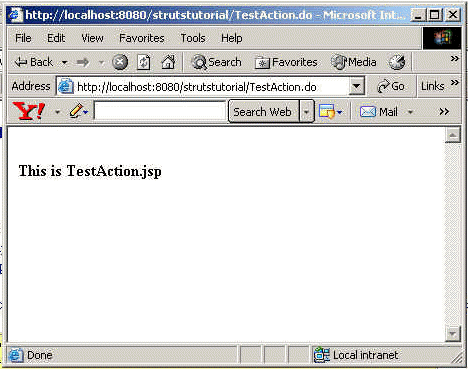
In this lesson you learned how to create Action Class and add the mappings in the struts-config.xml. Our Action Class returns the ActionForward  mapping of the TestAction.jsp.


Facing Programming Problem?
Add This Tutorial To:
  Del.icio.us   Digg   Google   Spurl   Blink   Furl   Simpy   Y! MyWeb 

Current Comments

99 comments so far (post your own) View All Comments Latest 10 Comments:

can any one pls send me a web application using struts.

Posted by Arun on Monday, 03.31.08 @ 11:59am | #54854

I will review it further and let you know my comments. Thanks for your efforts.

Posted by Srinivas Marripudi on Wednesday, 02.13.08 @ 14:13pm | #48134

I wrote Errors in ApplicationResource.properties
But i am unable to print those Errors using
< html:errors /> in JSP
How can i print errors using ApplicationResource.properties

Posted by Ravi Goud on Monday, 12.24.07 @ 15:43pm | #43577

this tutorial is very nice.

Posted by abhishek on Wednesday, 12.5.07 @ 11:22am | #41335

hi all,
this one is good example. what we all think about struts 2 version

Posted by sumit on Sunday, 11.11.07 @ 23:46pm | #36917

Hi
Its very good example,but you should give some more descritive

Posted by jayanta on Monday, 10.8.07 @ 19:24pm | #32506

http://www.roseindia.net/images/struts2.gif is very irritating. It's too straining for the eyes.
Kindly remove it.

Thanks,
kanakangi

Posted by kanakangi on Wednesday, 10.3.07 @ 12:02pm | #31291

here is the struts-config.xml code
<struts-config>
<form-beans>
<form-bean name="ref name of form bean demoform" type="demopack.DemoForm"/>
<form-beans>
<action-mappings>
<action path="/demo" name="demoform" type="demopack.DemoAction">
<forward name="success" path="/result.jsp"/>
</action-mappings>
</struts-config>

Posted by santosh kumar on Wednesday, 09.26.07 @ 10:32am | #29632

This document is very handy and very helpful for Struts novice programmers like me. I am using Eclipse 3.2.1 , Struts 1.3.5 and Tomcat 5.5. It has been great to understand your tutorials but it will more helpful and jutifying if details on configuring your workspace can also be made available. Thanks again, keep up the good work!

Posted by Srinivas Marripudi on Thursday, 09.20.07 @ 15:31pm | #28191

Please changes the image http://www.roseindia.net/images/struts2.gif. Its an irritative image. Please change that if possible

Posted by Mammu on Monday, 09.10.07 @ 11:05am | #26559

Leave your comment:

Name:

Email:

URL:

Title:

Comments:


Enter Code:


Note: Emails will not be visible or used in any way, and are not required. Please keep comments relevant. Any content deemed inappropriate or offensive may be edited and/or deleted.

No HTML code is allowed. Line breaks will be converted automatically. URLs will be auto-linked. Please use BBCode to format your text.

  EAI Articles
  Java Certification
Tell A Friend
Your Friend Name
Search Tutorials


Browse all Java Tutorials
Java JSP Struts Servlets Hibernate XML
Ajax JDBC EJB MySQL JavaScript JSF
Maven2 Tutorial JEE5 Tutorial Java Threading Tutorial Photoshop Tutorials Linux Technology
Technology Revolutions Eclipse Spring Tutorial Bioinformatics Tutorials Tools SQL
 

Home | JSP | EJB | JDBC | Java Servlets | WAP  | Free JSP Hosting  | Search Engine | News Archive | Jboss 3.0 tutorial | Free Linux CD's | Forum | Blogs

About Us | Advertising On RoseIndia.net  | Site Map

India News

Send your comments, Suggestions or Queries regarding this site at roseindia_net@yahoo.com.

Copyright © 2007. All rights reserved.