--Ads--
Export data into CSV File using Servlet


In this section, you will learn how to Export data
into CSV file
using Servlet. We have created file "JdbcCsvFile.java" to export
data from this .java file..
Brief description for the flow of application :
A CSV file is commonly known as a Comma Delimited File or a Character Separated File. It is a text file that has a specific format which allows
saving of text in organized manner. This format known as a flat table, is very simple. Each row contains one record of information. The character used to distinguish each piece of data within each record is most commonly used a comma ",".
*)Create a folder "csv" in the C:\ Drive:.
*)Create a file "CsvFile.java" that creates a CSV file "myfile.csv".
*)Download the "Tomcat apache Server With Latest version"
and run with the URL
http://localhost:8080/servletcsv/csvFile.
Step 1: Create a Servlet "CsvFile.java"
import java.io.*;

import java.net.*;

import javax.servlet.*;

import javax.servlet.http.*;

public class CsvFile extends HttpServlet {

public void doGet (HttpServletRequest request,


HttpServletResponse response)

throws ServletException,IOException  {

try

{

  PrintWriter out = response.getWriter();

  String filename = "c:\\csv\\myfile.csv";

  FileWriter fw = new FileWriter(filename);


  fw.append("Employee Code");

  fw.append(',');

  fw.append("Employee Name");

  fw.append(',');

  fw.append("Employee Address");

  fw.append(',');

  fw.append("Employee Phone");

  fw.append(',');

  fw.append("Employee ZipCode");

  fw.append('\n');


  fw.append("E1");

  fw.append(',');

  fw.append("Vineet");

  fw.append(',');

  fw.append("Delhi");

  fw.append(',');

  fw.append("224277488");

  fw.append(',');

  fw.append("110085");

  fw.append('\n');


  fw.append("E2");

  fw.append(',');

  fw.append("Amar");

  fw.append(',');

  fw.append("Delhi");

  fw.append(',');

  fw.append("257765758");

  fw.append(',');

  fw.append("110001");

  fw.append('\n');


  fw.append("E3");

  fw.append(',');

  fw.append("Amit");

  fw.append(',');

  fw.append("Delhi");

  fw.append(',');

  fw.append("257685858");

  fw.append(',');

  fw.append("110005");

  fw.append('\n');


  fw.append("E4");

  fw.append(',');

  fw.append("Suman");

  fw.append(',');

  fw.append("Delhi");

  fw.append(',');

  fw.append("266447678");

  fw.append(',');

  fw.append("110081");

  fw.append('\n');


  fw.flush();

  fw.close();

  out.println("<b>Csv file Successfully created.</b>");


}

catch (Exception ex) {

ex.printStackTrace ();

}

}

}
|
Step 2:Create a
"Web.xml" for mapping the Servlet "CsvFile.java".
<?xml version="1.0" encoding="ISO-8859-1"?>
<web-app xmlns="http://java.sun.com/xml/ns/javaee"
xmlns:xsi="http://www.w3.org/2001/XMLSchema-instance"
xsi:schemaLocation="http://java.sun.com/xml/ns/javaee
http://java.sun.com/xml/ns/javaee/web-app_2_5.xsd"
version="2.5">
<display-name>Welcome to Tomcat</display-name>
<description>
Welcome to Tomcat
</description>
<servlet>
<servlet-name>csvfile</servlet-name>
<servlet-class>CsvFile</servlet-class>
</servlet>
<servlet-mapping>
<servlet-name>csvfile</servlet-name>
<url-pattern>/csvFile</url-pattern>
</servlet-mapping>
</web-app>
|
|
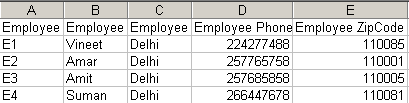
Output :

"myfile.csv"
Download Source Code