Home Servlets Expport data into CSV File using JDBC in Servlet


Expport data into CSV File using JDBC in Servlet
Posted on: September 26, 2008 at 12:00 AM
In this section, you will learn how to export data into CSV file using JDBC in Servlet.

Expport data into CSV File using JDBC in Servlet


In this section, you will learn how to export data into CSV file using JDBC in Servlet. We have created  file "JdbcCsvFile.java" to export data from database in to CSV file.

Brief description for the flow of application :

*)Create a folder "csv" in the C:\ Drive:.
*)Create a file "JdbcCsvFile.java" that creates a CSV file "myjdbcfile.csv".
*)Download the "Tomcat apache Server With Latest version" , download source code as given below and run application with the URL
   http://localhost:8080/servletcsv/jdbcCsvFile


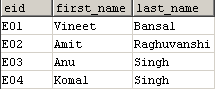
Step 1: Create a  table "user_register" in the database.

Step 1: Create a Servlet "JdbcCsvFile.java".

import java.io.FileWriter;
import java.io.IOException;
import java.sql.*;
import javax.servlet.*;
import javax.servlet.http.*;
import java.io.*;
 
public class JdbcCsvFile extends HttpServlet { 
public  void doGet (HttpServletRequest request,
  HttpServletResponse response) 
  throws ServletException,IOException  {
  String filename = "c:\\csv\\myjdbcfile.csv";
  Connection conn = null;
  String url = "jdbc:mysql://localhost:3306/";
  String dbName = "user_register";
  String driver = "com.mysql.jdbc.Driver";
  String userName = "root"; 
  String password = "root";
  Statement stmt;
  try
  {
  PrintWriter out = response.getWriter();
  FileWriter fw = new FileWriter(filename);
  fw.append("Employee Code");
  fw.append(',');
  fw.append("First Name");
  fw.append(',');
  fw.append("Last Name");
  fw.append('\n');

  Class.forName(driver).newInstance();
  conn = DriverManager.getConnection
   (url+dbName,userName,password);
  String query  = "select * from employee_details";
  stmt = conn.createStatement();
  ResultSet rs = stmt.executeQuery(query);
  while(rs.next())
  {
  fw.append(rs.getString(1));
  fw.append(',');
  fw.append(rs.getString(2));
  fw.append(',');
  fw.append(rs.getString(3));
  fw.append('\n');
  }
  fw.flush();
  fw.close();
  conn.close();
  out.println
   ("<b>You are Successfully Created Csv file.</b>");
  } catch (Exception e) {
  e.printStackTrace();
  }
  
  }
}

Step 2:Create a "Web.xml" for mapping the Servlet "CsvFile.java". 

<?xml version="1.0" encoding="ISO-8859-1"?>
<web-app xmlns="http://java.sun.com/xml/ns/javaee"
xmlns:xsi="http://www.w3.org/2001/XMLSchema-instance"
xsi:schemaLocation=
"http://java.sun.com/xml/ns/javaee
http://java.sun.com/xml/ns/javaee/web-app_2_5.xsd"
version="2.5">

<display-name>Welcome to Tomcat</display-name>
<description>
Welcome to Tomcat
</description>
<servlet>
<servlet-name>jdbccsvfile</servlet-name>
<servlet-class>JdbcCsvFile</servlet-class>
</servlet>
<servlet-mapping>
<servlet-name>jdbccsvfile</servlet-name>
<url-pattern>/jdbcCsvFile</url-pattern>
</servlet-mapping>
</web-app>


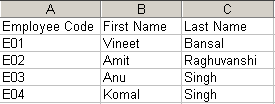
Output :


"myfile.csv"

Download Source Code


Related Tags for Expport data into CSV File using JDBC in Servlet:
javacdatabasefilejdbcdatacsvioservletexportportusingintthiscreatetabtolearnbaseeareilsectionfromincsasmntletjdbcdbasehowjdbintobccsxpocreatedatishalleaarccrtrvxpvassthavbcabonomo


More Tutorials from this section

Ask Questions?    Discuss: Expport data into CSV File using JDBC in Servlet   View All Comments

Post your Comment


Your Name (*) :
Your Email :
Subject (*):
Your Comment (*):
  Reload Image


Ask Questions?

If you are facing any programming issue, such as compilation errors or not able to find the code you are looking for.

Ask your questions, our development team will try to give answers to your questions.