--Ads--
insert into statement in sql using servlets


In this tutorial we are going to learn how we can
insert a value from a html form in the table stored in the database.
For inserting the values in the database table it is
required to have a table in which we are going to insert the values. Now make
one jsp page or html page where we will insert the values. In this program
we have made one simple enquiry form which will get stored in the database table
and when the data gets entered into the database then you will get a message.
Make one submit button for inserting the values into the database. Firstly this
values will go to the controller and retrieved the variables enter in the form
by the method getParameter() method of the request object. Pass a query
to insert the values retrieved from the html form. To set the values into the
database use setString() method. To retrieve the values from the database
use getString() method of the PreparedStatement object.
The code of the program is given below:
<html>
<head>
<meta http-equiv="Content-Language" content="en-us">
<meta http-equiv="Content-Type" content="text/html; charset=windows-1252">
<meta name="GENERATOR" content="Microsoft FrontPage 4.0">
<meta name="ProgId" content="FrontPage.Editor.Document">
<title>New Page 1</title>
</head>
<body>
<form method="POST" action="/sqlStatServlet/ServletUserEnquiryForm">
<!--webbot bot="SaveResults"
U-File="fpweb:///_private/form_results.txt"
S-Format="TEXT/CSV" S-Label-Fields="TRUE" -->
<p>User Id:
<input type="text" name="userId" size="20"></p>
<p>First Name: <input type="text" name="firstname" size="20"></p>
<p>Surname: <input type="text" name="surname" size="20"></p>
<p>Address1: <input type="text" name="address1" size="20"></p>
<p>Address2:<input type="text" name="address2" size="20"></p>
<p>Town:<input type="text"
name="town" size="20"></p>
<p>City: <input type="text" name="country" size="20"></p>
<p>Zip code:<input type="text" name="zipcode" size="20"></p>
<p> <input type="submit" value="Submit" name="B1"></p>
</form>
</body>
</html>
|
ServletUserEnquiryForm.java
import java.io.*;

import java.sql.*;

import javax.servlet.*;

import javax.servlet.http.*;


public class ServletUserEnquiryForm extends HttpServlet{

  public void init(ServletConfig config) throws ServletException{

  super.init(config);

  }

  /**Process the HTTP Get request*/

  public void doPost(HttpServletRequest req,

  HttpServletResponse res) throws ServletException,

  IOException{

  String connectionURL = "jdbc:mysql://localhost/zulfiqar";

  Connection connection=null;

  ResultSet rs;

  res.setContentType("text/html");

  PrintWriter out = res.getWriter();

  //get the variables entered in the form

  String uId = req.getParameter("userId");

  String fname = req.getParameter("firstname");

  String sname = req.getParameter("surname");

  String address1 = req.getParameter("address1");

  String address2 = req.getParameter("address2");

  String town = req.getParameter("town");

  String county = req.getParameter("country");

  String zipcode = req.getParameter("zipcode");

  try {

  // Load the database driver

  Class.forName("org.gjt.mm.mysql.Driver");

  // Get a Connection to the database

  connection = DriverManager.getConnection

  (connectionURL, "root", "admin");

  //Add the data into the database

  String sql =

  "insert into emp_details values (?,?,?,?,?,?,?,?)";

  PreparedStatement pst =

  connection.prepareStatement(sql);

  pst.setString(1, uId);

  pst.setString(2, fname);

  pst.setString(3, sname);

  pst.setString(4, address1);

  pst.setString(5, address2);

  pst.setString(6, town);

  pst.setString(7, county);

  pst.setString(8, zipcode);

  int numRowsChanged = pst.executeUpdate();

  // show that the new account has been created

  out.println(" Hello : ");

  out.println(" '"+fname+"'");

  pst.close();

  }

  catch(ClassNotFoundException e){

  out.println("Couldn't load database driver: "

  + e.getMessage());

  }

  catch(SQLException e){

  out.println("SQLException caught: "

  + e.getMessage());

  }

  catch (Exception e){

  out.println(e);

  }

  finally {

  // Always close the database connection.

  try {

  if (connection != null) connection.close();

  }

  catch (SQLException ignored){

  out.println(ignored);

  }

  }

  }

}
|
web.xml file for this program:
<?xml version="1.0" encoding="ISO-8859-1"?>

<!DOCTYPE web-app

 PUBLIC "-//Sun Microsystems, Inc.//DTD Web Application 2.3//EN"

 "http://java.sun.com/dtd/web-app_2_3.dtd">


<web-app>

 <servlet>

 <servlet-name>Zulfiqar</servlet-name>

 <servlet-class>ServletUserEnquiryForm</servlet-class>

 </servlet>

 <servlet-mapping>

 <servlet-name>Zulfiqar</servlet-name>

 <url-pattern>/ServletUserEnquiryForm</url-pattern>

 </servlet-mapping>

</web-app>
|
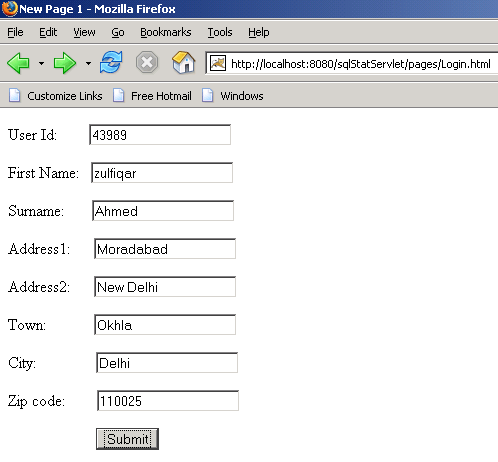
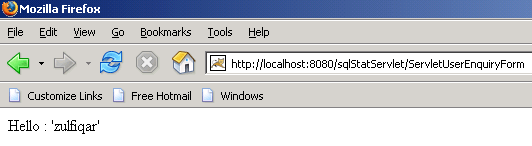
The output of the program is given below:
Login.html form for the data input:
The output of the input data:
Download this
example: