--Ads--
Getting Init Parameter Names


In this example we are going to retreive the init paramater values which we
have given in the web.xml file.
Whenever the container makes a servlet it always reads it deployment
descriptor file i.e. web.xml. Container creates name/value pairs for the
ServletConfig object. Once the parameters are in ServletConfig they will
never be read again by the Container.
The main job of the ServletConfig object is to give the init parameters.
To retrieve the init parameters in the program firstly we have made one class
named GettingInitParameterNames. The container calls the servlet's service()
method then depending on the type of request, the service method calls either
the doGet() or the doPost(). By default it will be doGet() method. Now inside
the doGet() method use getWriter() method of the response
object which will return a object of the PrintWriter class which helps us to print the content on the browser.
To retrieve all the values of the init parameter use method
getInitParameterNames() which will return the Enumeration of the init
parameters.
The code of the program is given below:
import java.io.*;

import javax.servlet.*;

import javax.servlet.http.*;

import java.util.*;


public class InitServlet extends HttpServlet {

  public void doGet(HttpServletRequest request,

   HttpServletResponse response)

      throws ServletException, IOException {

  PrintWriter pw = response.getWriter();

  pw.print("Init Parameters are : ");

  Enumeration enumeration = getServletConfig().getInitParameterNames();

  while(enumeration.hasMoreElements()){

  pw.print(enumeration.nextElement() + " ");

  }

  pw.println("\nThe email address is " +

  getServletConfig().getInitParameter("AdminEmail"));

  pw.println("The address is " +

  getServletConfig().getInitParameter("Address"));

  pw.println("The phone no is " +

  getServletConfig().getInitParameter("PhoneNo"));

  }

}
|
web.xml file of this program:
<?xml version="1.0" encoding="ISO-8859-1"?>

<!DOCTYPE web-app

 PUBLIC "-//Sun Microsystems, Inc.//DTD Web Application 2.3//EN"

 "http://java.sun.com/dtd/web-app_2_3.dtd">


<web-app>

 <servlet>

 <init-param>

 <param-name>AdminEmail</param-name>

 <param-value>zulfiqar_mca@yahoo.co.in</param-value>

 </init-param>

 <init-param>

 <param-name>Address</param-name>

 <param-value>Okhla</param-value>

 </init-param>

 <init-param>

 <param-name>PhoneNo</param-name>

 <param-value>9911217074</param-value>

 </init-param>

  <servlet-name>Zulfiqar</servlet-name>

  <servlet-class>InitServlet</servlet-class>

 </servlet>

 <servlet-mapping>

 <servlet-name>Zulfiqar</servlet-name>

 <url-pattern>/InitServlet</url-pattern>

 </servlet-mapping>

</web-app>
|
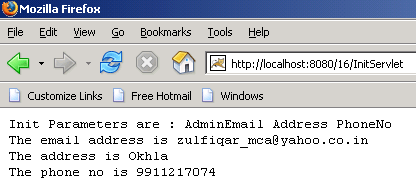
The output of the program is given below:
Download this example