Home | Ajax | BioInformatics | Dojo | EAI | EJB | Hibernate | J2ME | Java | Java Glossary | Java Servlets | JavaScript | Jboss | JDBC | JDO | Jmeter | JSF | JSP | JUnit | Maven | MySQL | Spring Framework | SQL | Struts | Technology | WAP | Web Services | XML
 
 
Search All Tutorials


Programming Tutorials: Ajax | Articles | JSP | Bioinformatics | Database | Free Books | Hibernate | J2EE | J2ME | Java | JavaScript | JDBC | JMS | Linux | MS Technology | PHP | RMI | Web-Services | Servlets | Struts | UML
 
Java Servlets
  JDO Tutorials
  EAI Articles
  Struts Tutorials
  Java Tutorials
  Java Certification
  Java Applet
Questions
Comments

Passing Parameter Using Html Form


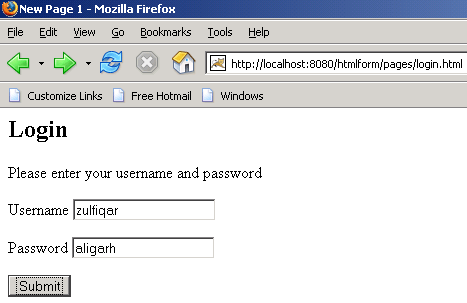
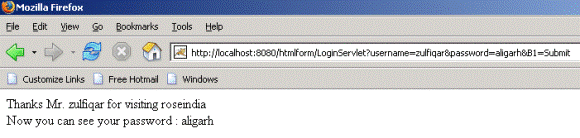
This is a very simple example in which we are going to display the name on the browser which we have entered from the Html page. 

To get the desired result firstly we have to make one html form which will have only one field named as name in which we will enter the name. And we will also have one submit button, on pressing the submit button the request will go to the server and the result will be displayed to us. 

In the servlet which will work as a controller here picks the value from the html page by using the method getParameter().  The output will be displayed to you by the object of the PrintWriter class. 

The code of the program is given below: 

<html>

<head>
<title>New Page 1</title>
</head>

<body>

<h2>Login</h2>
<p>Please enter your username and password</p>
<form method="GET" action="/htmlform/LoginServlet">
  <p> Username  <input type="text" name="username" size="20"></p>
  <p> Password  <input type="text" name="password" size="20"></p>
  <p><input type="submit" value="Submit" name="B1"></p>
</form>
<p>&nbsp;</p>

</body>

</html>

LoginServlet.java

import java.io.*;
import javax.servlet.*;
import javax.servlet.http.*;

public class LoginServlet extends HttpServlet{
  public void doGet(HttpServletRequest request, HttpServletResponse response)
                                   throws ServletException, IOException {
    response.setContentType("text/html");
    PrintWriter out = response.getWriter();
    String name = request.getParameter("username");
    String pass = request.getParameter("password");
    out.println("<html>");
    out.println("<body>");
    out.println("Thanks  Mr." "  " + name + "  " "for visiting roseindia<br>" );
    out.println("Now you can see your password : " "  " + pass + "<br>");
    out.println("</body></html>");
  }
}

 web.xml file for this program:

<?xml version="1.0" encoding="ISO-8859-1"?>
<!--<!DOCTYPE web-app
 PUBLIC "-//Sun Microsystems, Inc.//DTD Web Application 2.3//EN"
 "http://java.sun.com/dtd/web-app_2_3.dtd"> -->

<web-app>
 <servlet>
  <servlet-name>Hello</servlet-name>
  <servlet-class>LoginServlet</servlet-class>
 </servlet>
 <servlet-mapping>
 <servlet-name>Hello</servlet-name>
 <url-pattern>/LoginServlet</url-pattern>
 </servlet-mapping>
</web-app>

 The output of the program is given below:


Download this example:
                         

Facing Programming Problem?
Add This Tutorial To:
  Del.icio.us   Digg   Google   Spurl   Blink   Furl   Simpy   Y! MyWeb 

Current Comments

8 comments so far (post your own) View All Comments Latest 10 Comments:

I want to get parameter value and store it in html page's list.

Posted by umesh on Wednesday, 04.16.08 @ 17:06pm | #56706

sir while executing the servlet program iam getting error The requested resource (/hello) is not available.can u send me the answer as early as possible?

Posted by vamsi on Thursday, 03.27.08 @ 12:50pm | #54472

can u let me know the directory structure for this program.
even am getting error.
where this "/htmlforms" came from, in "LoginForm.html" action tag.

Posted by Kishore on Tuesday, 02.26.08 @ 16:36pm | #50135

if we get a pdf of servlets material

Posted by kambala on Monday, 10.15.07 @ 10:39am | #33842

Your way in which you have presented the examples are really good.

Posted by SANJAY SHUKLA on Saturday, 10.13.07 @ 03:59am | #33457

please let me know under which directories the code should be placed.

I tried the above expample but ended up getting page not found exception..

Thanks !

Posted by Annu on Friday, 08.24.07 @ 05:39am | #24009

i would like to know how to get all fields from html to servlet.

Posted by Mahitha on Thursday, 06.7.07 @ 13:20pm | #18480

content is good but very iritating advertisements.

Posted by shivaji on Tuesday, 04.3.07 @ 17:35pm | #13275

Leave your comment:

Name:

Email:

URL:

Title:

Comments:


Enter Code:

Audio Version
Reload Image
 

Note: Emails will not be visible or used in any way, and are not required. Please keep comments relevant. Any content deemed inappropriate or offensive may be edited and/or deleted.

No HTML code is allowed. Line breaks will be converted automatically. URLs will be auto-linked. Please use BBCode to format your text.

Java String toLowerCase Example
Java String toCharArray Example
Java String substring Example
Java String indexOf Example
Java String startsWith Example
Java String hashCode Example
Java String matches Example
Java String length Example
Java String lastIndexOf Example
Java String isEmpty Example
Java String equalsIgnoreCase Example
Java String equals Example
Java String endsWith Example
Java String copyValueOf Example
Java String contentEquals Example
  EAI Articles
  Java Certification
Tell A Friend
Your Friend Name
Search Tutorials


Browse all Java Tutorials
Java JSP Struts Servlets Hibernate XML
Ajax JDBC EJB MySQL JavaScript JSF
Maven2 Tutorial JEE5 Tutorial Java Threading Tutorial Photoshop Tutorials Linux Technology
Technology Revolutions Eclipse Spring Tutorial Bioinformatics Tutorials Tools SQL
 

Home | JSP | EJB | JDBC | Java Servlets | WAP  | Free JSP Hosting  | Search Engine | News Archive | Jboss 3.0 tutorial | Free Linux CD's | Forum | Blogs

About Us | Advertising On RoseIndia.net  | Site Map

India News

Indian Software Development Company | iPhone Development Company in India

Send your comments, Suggestions or Queries regarding this site at roseindia_net@yahoo.com.

Copyright © 2008. All rights reserved.