Services | Updates | Contact
Home | Ajax | BioInformatics | Dojo | EAI | EJB | Hibernate | J2ME | Java | Java Glossary | Java Servlets | JavaScript | Jboss | JDBC | JDO | Jmeter | JSF | JSP | JUnit | Maven | MySQL | Spring Framework | SQL | Struts | Technology | WAP | Web Services | XML
Search All Tutorials
Top Search: Loan Struts Open Source
EasyEclipse for Python
There are currently 10 comments for this distribution. You can review them and add more here.
 
Beginners Java Tutorial
This tutorial will introduce you with the Java Programming language.
 
More Tutorials...

Programming Tutorials: Ajax | Articles | JSP | Bioinformatics | Database | Free Books | Hibernate | J2EE | J2ME | Java | JavaScript | JDBC | JMS | Linux | MS Technology | PHP | RMI | Web-Services | Servlets | Struts | UML


Maven
Comments


Repository


II. Repository

Another concept in Maven is that of a repository. The repository holds the artifacts on which your project depends. There are two kinds of repository: local and remote. Both of them can be declaratively set. Unless specified otherwise, the local repository is created in a special directory called ".m2/repository". In Windows, this directory is created in C:\Documents and Settings\Administrator. For example, if your project depends on commons-logging version 1.0.4, you can specify the dependency in pom.xml and when maven is executed, it will copy the appropriate commons-logging jar file from the remote repository to the local repository and then use it to build your project's artifact like JARs, WARs, EARs etc. 

The maven repository folder has subfolders for each library. For instance, there is a sub folder for commons-logging. Beneath the commons-logging folder there is another subfolder called jars. This jars folder has the commons logging jar files suffixed by version number. 

The role of the repository is immediately obvious. Instead of each project having its own copies of third party libraries, the repository helps developers across projects to share the libraries. Each project can also in turn generate its artifacts and publish it into the remote repository. The process of publishing a jar into the repository is called "install" in Maven lingo. This install process helps organizations to share internal artifacts across projects in a standard manner. This also holds the basis for continuous integration among inter-dependent projects. 

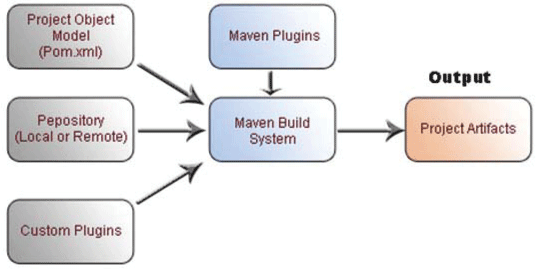
Figure shows the  pom.xml, repository and plugins. The grey colored rectangles are provided by you. The blue colored rectangles are provided by Maven. The orange colored rectangle shaded is the output - the real deployment artifact obtained for your project. Custom plug-ins  are optional. The rest of the inputs are mandatory.

Click to learn more about Maven2 Repository
Setting Up A Maven2 Repository


Facing Programming Problem?
Add This Tutorial To:
  Del.icio.us   Digg   Google   Spurl   Blink   Furl   Simpy   Y! MyWeb 

Current Comments

0 comments so far (post your own) View All Comments Latest 10 Comments:

Leave your comment:

Name:

Email:

URL:

Title:

Comments:


Enter Code:


Note: Emails will not be visible or used in any way, and are not required. Please keep comments relevant. Any content deemed inappropriate or offensive may be edited and/or deleted.

No HTML code is allowed. Line breaks will be converted automatically. URLs will be auto-linked. Please use BBCode to format your text.

  EAI Articles
  Java Certification
Tell A Friend
Your Friend Name
Search Tutorials


Browse all Java Tutorials
Java JSP Struts Servlets Hibernate XML
Ajax JDBC EJB MySQL JavaScript JSF
Maven2 Tutorial JEE5 Tutorial Java Threading Tutorial Photoshop Tutorials Linux Technology
Technology Revolutions Eclipse Spring Tutorial Bioinformatics Tutorials Tools SQL
 

Home | JSP | EJB | JDBC | Java Servlets | WAP  | Free JSP Hosting  | Search Engine | News Archive | Jboss 3.0 tutorial | Free Linux CD's | Forum | Blogs

About Us | Advertising On RoseIndia.net  | Site Map

India News

Send your comments, Suggestions or Queries regarding this site at roseindia_net@yahoo.com.

Copyright © 2007. All rights reserved.