Maven 2 Eclipse Plug-in


Plugins are great in simplifying the life of programmers; it actually reduces the repetitive tasks involved in the programming. In this article our experts will show you the steps required to download and install the Maven Plugin with your eclipse IDE.
Why Maven with Eclipse
Eclipse is an industry
leader in IDE market, it is used very extensively in developing projects all
around the world. Similarly, Maven is a high-level, intelligent project
management, build and deployment tool provided by Apache?s software foundation
group. Maven deals with application development lifecycle management.
Maven?Eclipse Integration makes the development, testing, packaging and
deployment process easy and fast. Maven Integration for Eclipse provides a tight
integration for Maven into the IDE and avails the following features:
· It helps to launch Maven builds from within Eclipse
· It avails the
dependency management for Eclipse build path based on Maven's pom.xml
· It resolves Maven dependencies from the Eclipse workspace without installing to local Maven repository
· It avails an automatic downloading of the required dependencies from the remote Maven repositories
· It provides wizards for creating new Maven projects, pom.xml or to enable Maven support on plain Java project
· It helps to search quickly for dependencies in Maven remote repositories
· It quickly fixes in the Java editor for looking up required dependencies/jars by the class or package name.
1. Get the Eclipse Development Environment :
In this tutorial
we are using the eclipse-SDK-3.3-win32, which can be downloaded from http://www.eclipse.org/downloads/
2. Get Maven-eclipse-plugin-plugin :
It is
available at http://mevenide.codehaus.org/maven-eclipse-plugin-plugin/
Download and Install Eclipse
First download and install the eclipse plugin on your
development machine then proceed with the installation process of the
eclipse-maven plugin.
Steps to Install the eclipse-maven plugin
1.Open eclipse IDE and
go to Help->Software Updates-> Find and Install
as shown in Figure 1 below:
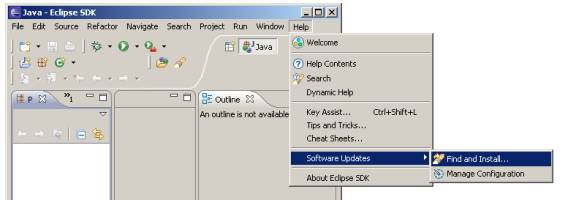
Figure 1
2. Choose the way you want to search for the features to Install in the Install/update window. It is show in the figure 2:

Figure 2
Now, Select the option ?Search for new features to install? and click on the ?Next? button.
3. An Install wizard appears as shown in Figure 3 :
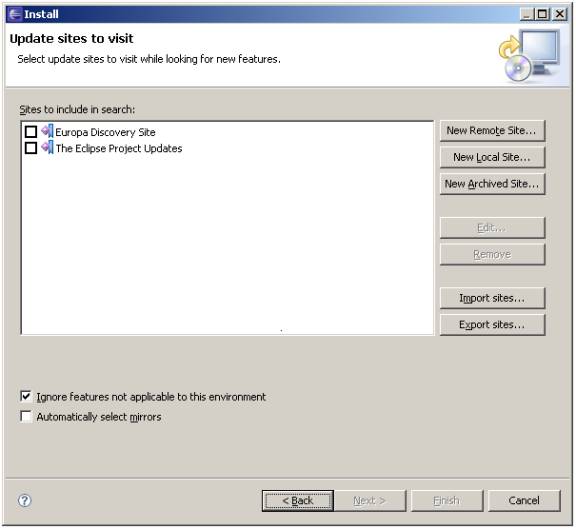
Figure: 3
Now click on ?New Remote Site?? and enter the
following details in the dialog box:
Name: Maven2Plugin
URL: http://mevenide.codehaus.org/repository
As shown in figure 4

Figure 4
Now click on ?OK? button.
4.  Then
update the information of the sites to visit for instance we have selected the Maven2plugin
site in the Eclipse update list as shown in following figure (Figure 5)
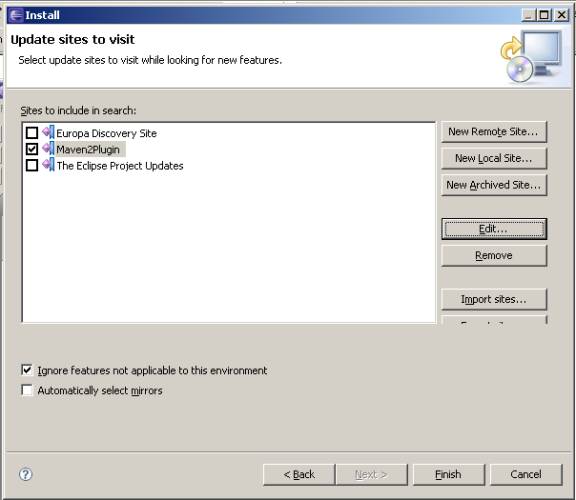
Figure 5
5. Click on the ?Finish? button. Update manager starts searching for the updates as shown in Figure 6
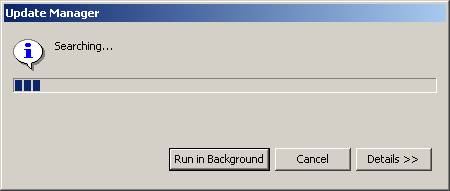
Figure 6
6. Then an Eclipse update window appears, select ?Maven2Plugin? check box as show below:
 0
0
Click on the ?Next? button and then Accept the
terms and conditions in the next window and click the next button.
7. Then, An Installation confirmation window appears as shown below:
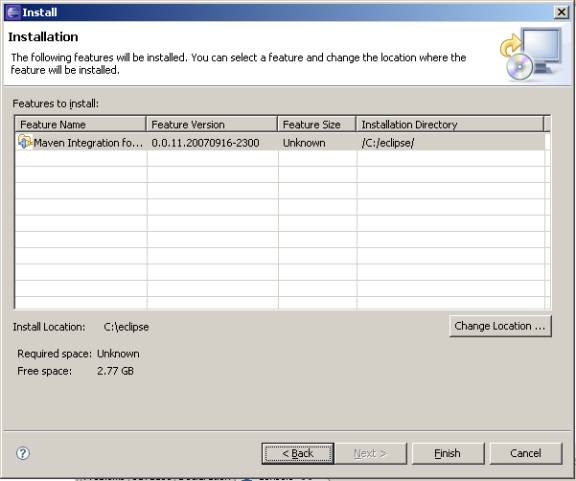
8. Update manager will download the files and install the Maven eclipse plugin for you. 1

 2
2
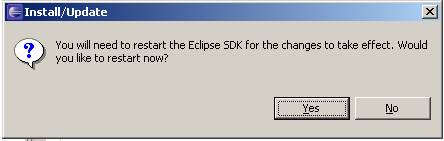
Now the Eclipse-Maven plugin is ready for use.