
create web application using maven
In this section, you will learn to create a web application using maven.
The apache-maven-2.2.1 versions is used in the below example.
To create web application structure using maven inside project_maven directory, you need to issue following following command :
| C:\project_maven>mvn archetype:generate
-DgroupId=net.roseindia -DartifactId=roseindia-webapp
-DarchetypeArtifactId=maven-archetype-webapp [INFO] Scanning for projects... [INFO] Searching repository for plugin with prefix: 'archetype'. [INFO] ------------------------------------------------------------------------ [INFO] Building Maven Default Project [INFO] task-segment: [archetype:generate] (aggregator-style) [INFO] ------------------------------------------------------------------------ [INFO] Preparing archetype:generate [INFO] No goals needed for project - skipping [INFO] Setting property: classpath.resource.loader.class => 'org.codehaus.plexus .velocity.ContextClassLoaderResourceLoader'. [INFO] Setting property: velocimacro.messages.on => 'false'. [INFO] Setting property: resource.loader => 'classpath'. [INFO] Setting property: resource.manager.logwhenfound => 'false'. [INFO] [archetype:generate {execution: default-cli}] [INFO] Generating project in Interactive mode Downloading: http://repo1.maven.org/maven2/org/apache/maven/archetypes/maven-arc hetype-webapp/1.0/maven-archetype-webapp-1.0.jar Downloading: http://repo1.maven.org/maven2/org/apache/maven/archetypes/maven-arc hetype-webapp/1.0/maven-archetype-webapp-1.0.jar Downloading: http://repo1.maven.org/maven2/org/apache/maven/archetypes/maven-arc hetype-webapp/1.0/maven-archetype-webapp-1.0.jar Downloading: http://repo1.maven.org/maven2/org/apache/maven/archetypes/maven-arc hetype-webapp/1.0/maven-archetype-webapp-1.0.jar Define value for version: 1.0-SNAPSHOT: : 1.0 Confirm properties configuration: groupId: net.roseindia artifactId: roseindia-webapp version: 1.0 package: net.roseindia Y: : y Downloading: file://C:\Documents and Settings\satya\.m2\repository/org/apache/ma ven/archetypes/maven-archetype-webapp/1.0/maven-archetype-webapp-1.0.jar Downloading: file://C:\Documents and Settings\satya\.m2\repository/org/apache/ma ven/archetypes/maven-archetype-webapp/1.0/maven-archetype-webapp-1.0.jar Downloading: file://C:\Documents and Settings\satya\.m2\repository/org/apache/ma ven/archetypes/maven-archetype-webapp/1.0/maven-archetype-webapp-1.0.jar Downloading: file://C:\Documents and Settings\satya\.m2\repository/org/apache/ma ven/archetypes/maven-archetype-webapp/1.0/maven-archetype-webapp-1.0.jar [INFO] ------------------------------------------------------------------------- --- [INFO] Using following parameters for creating OldArchetype: maven-archetype-web app:1.0 [INFO] ------------------------------------------------------------------------- --- [INFO] Parameter: groupId, Value: net.roseindia [INFO] Parameter: packageName, Value: net.roseindia [INFO] Parameter: package, Value: net.roseindia [INFO] Parameter: artifactId, Value: roseindia-webapp [INFO] Parameter: basedir, Value: C:\project_maven [INFO] Parameter: version, Value: 1.0 [INFO] ********************* End of debug info from resources from generated POM *********************** [INFO] OldArchetype created in dir: C:\project_maven\roseindia-webapp [INFO] ------------------------------------------------------------------------ [INFO] BUILD SUCCESSFUL [INFO] ------------------------------------------------------------------------ [INFO] Total time: 2 minutes 25 seconds [INFO] Finished at: Mon Jul 09 16:09:01 GMT+05:30 2012 [INFO] Final Memory: 9M/21M [INFO] ------------------------------------------------------------------------ |
This command will auto generate the structure for web application inside project_maven directory as follows:
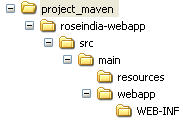
The default pom.xml have following code :
<project xmlns="http://maven.apache.org/POM/4.0.0" xmlns:xsi="http://www.w3.org/2001/XMLSchema-instance"
xsi:schemaLocation="http://maven.apache.org/POM/4.0.0 http://maven.apache.org/maven-v4_0_0.xsd">
<modelVersion>4.0.0</modelVersion>
<groupId>net.roseindia</groupId>
<artifactId>roseindia-webapp</artifactId>
<packaging>war</packaging>
<version>1.0</version>
<name>roseindia-webapp Maven Webapp</name>
<url>http://maven.apache.org</url>
<dependencies>
<dependency>
<groupId>junit</groupId>
<artifactId>junit</artifactId>
<version>3.8.1</version>
<scope>test</scope>
</dependency>
</dependencies>
<build>
<finalName>roseindia-webapp</finalName>
</build>
</project>
The default web.xml have following code :
<!DOCTYPE web-app PUBLIC
"-//Sun Microsystems, Inc.//DTD Web Application 2.3//EN"
"http://java.sun.com/dtd/web-app_2_3.dtd" >

<web-app>
<display-name>Archetype Created Web Application</display-name>
</web-app>
You can edit pom.xml and web.xml according to your web application requirements.