
Tomahawk validateEmail tag


This tag is used to validate email address entered in the field. We can render the validation message by the use of message, detailMessage and summaryMessage attributes.
Code Description :
<%@ taglib uri="http://java.sun.com/jsf/html" prefix="h"%>
<%@ taglib uri="http://java.sun.com/jsf/core" prefix="f"%>
<%@ taglib uri="http://myfaces.apache.org/tomahawk" prefix="t"%>

<f:view>
<html>
<head>
<meta http-equiv="Content-Type" content="text/html; charset=iso-8859-1">
<title>t:validateEmail example</title>
<style type="text/css">
<!--
body{
background-color:#fff2f2;
margin-top:30;
}
-->
</style>
</head>
<body >
<h:form><center>
  <t:panelGrid columns="2" style="font-weight:bold;" width="40%">
	<t:outputText value="Name" />
	<t:inputText id="name"/>
	<t:outputText value="Phone No." />
	<t:inputText id="phone"/>

	<t:outputText value="Email" />
	<t:panelGroup>
		<t:inputText id="email" required="true">
			<t:validateEmail message="Enter valid EmailID."/>
		</t:inputText>
		<f:verbatim></br></f:verbatim>
	<t:message for="email"/>
	</t:panelGroup>
	<t:outputText value=" " />
	<t:commandButton id="cb" image="images/submit_button.gif"
                  action="welcome"/>
  </t:panelGrid>
</center></h:form>
</body>
</html>
</f:view>
|
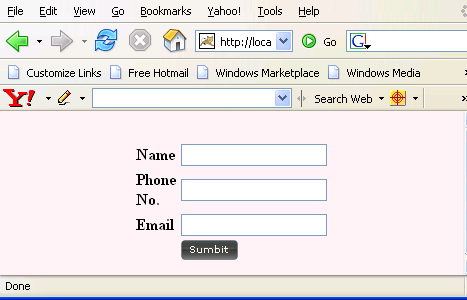
Rendered Output :
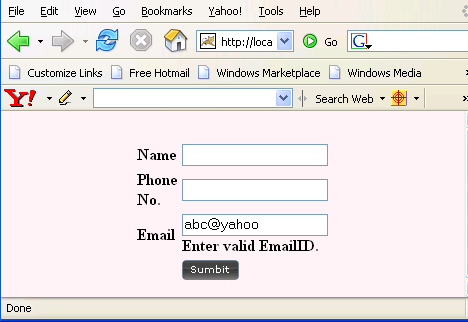
If we enter wrong email id then the message written is message tag is displayed like is the figure below :
Html Source Code :
<html>
<head>
<meta http-equiv="Content-Type" content="text/html; charset=iso-8859-1">
<title>t:validateEmail example</title>
<style type="text/css">
<!--
body{
background-color:#fff2f2;
margin-top:30;
}
-->
</style>
</head>
<body >
<form id="_idJsp0" name="_idJsp0" method="post"
      action="/tomahawk_tags/pages/validateEmail.jsf"
      enctype="application/x-www-form-urlencoded">
<center>
<table width="40%" style="font-weight:bold;">
<tbody>
<tr><td>Name</td><td>
<input id="_idJsp0:name" name="_idJsp0:name" type="text" value="" />
</td></tr>
<tr><td>Phone No.</td><td>
<input id="_idJsp0:phone" name="_idJsp0:phone" type="text" value="" />
</td></tr>
<tr><td>Email</td><td>
<input id="_idJsp0:email" name="_idJsp0:email" type="text" />
</br></td></tr>
<tr><td> </td><td>
<input id="_idJsp0:cb" name="_idJsp0:cb" type="image"
 src="images/submit_button.gif"
onclick="if(typeof window.clearFormHiddenParams__idJsp0!='undefined')
{clearFormHiddenParams__idJsp0('_idJsp0');}" /></td></tr>
</tbody></table>
</center><input type="hidden" name="_idJsp0_SUBMIT" value="1" />
<input type="hidden" name="_idJsp0:_link_hidden_" />
<input type="hidden" name="_idJsp0:_idcl" />
<script type="text/javascript"><!--

	function clear__5FidJsp0()
	{
		clearFormHiddenParams__idJsp0('_idJsp0');
	}

	function clearFormHiddenParams__idJsp0(currFormName)
	{
		var f = document.forms['_idJsp0'];
		f.elements['_idJsp0:_link_hidden_'].value='';
		f.elements['_idJsp0:_idcl'].value='';
		f.target='';
	}

	clearFormHiddenParams__idJsp0();
//--></script><input type="hidden" name="javax.faces.ViewState"
 id="javax.faces.ViewState" value="rO0ABXVyABNbTGphdmEubGFuZy5PYmpl
Y3Q7kM5YnxBzKWwCAAB4cAAAAAN0AAIxOHB0ABgvcGFnZXMvdmFsaWRhdGVFbWFpbC5
qc3A=" /></form>
<!-- MYFACES JAVASCRIPT -->

</body>
</html>
|
This tag contains attributes given below :
- message : This attribute specifies the alternative validation message. The message written in this tag is rendered if validation fails.
- detailMessage : This attribute specifies the alternative validation message.
- summaryMessage : This attribute specifies the alternative validation message.