--Ads--
Ejb message driven bean


This tutorial explains you the process which are
involved in making a message driven bean using EJB. Mesaage driven bean in EJB
have the following features:-
1) is a JMS listener
2) provides a single-use service
3) is relatively short lived
For developing the message driven bean we are using both the EJB module and web module. The
steps involved in creating message driven bean are as follows:-
Step1:-Create a persistence unit named as
persistence.xml.
Persistence unit defines the data source and entity manager used in our application. The
use of persistence unit to describe a convenient way of specifying a set of metadata files, and classes.
persistence.xml
<?xml version="1.0" encoding="UTF-8"?>
<persistence version="1.0" xmlns="http://java.sun.com/xml/ns/persistence"
xmlns:xsi="http://www.w3.org/2001/XMLSchema-instance" xsi:schemaLocation="
http://java.sun.com/xml/ns/persistence http://java.sun.com/xml/ns/persistence/
persistence_1_0.xsd">
<persistence-unit name="NewsApp-ejbPU" transaction-type="JTA">
<provider>oracle.toplink.essentials.PersistenceProvider</provider>
<jta-data-source>jdbc/sample</jta-data-source>
<exclude-unlisted-classes>false</exclude-unlisted-classes>
<properties>
<property name="toplink.ddl-generation" value="drop-and-create-tables"/>
</properties>
</persistence-unit>
</persistence> |
Step2:-Create an Entity class named
NewsEntity.java
By Entity class we mean a java class that represent table from the
database. The annotation which is used for Representing a class as Entity is @Entity. Here
in the program given below :-
@Id annotation is used to declare the field as a
primary key.
@GeneratedValue association is used for a
primary key property. it specifies auto-generation parameters and methods for
primary key.
private Long id; private String title; private String body; private String email; private String dob:-These
are the field declaration to the
class
NewsEntity.java
package ejb;


import java.io.Serializable;

import javax.persistence.Entity;

import javax.persistence.GeneratedValue;

import javax.persistence.GenerationType;

import javax.persistence.Id;


@Entity

public class NewsEntity implements Serializable {


  private static final long serialVersionUID = 1L;

  private Long id;

  private String title;

  private String body;

  private String email;

 private String dob;


  public void setId(Long id) {

  this.id = id;

  }


  @Id

  @GeneratedValue(strategy = GenerationType.AUTO)

  public Long getId() {

  return id;

  }


  public String getTitle() {

  return title;

  }


  public void setTitle(String title) {

  this.title = title;

  }


  public String getEmail() {

  return email;

  }


  public String getDob() {

  return dob;

  }


  public void setDob(String dob) {

  this.dob = dob;

  }


  public void setEmail(String email) {

  this.email = email;

  }


  public String getBody() {

  return body;

  }


  public void setBody(String body) {

  this.body = body;

  }

}
|
Step3:-Create a messagedriven bean named
NewMessageBean.java
@MessageDriven(mappedName = "jms/Queue", activationConfig =  {

      @ActivationConfigProperty(propertyName = "acknowledgeMode",

	propertyValue = "Auto-acknowledge"),

      @ActivationConfigProperty(propertyName = "destinationType",

	 propertyValue = "javax.jms.Queue")

  })
|
This is the message driven annotation that tells the container that the component is a message-driven bean and the JMS resource
is used by the bean.
private EntityManager em:-By this we define the entity manager into the class.
NewMessageBean.java
package ejb;


import javax.annotation.Resource;

import javax.ejb.ActivationConfigProperty;

import javax.ejb.MessageDriven;

import javax.ejb.MessageDrivenContext;

import javax.jms.JMSException;

import javax.jms.Message;

import javax.jms.MessageListener;

import javax.jms.ObjectMessage;

import javax.persistence.EntityManager;

import javax.persistence.PersistenceContext;


@MessageDriven(mappedName = "jms/Queue", activationConfig =  {

      @ActivationConfigProperty(propertyName = "acknowledgeMode",

	 propertyValue = "Auto-acknowledge"),

      @ActivationConfigProperty(propertyName = "destinationType",

	 propertyValue = "javax.jms.Queue")

  })

public class NewMessageBean implements MessageListener {

  @Resource

  private MessageDrivenContext mdc;

  @PersistenceContext

  private EntityManager em;


  public NewMessageBean() {

  }


  public void onMessage(Message message) {

  ObjectMessage msg=null;

 try {

  if (message instanceof ObjectMessage) {

  msg = (ObjectMessage) message;

  NewsEntity e = (NewsEntity) msg.getObject();

  save(e);

  }

  } catch (JMSException e) {

  e.printStackTrace();

  mdc.setRollbackOnly();

  } catch (Throwable te) {

  te.printStackTrace();

  }

  }


  public void save(Object object) {

  em.persist(object);

  }


}
|
Step4:-Create a session bean named
NewsEntityFacade.java
@Stateless is the annotation used to declare the class as a stateless session bean component.
NewsEntityFacade.java
package ejb;


import java.util.List;

import javax.ejb.Stateless;

import javax.persistence.EntityManager;

import javax.persistence.PersistenceContext;


@Stateless

public class NewsEntityFacade implements NewsEntityFacadeLocal {

  @PersistenceContext

  private EntityManager em;


  public void create(NewsEntity newsEntity) {

  em.persist(newsEntity);

  }


  public void edit(NewsEntity newsEntity) {

  em.merge(newsEntity);

  }


  public void remove(NewsEntity newsEntity) {

  em.remove(em.merge(newsEntity));

  }


  public NewsEntity find(Object id) {

  return em.find(ejb.NewsEntity.class, id);

  }


  public List findAll() {

        return em.createQuery("select object(o)   from NewsEntity as o")

   .getResultList();

  }


}
|
Step5:-Create a local Interface named NewsEntityFacade.java
NewsEntityFacadeLocal.java
package ejb;


import java.util.List;

import javax.ejb.Local;


@Local

public interface NewsEntityFacadeLocal {


  void create(NewsEntity newsEntity);


  void edit(NewsEntity newsEntity);


  void remove(NewsEntity newsEntity);


  NewsEntity find(Object id);


  List findAll();


}
|
Step6:-Create a servlet named
ListNews.java
This is the servlet for displaying our data.
@EJB:-This is the annotation that configure the EJB values for a field or
a method. Normally this annotation is a Resource annotation where it is known
that the resultant is an EJB interface.
ListNews.java
package web;


import ejb.NewsEntity;

import ejb.NewsEntityFacadeLocal;

import java.io.*;

import java.net.*;

import java.util.Iterator;

import java.util.List;

import javax.ejb.EJB;

import javax.servlet.*;

import javax.servlet.http.*;


public class ListNews extends HttpServlet {


  @EJB

  private NewsEntityFacadeLocal newsEntityFacade;


  protected void processRequest(HttpServletRequest request,

         HttpServletResponse response) throws ServletException, IOException {

  response.setContentType("text/html;charset=UTF-8");

  PrintWriter out = response.getWriter();

  try {

  out.println("<html>");

  out.println("<head>");

  out.println("<title>EJB Message driven bean</title>");

  out.println("</head>");

  out.println("<body>");

  out.println("<h1>EJB Message driven bean using Servlet</h1>");

  out.println("<hr></hr>");

  out.println("<h3>Details You have Entered is:</h3>");

  List news = newsEntityFacade.findAll();

  for (Iterator it = news.iterator(); it.hasNext();) {

  NewsEntity elem = (NewsEntity) it.next();

  out.println(" <b>" + "Name is: " + "</b>"

	 + elem.getTitle() + "<br />");

 out.println("<b>" + "E-mail is: " + "</b>"

	+ elem.getEmail() + "<br /> ");

  out.println("<b>" + "Dob is: " + "</b>"

	 + elem.getDob() + "<br /> ");

	out.println("<b>" + "Address is: " + "</b>"

	+ elem.getBody() + "<br /><br /> ");

  }

  out.println("<a href='PostMessage'><b>Post new message</b></a>");

  out.println("</body>");

  out.println("</html>");

  } finally {

  out.close();

  }

  }

  protected void doGet


	(HttpServletRequest request, HttpServletResponse response

  throws ServletException, IOException {

  processRequest(request, response);

  }

  protected void doPost(HttpServletRequest request,

  HttpServletResponse response


	throws ServletException, IOException {

  processRequest(request,

   response);

  }

  public String getServletInfo() {

  return "Short description";

  }

 }
|
Step7:-Create a servlet named
PostMessage.java
This servlet is used to post message.
PostMessage.java
package web;


import ejb.NewsEntity;

import java.io.*;

import java.net.*;

import javax.jms.Connection;

import javax.annotation.Resource;

import javax.jms.ConnectionFactory;

import javax.jms.JMSException;

import javax.jms.MessageProducer;

import javax.jms.ObjectMessage;

import javax.jms.Queue;

import javax.jms.Session;

import javax.servlet.*;

import javax.servlet.http.*;


public class PostMessage extends HttpServlet {


  @Resource(mappedName = "jms/NewMessageFactory")

  private ConnectionFactory connectionFactory;

  @Resource(mappedName = "jms/NewMessage")

  private Queue queue;


  protected void processRequest


	(HttpServletRequest request, HttpServletResponse response)


       throws ServletException, IOException {

  response.setContentType("text/html;charset=UTF-8");

  String title = request.getParameter("title");

  String body = request.getParameter("body");

  String email = request.getParameter("email");

  String dob = request.getParameter("dob");


  if ((title != null) && (body != null) && (email != null)

	 && (dob != null)) {

  try {

  Connection connection =

	 connectionFactory.createConnection();

  Session session =

	 connection.createSession(false, Session.AUTO_ACKNOWLEDGE);

  MessageProducer messageProducer =


	session.createProducer(queue);


  ObjectMessage message =

	session.createObjectMessage();

  NewsEntity e = new NewsEntity();


  e.setTitle(title);

  e.setBody(body);

  e.setEmail(email);

  e.setDob(dob);

  message.setObject(e);

  messageProducer.send(message);

  messageProducer.close();

  connection.close();

  response.sendRedirect("ListNews");

  } catch (JMSException ex) {

  ex.printStackTrace();

  }

  }


  PrintWriter out = response.getWriter();

  try {


  out.println("<html>");

  out.println("<head>");

  out.println("<title>Servlet PostMessage</title>");

  out.println("</head>");

  out.println("<body>");

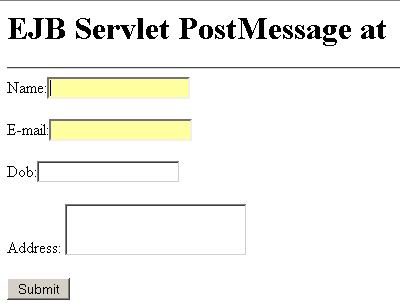
  out.println("<h1>EJB Servlet PostMessage at </h1>");

  out.println("<hr></hr>");

  out.println("<form>");


  out.println("Name:<input type='text' name='title'>

	<br/><br/>");

  out.println("E-mail:<input type='text' name='email'>

	<br/><br/>");

 out.println("Dob:<input type='text' name='dob'>

	<br/><br/>");


 out.println("Address: <textarea name='body'></textarea><br/><br/>");

  out.println("<input type='submit' value='Submit'><br/>");

  out.println("</form>");

  out.println("</body>");

  out.println("</html>");

  } finally {

  out.close();

  }

  }

  protected void doGet(HttpServletRequest request,

   HttpServletResponse response)


       throws ServletException, IOException {

  processRequest(request, response);

  }

  protected void doPost(HttpServletRequest request,

   HttpServletResponse response)


       throws ServletException, IOException {

  processRequest(request, response);

  }

  public String getServletInfo() {

  return "Short description";

  }

  }
|
Output of the program


Download Source code