Stateless Session Bean Example


In this part of Enterprise Session Beans, you will
learn how to develop, deploy, and run a simple Java EE application named example
using stateless session bean.
The purpose of example is to performs the mathematical operations such
as Addition, Subtraction, Multiplication, and Division.
The example application consists of an enterprise bean, which performs the
calculations, and two types of clients: an application client and a web
client.
There are following steps that you have to follow to develop a example JEE application.
-
Create the enterprise bean: CalculatorBean
-
Create the web client: WebClient
-
Deploy example onto the server.
-
Using a browser, run the web client.
I. Creating the enterprise bean:
The enterprise bean in our example is a stateless session bean called CalculatorBean. The source code for CalculatorBean is in ?net/roseindia/ejb3/stateless? directory.
Creating CalculatorBean requires these steps:
(i) Coding the bean?s Remote business interface and Enterprise bean class.
(ii) Compiling the source code with the Ant tool.
(i) Coding the Business Interface
The business interface defines the business methods that a client can call remotely. The business methods are implemented in the enterprise bean class. The source code for the CalculatorRemote business interface is given below.
package net.roseindia.ejb3.stateless;
|
Note that, the @Remote annotation decorating the interface definition. This lets the container know that CalculatorBean will be accessed by remote clients.
II. Coding the Enterprise Bean Class
The enterprise bean class for this example is called CalculatorBean. This class implements the four business methods (add, subtract, multiply, division) that are defined in the CalculatorRemote business interface. The source code for the CalculatorBean class is given below.
package net.roseindia.ejb3.stateless;
|
Note that, the @Stateless annotation decorating the enterprise bean class. This lets the container know that CalculatorBean is a stateless session bean.
Compiling and Packaging the example Example
Now you are ready to compile the remote business interface (CalculatorRemote.java), the enterprise bean class (CalculatorBean.java) and the application client (CalculatorClient.java), then package the compiled classes into an enterprise bean JAR.
II. Creating the calculator Web Client
The web client is contained in the JSP page "WebClient.jsp". A JSP page is a text-based document that contains JSP elements, which construct dynamic content, and static template data, expressed in any text-based format such as HTML, WML, and XML.
The source code for the ?form.jsp? is given below.
| <html> <head> <title>Calculator</title> </head> <body bgcolor="pink"> <h1>Calculator</h1> <hr> <form action="WebClient.jsp" method="POST"> <p>Enter first value: <input type="text" name="num1" size="25"></p> <br> <p>Enter second value: <input type="text" name="num2" size="25"></p> <br> <b>Seclect your choice:</b><br> <input type="radio" name="group1" value ="add">Addition<br> <input type="radio" name="group1" value ="sub">Subtraction<br> <input type="radio" name="group1" value ="multi">Multiplication<br> <input type="radio" name="group1" value ="div">Division<br> <p> <input type="submit" value="Submit"> <input type="reset" value="Reset"></p> </form> </body> </html> |
The following statements given below in ?WebClient.jsp? are used for locating the business interface, creating an enterprise bean instance, and invoking a business method.
| InitialContext ic = new InitialContext(); CalculatorRemote calculator = (CalculatorRemote)ic.lookup("example/CalculatorBean/remote"); |
The classes needed by the client are declared using a JSP page directive (enclosed within the <%@ %> characters). Because locating the business interface and creating the enterprise bean are performed only once, this code appears in a JSP declaration (enclosed within the <%! %> characters) that contains the initialization method, jspInit, of the JSP page. A scriptlet (enclosed within the <% %> characters) retrieves the parameters from the request and converts it to a Float object. Finally, a JSP scriptlet invokes the enterprise bean?s business methods, and JSP expressions (enclosed within the <%= %> characters) insert the results into the stream of data returned to the client.
The full source code for the WebClient program is given below.
<%@ page contentType="text/html; charset=UTF-8" %>
|
Note: The Application Server automatically compiles web clients that are JSP pages. If the web client were a servlet, you would have to compile it.
The source code for the ?index.jsp? is given below that will actual call the client-design form.
| <%@page language="java" %> <html> <head> <title>Ejb3 Stateless Tutorial</title> </head> <body bgcolor="#FFFFCC"> |
III. Deploy example onto the server 0
To deploy the created example application we are going to use Jboss 4.2.0 Application Server about which you have read in the previous section of this Javajazzup issue. So you first need to download the following tools to deploy this application.
- JDK 1.5 or Higher
- apache-ant-1.7.0
- JBoss 4.2.0
Do the following steps to deploy the example application:
(i) Make a directory structure. You can Click here to extract the readymade directory structure according to this tutorial. 1 (ii) Create the essential deployment descriptor .xml files.
build.xml
| <?xml
version="1.0"?> <project name="Jboss Tutorials" default="all" basedir=".">
<target name="init"> <!--
classpath for Project --> <!-- Create Web-inf and classes directories -->
<mkdir dir="${warDir}/WEB-INF"/> <!-- Main target --> 3
<target name="all" depends="init,build,buildWar,buildJar,buildEar"/> <!-- Create the web archive File -->
<target name="buildWar"
depends="init">
<copy todir="${warDir}"> <!-- Create the jar File -->
<target name="buildJar"
depends="init">
<copy todir="${jarDir}/META-INF">
<!-- Create jar file and place in ear directory -->
</target>
<target name="buildEar"
depends="init">
<copy todir="C:/jboss-4.2.0.GA/server/default/deploy/"> </target> </project> |
Put this file in the base
(stateless\code)directory.
Application.xml
| <?xml
version="1.0" encoding="UTF-8"?>
<application xmlns="http://java.sun.com/xml/ns/javaee"
xmlns:xsi="http://www.w3.org/2001/XMLSchema-instance"
version="5" xsi:schemaLocation="http://java.sun.com/xml/ns/javaee
http://java.sun.com/xml/ns/javaee/application_5.xsd"> |
Put this file in the Stateless\code\deploymentdescriptors\ear directory.
web.xml
| <?xml
version="1.0" encoding="UTF-8"?>
<!DOCTYPE web-app PUBLIC "-//Sun Microsystems, Inc.//DTD Web Application 2.3//EN" "http://java.sun.com/dtd/web-app_2_3.dtd"> 8 <web-app > </web-app> |
Put this file in the Stateless\code\deploymentdescriptors\web
directory.
Put all .jsp files in the Stateless\code\web directory.
Put all .java files in the Stateless\code\src directory.
(iii) Start command prompt, and go to the Stateless\code directory. Then
type the command as:
C:\Stateless\code>ant
build.xml 9
The Ant tool will deploy the example.ear file to the jboss-4.2.0.GA\server\default\deploy directory.
V. Running the example Web Client
Open the web browser and type the following URL to run the application: 0
http://localhost:8080/example
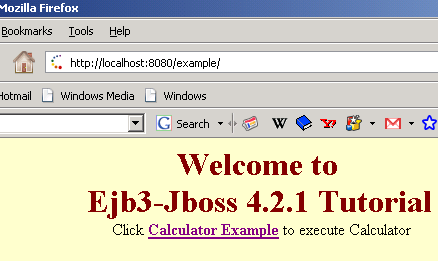
Click at the given link as Calculator Example: 1
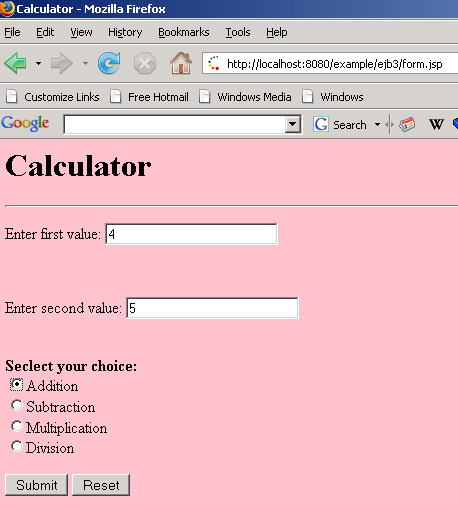
Give values to the textbox and choose the desire option button as Addition then clicks the Submit button to get the result.
 2
2
The result is: 9.0