How to set memory used by JVM in Ant


This example illustrates how to set memory size of JVM (java virtual
machine), when ANT (another neat tool) is used outside of java virtual machine.
In this example, <property name="sourcedir"> is used to specify
the location of source directory and <property
name="targetdir"> is used to specify the location of target
directory and <property name="librarydir"> is used to
define the location of library directory.
In this build.xml file, <path id="libraries"> is used to put any jar file in the lib directory. The target <target name="clean"> is used to delete the target directory and library directory from base directory. The target <target name="prepare"> is used to create the source directory, target directory and library directory and <target name="compile"> is used to compile the source code. The fork="true" is used if you don't run Java code in a separate JVM to the ant script, you can get some pretty strange errors that are difficult to diagnose. For NoClassDefFoundError, the problem was fixed by setting fork=true in the java target. The memoryMaximumSize="1024m" for the underlying VM, if using fork mode; ignored otherwise. Defaults to the standard VM memory setting. (Examples: 83886080, 81920k, or 80m) and memoryInitialSize="256m" is used for the underlying VM, if using fork mode; ignored otherwise. Defaults to the standard VM memory setting. (Examples: 83886080, 81920k, or 80m). The source code of build.xml file is as follows:
|
|
Hello.java
|
class Hello{ |
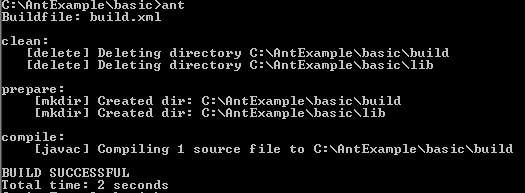
Create a class file in the 'src' folder and compile it on the console with
ant command. The following output will be displayed.