
Home Tutorials Ant Ant and JUnit


Ant and JUnit
Posted on: September 6, 2008 at 12:00 AM
This example illustrates how to implement junit test case with ant script. This is a basic tutorial to implement JUnit framework with ANT technology.

Ant and JUnit


This example illustrates how to implement junit test case with ant script. This is a basic tutorial to implement JUnit framework with ANT technology. Before creating any test case you will need Java compiler, Ant and JUnit. You will also need junit.jar in your Ant's library folder.

Junit is used to test the application in Java. It can test Java classes and even the complete project. Junit provides extensive functionality for testing the applications. It can unit test application and even configure the application to run the integration test in the application.

Ant is very effective tool for the compiling and building the Java based application. With the help of JUnit and other tools it can streamline the process of building, testing and deploying the application on the servers.

So, Ant and JUnit provides best solution to the developers for building the applications.

Download the junit.jar file from the given link http://junit.org/ and paste this jar file in ANT_HOME/lib folder. Then create a build.xml file as shown below.


  <property name="testdir" location="test" />
  <property name="srcdir" location="src" />
  <property name="full-compile" value="true" />

  <path id="classpath.base"/>
  
  <path id="classpath.test">
  <pathelement location="/apache-ant-1.7.1/lib/junit-3.8.1.jar" />
  <pathelement location="/apache-ant-1.7.1/lib/junit-3.8.jar" />
  <pathelement location="${testdir}" />
  <pathelement location="${srcdir}" />
  <path refid="classpath.base" />
  </path>

  <target name="clean" >
  <delete verbose="${full-compile}">
  <fileset dir="${testdir}" includes="**/*.class" />
  </delete>
  </target>

  <target name="compile" depends="clean">
  <javac srcdir="${srcdir}" destdir="${testdir}" verbose="${full-compile}" >
  <classpath refid="classpath.test"/>
  </javac>
  </target>

  <target name="test" depends="compile">
  <junit>
  <classpath refid="classpath.test" />
  <formatter type="brief" usefile="false" />
  <test name="JUnitTestExample" />
  </junit>
  </target>

</project>


Create a JUnitTestExample.java file in the src directory as given below.

import junit.framework.*;

public class JUnitTestExample extends TestCase{
  public void testCase1(){
  assertTrue( "TestExample"true );
  }
}


If you run the source code with ant command, then the following output will be displayed.


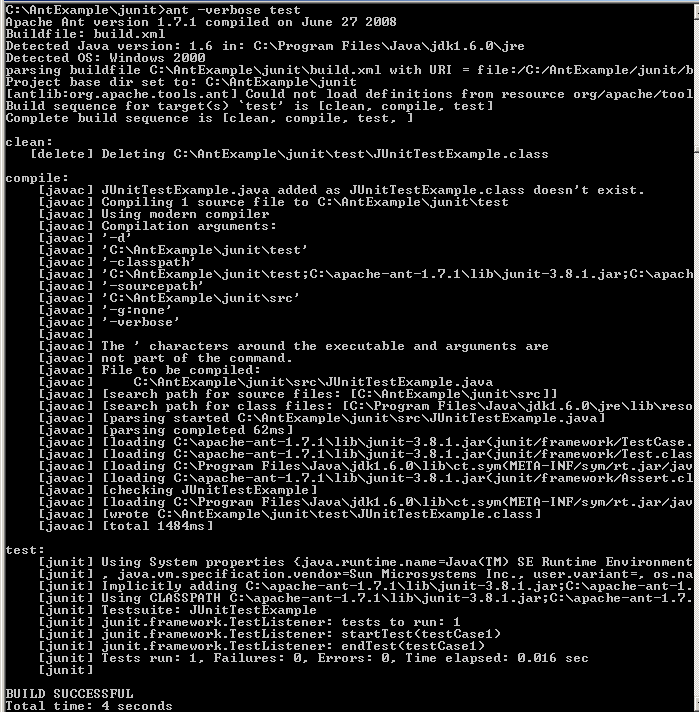
If you compile with ant -verbose test command, then the following output will be displayed.

Download Source Code


Related Tags for Ant and JUnit:
javaclibrarycomcompilerantframeworkscriptjunitjartestcompileiptutorialpilfolderriathislogcasebasiccasframefortechnologyexamplewithworkmpitoramunitexamldeilitliblsliiminnorarasmnttrcajestechemasepimehowraterates.jarcreatingtorxaxampssoeefoldbeforeatanyoldkisllmpleaandarstrvatutorscrssriripthavstatieworkframlsopleplndomolo


More Tutorials from this section

Ask Questions?    Discuss: Ant and JUnit  

Post your Comment


Your Name (*) :
Your Email :
Subject (*):
Your Comment (*):
  Reload Image


Ask Questions?

If you are facing any programming issue, such as compilation errors or not able to find the code you are looking for.

Ask your questions, our development team will try to give answers to your questions.