Value in the properties file overwrite the value in the build.xml


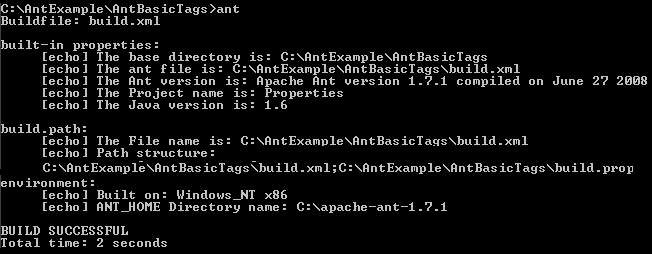
This example illustrates how to create a build.properties file in the C:\apache-tomcat-6.0.16\webapp\antBuild\build.properties and overwrite it's properties in the build.xml file. In this example, <property name="build.path"> is used to map the path of build.xml and build.properties file, <property url="http://localhost:8080/antBuild/build.properties"> is used to root url of properties file, <property file="build.properties" prefix="imported"> is used to define the property of the build.properties file and <property environment="env"> is used to create an environment variable that is 'env'. Now the target <target name="built-in-properties"> is used to find base directory name, ant file name, version of ant, project name and version of java. The target <target name="build.path"> is used to print the file name and path of file and finally <target name="environment"> is used to print the processor architecture name and operating system name and print the ant home directory name.
Source code of build.xml:
|
<project name="Properties" basedir="." default="environment"> |
source code of
build.properties:
|
property.example=Local File |
Run this program on command prompt - the following output will be displayed.