
Rewrite Tag<html:rewrite>:


html:rewrite Tag - This tag renders a request URI based on exactly the same rules as the link tag does, but without creating the
hyperlink.
Note :
- This request URI value is useful when required to generate a string constant for use by a JavaScript procedure.
- This tag will automatically apply URL rewriting, to maintain session state in the absence of cookies.
- The content displayed for the hyperlink will be taken from the body of the
tag. The base URL for the hyperlink
is calculated based on properties given with the tag.
| Name | Description |
| action |
This attribute specifies the logical name of a |
| anchor |
Optional anchor tag ("#xxx") to be added to the generated hyperlink. Specify this value without any "#" character. |
| forward |
Logical name of a global |
| href |
The "href" attribute specifies URL to which this hyperlink will transfer control if activated.
This hyperlink may be dynamically modified by the inclusion of query
parameters, as described in the tag description. You must
specify exactly one of the |
| name |
The name of a JSP bean that contains a |
| page |
The module-relative path (beginning with a "/" character) to
which this hyperlink will transfer control if activated. This hyperlink
may be dynamically modified by the inclusion of query parameters, as
described in the tag description. You must specify
exactly one of the |
| property |
The name of a property of the bean specified by the |
| scope |
The scope within which to search for the bean specified by the |
Example Illustrating the use of the Rewrite<html:rewrite>
tag.
Here you will learn to use the Struts Html<html:rewrite> tag.
We will cover an example that will show a working of<html:rewrite>tag.
Example code :
Creating an Action Class : Not Required here.
Creating Form Bean : Not Required here.
Defining the global-forwards :
Add the following entry in the struts-config.xml file for global-forward.
<global-forwards>
|
Developing the Action Mapping in the struts-config.xml :
Here, Action mapping helps to select the Form Bean, the Action class etc,
for specific requests.
<action path="/Welcome" forward="/welcomeStruts.jsp"/>
|
Developing the HtmlRewriteTag.jsp page :
<%@page contentType="text/html"%>

<%@page pageEncoding="UTF-8"%>

<%@ taglib uri="http://jakarta.apache.org/struts/tags-bean" prefix="bean" %>

<%@ taglib uri="http://jakarta.apache.org/struts/tags-html" prefix="html" %>

<%@ taglib uri="http://jakarta.apache.org/struts/tags-logic" prefix="logic"%>


<!DOCTYPE HTML PUBLIC "-//W3C//DTD HTML 4.01 Transitional//EN"

"http://www.w3.org/TR/html4/loose.dtd">

<html>

  <head>


  <meta http-equiv="Content-Type" content="text/html; charset=UTF-8">

  <title>JSP Page</title>

  </head>

  <body bgcolor="#999933">

  <h3><font color="#FFFF33">html:rewrite Tag Demo</font></h3>

  <A HREF="<html:rewrite action="Welcome.do" />" >

       Click for URL <html:rewrite action="Welcome.do" />

       </A>

  </body>

</html>
Developing the welcomeStruts.jsp page :
<%@ taglib uri="http://jakarta.apache.org/struts/tags-bean" prefix="bean" %>

<%@ taglib uri="http://jakarta.apache.org/struts/tags-html" prefix="html" %>

<%@ taglib uri="http://jakarta.apache.org/struts/tags-logic" prefix="logic"%>


<html:html locale="true">

<head>

<title><bean:message key="welcome.title"/></title>

<html:base/>

</head>

<a href="HtmlRewriteTag.jsp">Go Back........</a><br/>

<body bgcolor="#999933">


<logic:notPresent name="org.apache.struts.action.MESSAGE"


     scope="application">

  <font color="red">

  ERROR:  Application resources not loaded -- check servlet container

  logs for error messages.

  </font>

</logic:notPresent>


<h3><bean:message key="welcome.heading"/></h3>

<p><bean:message key="welcome.message"/></p>

</body>

</html:html>
Add the following line in the index.jsp to call the form :
<a href="HtmlRewriteTag.jsp">HtmlRewriteTagDemo</a><br/>
|
Building and Testing the Example :
Build , deploy and Test the application .
Open the browser and navigate to the HtmlRewriteTag.jsp page.
Your browser displays the following page.
 |
Click the hyperlink to analyze the generated URL, welcomeStruts.jsp
page, and see the output .
Output after clicked..........
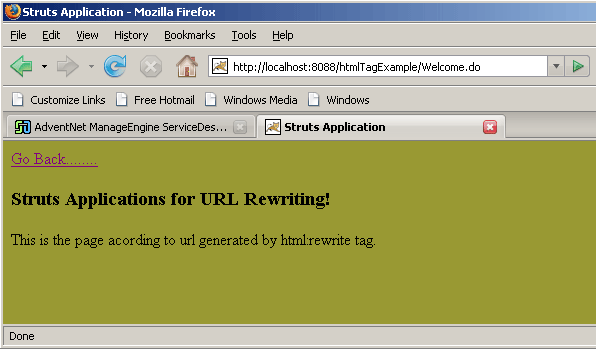 |
Above actions displays the working of <html:rewrite>tag.