
Services | Updates | Contact
Home | Ajax | BioInformatics | Dojo | EAI | EJB | Hibernate | J2ME | Java | Java Glossary | Java Servlets | JavaScript | Jboss | JDBC | JDO | Jmeter | JSF | JSP | JUnit | Maven | MySQL | Spring Framework | SQL | Struts | Technology | WAP | Web Services | XML
Search All Tutorials
Top Search: Loan Struts Open Source
JSP Interview Questions
Question: What do you understand by JSP Actions? Answer: JSP actions are XML tags that direct the server to use existin
 
Photran, an eclipse plugin for Fortran developement
Photran is an IDE for Fortran 77, 90, and 95 based on Eclipse and the CDT. It includes: * Syntax-highlighting ed
 
More Tutorials...

Programming Tutorials: Ajax | Articles | JSP | Bioinformatics | Database | Free Books | Hibernate | J2EE | J2ME | Java | JavaScript | JDBC | JMS | Linux | MS Technology | PHP | RMI | Web-Services | Servlets | Struts | UML


Struts
Comments


Cookie Tag:


bean:cookie Tag - is used to define scripting variable based on the value(s) of the specified request cookie.

This tag retrieve the value of the specified request cookie (as a single value or multiple values, which  depends 
on the multiple attribute), and define  attribute of type Cookie or Cookie[] (depends on the multiple attribute 
specification) in the page scope. If no cookie with the specified name can be located, and no default value is 
specified then a request time exception will be thrown.


Name Description
id

This attribute specifies the name of the scripting variable (and associated page scope attribute) that will be made available with the value of the specified request cookie.

multiple

This attribute specifies that If any arbitrary value for this attribute is specified, causes all matching cookies to be accumulated and stored into a bean of type Cookie[]. If not specified, the first value for the specified cookie will be retrieved as a value of type Cookie.

name

This attribute specifies  the name of the request cookie whose value, or values, is to be retrieved.

value

The default cookie value to return if no cookie with the specified name was included in this request.

Example Illustrating the use of the Cookie<html:cookie> tag.
Here you will learn to use the Struts Html  <html:cookie> tags. 
We will cover an example that will show a working of<html:cookie> tags

Example code :
Creating an Action Class                                               : Not Required here.
Creating Form Bean                                                      : Not Required here.
Defining the global-forwards                                        : Not Required here.
Developing the Action Mapping in the struts-config.xml  : Not Required here.

Developing the beanCookieTag.jsp page
:

<%@page contentType="text/html"%>
<%@page pageEncoding="UTF-8"%>
<%taglib uri="http://jakarta.apache.org/struts/tags-bean" prefix="bean" %>
<%taglib uri="http://jakarta.apache.org/struts/tags-html" prefix="html" %>
<%taglib uri="http://jakarta.apache.org/struts/tags-logic" prefix="logic"%>

<!DOCTYPE HTML PUBLIC "-//W3C//DTD HTML 4.01 Transitional//EN"
"http://www.w3.org/TR/html4/loose.dtd">

<html>
    <head>
        <meta http-equiv="Content-Type" content="text/html; charset=UTF-8">
    </head>
    <h3><font color="#33FF33">Bean Cookie Tag Demo</font></h3>
  <body bgcolor="#999933">
        <bean:cookie id="sess" name="JSESSIONID"/>
        <table border="2">
            <tr>
                <th><font color="#33FF33">Property Name</font></th>
                <th>
                    <font color="#33FF33">Values</font>
                </th>
            </tr>
            
            <tr>
                <td>comment</td>
                <td>
                    <bean:write name="sess" property="comment" />
                </td>
            </tr>
            
            <tr>
                <td>comment</td>
                <td>
                    <bean:write name="sess" property="comment" />
                </td>
            </tr>
            
            <tr>
                <td>comment</td>
                <td>
                    <bean:write name="sess" property="comment" />
                </td>
            </tr>
            <tr>
                <td>domain</td>
                <td>
                    <bean:write name="sess" property="domain" />
                </td>
            </tr>
            <tr>
                <td>maxAge</td>
                <td>
                    <bean:write name="sess" property="maxAge" />
                </td>
            </tr>
            <tr>
                <td>path</td>
                <td>
                    <bean:write name="sess" property="path" />
                </td>
            </tr>
            <tr>
                <td>name</td>
                <td>
                    <bean:write name="sess" property="name" />
                </td>
            </tr>   
            <tr>
                <td>value</td>
                <td>
                    <bean:write name="sess" property="value" />
                </td>
            </tr>
            <tr>
                <td>secure</td>
                <td>
                    <bean:write name="sess" property="secure" />
                </td>
            </tr>
            
        </table>    
    </body>
</html>

Add the following line in the index.jsp to call the form.
<a href="beanCookieTag.jsp">beanCookieTagDemo</a><br/> 

Building and Testing the Example  :
Build , deploy and Test  the application . 
Open the browser and navigate to the beanCookieTag.jsp page
Your browser displays the following page beanCookieTag.jsp and see the output.

Output:
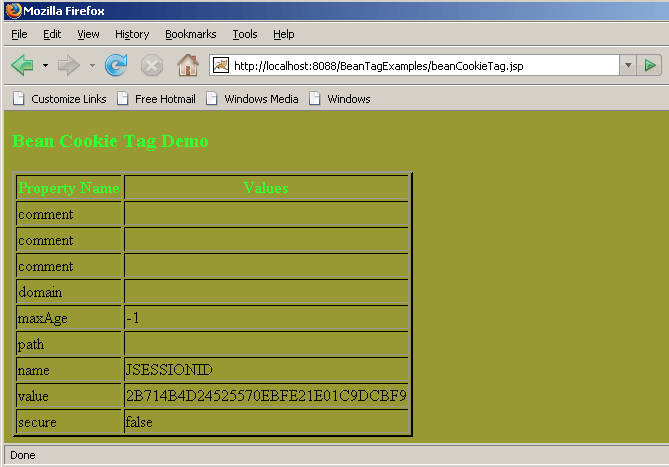

Above actions   displays the working of beanCookieTag..


Facing Programming Problem?
Add This Tutorial To:
  Del.icio.us   Digg   Google   Spurl   Blink   Furl   Simpy   Y! MyWeb 

Current Comments

0 comments so far (post your own) View All Comments Latest 10 Comments:

Leave your comment:

Name:

Email:

URL:

Title:

Comments:


Enter Code:


Note: Emails will not be visible or used in any way, and are not required. Please keep comments relevant. Any content deemed inappropriate or offensive may be edited and/or deleted.

No HTML code is allowed. Line breaks will be converted automatically. URLs will be auto-linked. Please use BBCode to format your text.

  EAI Articles
  Java Certification
Tell A Friend
Your Friend Name
Search Tutorials


Browse all Java Tutorials
Java JSP Struts Servlets Hibernate XML
Ajax JDBC EJB MySQL JavaScript JSF
Maven2 Tutorial JEE5 Tutorial Java Threading Tutorial Photoshop Tutorials Linux Technology
Technology Revolutions Eclipse Spring Tutorial Bioinformatics Tutorials Tools SQL
 

Home | JSP | EJB | JDBC | Java Servlets | WAP  | Free JSP Hosting  | Search Engine | News Archive | Jboss 3.0 tutorial | Free Linux CD's | Forum | Blogs

About Us | Advertising On RoseIndia.net  | Site Map

India News

Send your comments, Suggestions or Queries regarding this site at roseindia_net@yahoo.com.

Copyright © 2007. All rights reserved.