
Define Tag:


bean:define Tag - is used to define a scripting variable based on the value(s) of the specified bean property.
This tag create a new attribute in the scope as specified and a corresponding scripting variable, both are named by the value of the id
attribute.
The corresponding value to which this new attribute (and scripting variable) is set are specified via use of exactly one of the following approaches (trying to use more than one will result in a JspException being thrown).
- Specify a name attribute plus optional property and scope
attributes
The created attribute and scripting variable will be of the type of the retrieved JavaBean property, unless it is a Java primitive type. - Specify a value attribute
The created attribute and scripting variable will be of type java.lang.String, set to the value of this attribute. - Specify nested body content
The created attribute and scripting variable will be of type java.lang.String, set to the value of the nested body content.
Note:
- <bean:define> for the same bean name more than once in a single page can't be apply..
- The scripting variable cannot be defined as null.
- bean:define Tag can't be used to instantiate a DynaActionForm.
- If a problem occurs while retrieving the specified bean property, a
request time exception will be thrown.
| Name | Description |
| id |
This attribute specifies the name of the scripting variable (and associated page scope attribute) that will be made available with the value of the specified property. |
| name |
This attribute specifies the attribute name of the bean whose property is accessed to
define a new page scope attribute (if |
| property |
This attribute specifies the name of the property to be accessed on the bean specified
by |
| scope |
This attribute specifies the variable scope searched to retrieve the bean specified by
|
| toScope |
This attribute specifies the variable scope into which the newly defined bean will be
created. If not specified, the bean will be created in |
| value |
This attribute specifies the |
Example Illustrating the use of the Rewrite<html:define
> tag.
Here you will learn to use the Struts Html <html:define>
tags.
We will cover an example that will show a working of<html:define>
tags
Example code :
Creating an Action Class : Not Required here.
Creating Form Bean
: Not Required here.
Defining the global-forwards
: Not Required here.
Developing the Action Mapping in the struts-config.xml
:Not Required here.
Developing the beanDefineTag.jsp page
|
<%@page contentType="text/html"%> <%@page pageEncoding="UTF-8"%> <%@ taglib uri="http://jakarta.apache.org/struts/tags-bean" prefix="bean" %> <%@ taglib uri="http://jakarta.apache.org/struts/tags-html" prefix="html" %> <%@ taglib uri="http://jakarta.apache.org/struts/tags-logic" prefix="logic" %> <!DOCTYPE HTML PUBLIC "-//W3C//DTD HTML 4.01 Transitional//EN" "http://www.w3.org/TR/html4/loose.dtd"> <html> <head> <meta http-equiv="Content-Type" content="text/html; charset=UTF-8"> <title>JSP Page</title> </head> <body bgcolor="#999933"> <h3><font color="#33FF33">Bean Define Tag Demo.......</font></h3> <bean:define id="variable" property= "propertyName" value="THE PROPERTY VAL" toScope="seesion" type="String" /> <table border="2"> <tr> <th><font color="#33FF33">Property Name</font></th> <th><font color="#33FF33">Property Value</font></th> </tr> <tr> <td><font color="#33FF33">propertyName</font></td> <td> <bean:write name="variable" /></td> </tr> </table> </body> </html> |
Add the following line in the index.jsp to call the form.
| <a href="beanDefineTag.jsp">beanDefineTagDemo</a><br/> |
Building and Testing the Example
Build , deploy and Test the application .
Open the browser and navigate to the beanDefineTag.jsp
page
Your browser displays the following page beanDefineTag.jsp
and see the output.
Output:
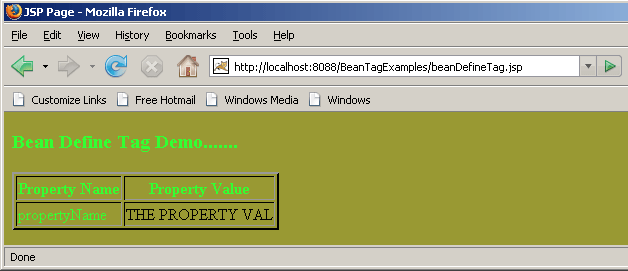 |
Above actions displays the working of beanDefineTag..