
Hidden Tag <html:hidden>:


This tag facilitate an HTML <input> element of type hidden, populated from the specified value or the specified property of the bean associated with our current form. This tag is only valid when nested inside a form tag body.
| Name | Description |
| disabled | This attribute set to true if this input field should be disabled. |
| name | The attribute name of the bean whose properties are consulted when rendering the current value of this input field. If not specified, the bean associated with the form tag we are nested within is utilized. |
| property | Name of this input field, and the name of the corresponding bean property if value is not specified. The corresponding bean property (if any) must be of type String. |
| value | Value to which this field should be initialized. |
Example Illustrating the use of the Hidden<html:hidden>
tag.
Here you will learn to use the Struts Html <html:hidden> tag.
We will cover an example that will show a working of<html:hidden>tag.
Example code :
Creating Form Bean :
Develop a simple Form Bean class HtmlHiddenActionForm.java.
package ActionForm;
|
Creating an Action Class :
Develop a simple action class HtmlHiddenTagAction.java.
|
package action; import javax.servlet.http.HttpServletRequest; import javax.servlet.http.HttpServletResponse; import org.apache.struts.action.Action; import org.apache.struts.action.ActionForm; import org.apache.struts.action.ActionMapping; import org.apache.struts.action.ActionForward; public class HtmlHiddenTagAction extends Action { private final static String SUCCESS = "success"; public ActionForward execute(ActionMapping mapping, ActionForm form, HttpServletRequest request, HttpServletResponse response) throws Exception { return mapping.findForward(SUCCESS); } } |
Defining form Bean in struts-config.xml file :
Add the following entry in the struts-config.xml file for defining the form bean :
<form-bean name="HtmlHiddenActionForm"
|
Developing the Action Mapping in the struts-config.xml :
Here, Action mapping helps to select Action class, Formbean and configuration information for specific
requests.
|
<action input="/" name="HtmlHiddenActionForm" path="/HtmlHiddenTagAction" scope="session" type="action.HtmlHiddenTagAction" validate="false"> <forward name="success" path="/htmlHiddenTagOutPut.jsp"/> </action> |
Developing the strutsHiddenTag.jsp page :
<%@page contentType="text/html"%>

<%@page pageEncoding="UTF-8"%>

<%@ taglib uri="http://jakarta.apache.org/struts/tags-bean" prefix="bean" %>

<%@ taglib uri="http://jakarta.apache.org/struts/tags-html" prefix="html" %>

<%@ taglib uri="http://jakarta.apache.org/struts/tags-logic" prefix="logic"%>

    <!DOCTYPE HTML PUBLIC "-//W3C//DTD HTML 4.01 Transitional//EN"

"http://www.w3.org/TR/html4/loose.dtd">


<html>

  <head>

  <meta http-equiv="Content-Type" content="text/html; charset=UTF-8">

  </head>

  <body bgcolor="#999933">


  <h3><font color="#FFFF33">Main Page</font></h3>

  <html:form action="HtmlHiddenTagAction" method="GET">

  <html:hidden property="username" value="USERNAME"/>

  <html:hidden property="password" value="PASSWORD"/>

  <TABLE BORDER="2">

  <TR>

 <TD><font color="#FFFF33">


     User Name=USERNAME(Hidden Value)


     </font>


    </TD>

  </TR>

  <TR>

  <TD><font color="#FFFF33">


     Password =PASSWORD(Hidden Value)


    </font>


    </TD>

  </TR>

  <TR>

  <TD><font color="#FFFF33">


     <html:submit value="submit Hideen fields"/>


    </font>


    </TD>

  </TR>

  </TABLE>

  </html:form>

  </body>

</html>
Developing the htmlHiddenTagOutPut.jsp page :
| <%@page contentType="text/html"%> <%@page pageEncoding="UTF-8"%> <%@ taglib uri="http://jakarta.apache.org/struts/tags-bean" prefix="bean" %> <%@ taglib uri="http://jakarta.apache.org/struts/tags-html" prefix="html" %> <%@ taglib uri="http://jakarta.apache.org/struts/tags-logic" prefix="logic"%> <!DOCTYPE HTML PUBLIC "-//W3C//DTD HTML 4.01 Transitional//EN" "http://www.w3.org/TR/html4/loose.dtd"> <html> <head> <a href="strutsHiddenTag.jsp">Go Back........</a><br/> <meta http-equiv="Content-Type" content="text/html; charset=UTF-8"> <title>JSP Page</title> </head> <body bgcolor="#999933"> <h3>OUT PUT</h3> <TABLE BORDER="2"> <TR> <Th><font color="#FFFF33"> PROPERTY NAME</font></Th> <Th><font color="#FFFF33"> PROPERTY HIDDEN VALUE</font></Th> </TR> <TR> <TD><font color="#FFFF33"> username</font></TD> <TD><font color="#FFFF33"> <bean:write name="HtmlHiddenActionForm" property="username"/> </font> </TD> </TR> <TR> <TD><font color="#FFFF33"> password</font></TD> <TD><font color="#FFFF33"> <bean:write name="HtmlHiddenActionForm" property="password"/> </font></TD> </TR> </TABLE> </body> </html> |
Add the following line in the index.jsp to call the
form :
Building and Testing the Example :
<a href="strutsHiddenTag.jsp">StrutsHiddenTagDemo</a><br/>
Build and deploy and Test the application
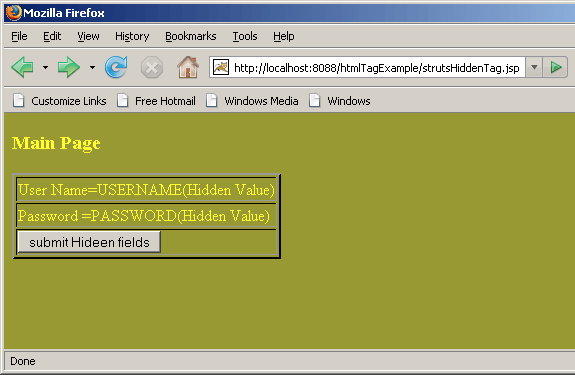
Open the browser and navigate to the strutsHiddenTag.jsp page.
Your browser displays the following page.
See and Analyze the strutsHiddenTag.jsp page and press
submit button and see the output. Output displays the hidden fields values.
 |
Output:
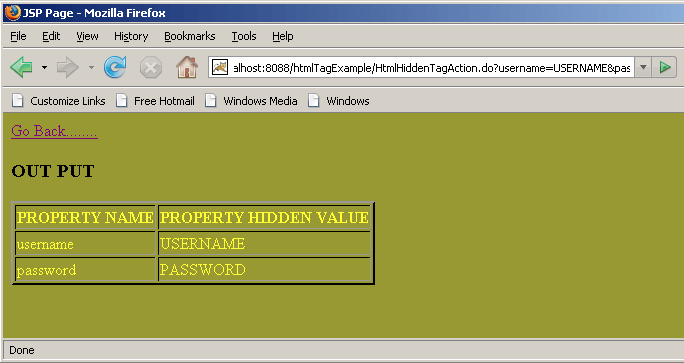 |
Above example shows the Demo of <html:hidden> Tag .