--Ads--
Spring Hello World Application


Hello World Example using Spring, The tutorial given below describes you the way to make a spring web
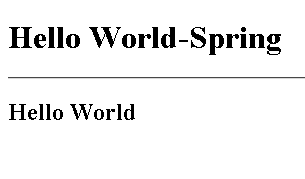
application that displays Hello World message on the Browser.
For that we have created a file called "applicationContext.xml",
which defines the bean name, their properties as well as their values.
Required fields:-
1)class name: A class name is the implementation of the bean class that
is described in the bean definition.
2)bean behavioral configuration elements: Here we define the bean behavior
that is bean initialization, dependency checking mode, destruction
methods etc.
3)constructor arguments and property values :-Defines the no of arguments
and the property values that are to be set in the newly created bean.
Note:- We have not defined any of these behavior
in our context file since we haven't created any of the bean to be used.
<?xml version="1.0" encoding="UTF-8"?>

<beans xmlns="http://www.springframework.org/schema/beans"

 xmlns:xsi="http://www.w3.org/2001/XMLSchema-instance"

 xmlns:p="http://www.springframework.org/schema/p"

 xmlns:aop="http://www.springframework.org/schema/aop"

 xmlns:tx="http://www.springframework.org/schema/tx"

 xsi:schemaLocation="http://www.springframework.org/schema/beans

   http://www.springframework.org/schema/beans/spring-beans-2.5.xsd

 http://www.springframework.org/schema/aop

   http://www.springframework.org/schema/aop/spring-aop-2.5.xsd

 http://www.springframework.org/schema/tx

   http://www.springframework.org/schema/tx/spring-tx-2.5.xsd">

</beans>
|
dispatcher-servlet. xml:-This is the file from
which the mapping from actions to controllers is done .We have used
ControllerClassNameHandlerMapping and
SimpleUrlHandlerMapping classes to do such mapping.
ControllerClassNameHandlerMapping
class generate URL path mappings from the class names of the Controller.SimpleUrlHandlerMapping
maps URLs to the request handler beans.
p:viewName="index"Â />:This is the ParameterizableViewController. With
the use of this controller we can view the index.
p:suffix=".jsp"Â />:-This is InternalResourceViewResolver.
With
the use of this we can map this name to an actual jsp page.
<?xml version="1.0" encoding="UTF-8"?>

<beans xmlns="http://www.springframework.org/schema/beans"

 xmlns:xsi="http://www.w3.org/2001/XMLSchema-instance"

 xmlns:p="http://www.springframework.org/schema/p"

 xmlns:aop="http://www.springframework.org/schema/aop"

 xmlns:tx="http://www.springframework.org/schema/tx"

 xsi:schemaLocation="http://www.springframework.org/schema/beans


http://www.springframework.org/schema/beans/spring-beans-2.5.xsd


 http://www.springframework.org/schema/aop


http://www.springframework.org/schema/aop/spring-aop-2.5.xsd


http://www.springframework.org/schema/tx


http://www.springframework.org/schema/tx/spring-tx-2.5.xsd">

  <bean class="org.springframework.web.servlet.mvc.support.ControllerClassNameHandlerMapping"/>

  <bean id="urlMapping" class="org.springframework.web.servlet.handler.SimpleUrlHandlerMapping">

  <property name="mappings">

  <props>

  <prop key="/index.htm">indexController

  </prop>

  </props>

  </property>

  </bean>

  <bean id="viewResolver"

  class="org.springframework.web.servlet.view.InternalResourceViewResolver"

  p:prefix="/WEB-INF/jsp/"

  p:suffix=".jsp" />

  <bean name="indexController"

  class="org.springframework.web.servlet.mvc.ParameterizableViewController"

  p:viewName="index" />

</beans>
redirect.jsp:-
<%Â response.sendRedirect("index.htm");Â %>:-This is a
method of Interface HttpServletResponse that is used to sends a temporary redirect response to the client using the specified redirect location.
<%@page contentType="text/html" pageEncoding="UTF-8"%>

<% response.sendRedirect("index.htm"); %>
|
index.jsp:-This is the page in which the message
is to be displayed.
<%@page contentType="text/html" pageEncoding="UTF-8"%>

<!DOCTYPE HTML PUBLIC "-//W3C//DTD HTML 4.01 Transitional//EN"

 "http://www.w3.org/TR/html4/loose.dtd">

<html>

  <head>

  <meta http-equiv="Content-Type" content="text/html; charset=UTF-8">

  <title>Hello World-Spring</title>

  <h1>Hello World-Spring</h1>

  <hr></hr>

  </head>


  <body>

  <h2>Hello World</h2>

  </body>

</html>
Output of the program
Download Source code