Spring 2.5 MVC File Upload
This tutorial explains how to upload file in Spring 2.5 MVC Framework.
Spring MVC module of Spring framework allows the developers to create
web based application very easily. You can easily create file upload and
form based application in Spring MVC. In this tutorial we are going to
create an application which allows the user to upload a file on server.
Spring MVC framework built in feature to process the file upload.
This application is developed using Eclipse IDE and runs on Tomcat
server. You can download the Spring MVC file upload example code at the
end of this page.
This
tutorial create in Eclipse IDE and tomcat to run application. In this tutorial
use following jar :
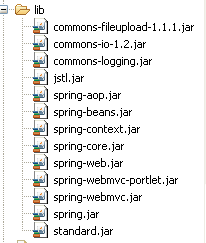
This tutorial applied following steps :
Step 1 :
First we create Dynamic web project "spring_fileupload".
Now we create index.jsp file under WebContent folder. The code of index.jsp
are given as:
|
<%@ page
contentType="text/html"
pageEncoding="UTF-8"%>
< html>
< head>
< title>File
Upload</title>
</ head>
< body>
< center><a
href="fileuploadform.html">File
Upload Example</a></center>
</ body>
</ html>
|
Step 2 :
Now create "FileUpload.java" class under src
folder. The code of "FileUpload.java" given below :
package net.roseindia.model;

import org.springframework.web.multipart.MultipartFile;
public class FileUpload {
 MultipartFile file;
 public void setFile(MultipartFile file){
  this.file=file;
  }
 public MultipartFile getFile(){
  return file;
  }
 }
Step 3 :
Now create controller class "FileUploadController.java" in src folder .
The code of "FileUploadController.java" given below :
package net.roseindia.controller;

import javax.servlet.http.HttpServletRequest;
import javax.servlet.http.HttpServletResponse;
import org.springframework.validation.BindException;
import org.springframework.web.multipart.MultipartFile;
import org.springframework.web.servlet.ModelAndView;
import org.springframework.web.servlet.mvc.SimpleFormController;
import java.io.InputStream;
import java.io.OutputStream;
import java.io.FileOutputStream;
import java.util.*;

import net.roseindia.model.FileUpload;;

public class FileUploadController extends SimpleFormController{

  @Override
  protected ModelAndView onSubmit(HttpServletRequest request,
		   HttpServletResponse response, Object command, BindException errors)
           throws Exception {
	 FileUpload fileUpload = (FileUpload)command;
	 MultipartFile multipartFile = fileUpload.getFile();
	 String fileName="";

	 // image type of file processing...
	 System.err.println("-------------------------------------------");
	 try {
	   InputStream inputStream = null;
	   OutputStream outputStream = null;
	   if (multipartFile.getSize() > 0) {
		  inputStream = multipartFile.getInputStream();
		  fileName = request.getRealPath("") +
		   "/images/"+ multipartFile.getOriginalFilename();
		  outputStream = new FileOutputStream(fileName);
		  int readBytes = 0;
		  byte[] buffer = new byte[10000];
		  while ((readBytes = inputStream.read(buffer, 0, 10000)) != -1) {
			 outputStream.write(buffer, 0, readBytes);
		   }
		  outputStream.close();
		  inputStream.close();
		}
	  } catch (Exception e) {
		 e.printStackTrace();
	  }
	 // ..........................................
	 Map model = new HashMap();
	 model.put("fileName", multipartFile.getOriginalFilename());
	 model.put("filepath", "images/"+multipartFile.getOriginalFilename());

	 return new ModelAndView(getSuccessView(), model);
   }
 }
Step 4 :
Now create validators class "FileUploadValidator.java"
in src folder that use for validation file upload .The code of
"FileUploadValidator.java" given below :
package net.roseindia.validators;

import org.springframework.validation.Errors;
import org.springframework.validation.Validator;
import net.roseindia.model.FileUpload;

public class FileUploadValidator implements Validator{
	@Override
	public boolean supports(Class clazz){
		return FileUpload.class.isAssignableFrom(clazz);
	 }
	@Override
	public void validate(Object target, Errors errors){
	  FileUpload fileUpload = (FileUpload)target;
	  if(fileUpload.getFile().getSize()==0){
		   errors.rejectValue("file", "error.empty.file",
		    "Please Select File.");
		}
	  if(fileUpload.getFile().getSize() > 10000){
		   errors.rejectValue("file", "error.empty.file",
		    "File size more than 10000 bytes ");
		}
	}
}
Step 5 :
Now Create "jsp" folder under "WebContent/WEB-INF" .Again create
one jsp file "fileuploadform.jsp" in "jsp" folder . The code of
"fileuploadform.jsp" given below :
|
<%@
taglib
prefix="form"
uri="http://www.springframework.org/tags/form"%>
< html>
< head>
< script
language="JavaScript">
function Validate(){
var
image =document.getElementById("file").value;
if(image!=''){
var
checkimg = image.toLowerCase();
if
(!checkimg.match(/(\.jpg|\.png|\.JPG|\.PNG|\.gif|\.GIF|\.jpeg|\.JPEG)$/)){
alert( "Please
enter Image File Extensions .jpg,.png,.jpeg,.gif");
document.getElementById( "file").focus();
return
false;
}
}
return
true;
}
</ script>
</ head>
< body>
<h2
align="center">Spring
2.5
MVC File Upload Example</h2>
<hr
width=600
>
<form:form
method="POST"
commandName="fileUpload"
enctype=
"multipart/form-data"
onsubmit="return
Validate();">
<table
align="center"
>
<tr>
<td><form:label
path="file">Please
Select File:</form:label></td>
<td><input
type="file"
name="file"
id="file"
/></td>
</tr>
<tr>
<td></td>
<td><font
color="red"><form:errors
path="file"
/></font></td>
</tr>
<tr>
<td></td>
<td><input
type="submit"
value="File
Upload"
/></td>
</tr>
</table>
</form:form>
</ body>
</ html>
|
Step 5 :
Now create jsp file "fileuploadsuccess.jsp" under "WebContent/WEB-INF/jsp"
. The code of "fileuploadsuccess.jsp" given below :
|
<%@
taglib
prefix="form"
uri="http://www.springframework.org/tags/form"%>
<%@
taglib
uri="http://java.sun.com/jsp/jstl/core"
prefix="core"%>
< html>
<body>
<h2
align="center">Spring
2.5 MVC File Upload Example</h2>
<hr
width=600
>
<p
align="center">
<img
src="${filepath}"
alt="Upload
Image"
/>
<br>
<core:out
value="FileName
:: "></core:out>
<core:out
value="${fileName}"></core:out>
<core:out
value="-Uploaded
Successfully."></core:out>
</p>
</body>
</ html>
|
Step 6:
The open file "web.xml" and modify as :
|
<? xml
version="1.0"
encoding="UTF-8"?>
< web-app
xmlns:xsi="http://www.w3.org/2001/XMLSchema-instance"
xmlns="http://java.sun.com/xml/ns/j2ee"
xmlns:web="http://java.sun.com/xml/ns/javaee/web-app_2_5.xsd"
xsi:schemaLocation="http://java.sun.com/xml/ns/j2ee
http:
//java.sun.com/xml/ns/j2ee/web-app_2_5.xsd"
version="2.5">
<servlet>
<servlet-name>dispatcher</servlet-name>
<servlet-class>org.springframework.web.servlet.DispatcherServlet</servlet-class>
<load-on-startup>1</load-on-startup>
</servlet>
<servlet-mapping>
<servlet-name>dispatcher</servlet-name>
<url-pattern>*.html</url-pattern>
</servlet-mapping>
<welcome-file-list>
<welcome-file>index.jsp</welcome-file>
</welcome-file-list>
</ web-app>
|
Step 7:
Now create "dispatcher-servlet.xml" file under "WebContent/WEB-INF/jsp"
directory. The code of "dispatcher-servlet.xml" file given below :
|
<? xml
version="1.0"
encoding="UTF-8"?>
< beans
xmlns="http://www.springframework.org/schema/beans"
xmlns:xsi="http://www.w3.org/2001/XMLSchema-instance"
xsi:schemaLocation="http://www.springframework.org/schema/beans
http:
//www.springframework.org/schema/beans/spring-beans-2.5.xsd"
xmlns:p="http://www.springframework.org/schema/p">
<bean
id="multipartResolver"
class="org.springframework.web.multipart.commons.CommonsMultipartResolver"/>
<bean
id="viewResolver"
class="org.springframework.web.servlet.view.InternalResourceViewResolver">
<property
name="prefix">
<value>/WEB-INF/jsp/</value>
</property>
<property
name="suffix">
<value>.jsp</value>
</property>
</bean>
<bean
id="urlMapping"
class="org.springframework.web.servlet.handler.SimpleUrlHandlerMapping">
<property
name="interceptors">
<list>
<ref
local="localeChangeInterceptor"/>
</list>
</property>
<property
name="urlMap">
<map>
<entry
key="/fileuploadform.html">
<ref
bean="fileUploadFormController"/>
</entry>
</map>
</property>
</bean>
<bean
id="fileUploadValidator"
class="net.roseindia.validators.FileUploadValidator"/>
<bean
id="fileUploadFormController"
class="net.roseindia.controller.FileUploadController">
<property
name="sessionForm"><value>false</value></property>
<property
name="commandName"><value>fileUpload</value></property>
<property
name="commandClass"><value>net.roseindia.model.FileUpload</value></property>
<property
name="validator"><ref
bean="fileUploadValidator"/></property>
<property
name="formView"><value>fileuploadform</value></property>
<property
name="successView"><value>fileuploadsuccess</value></property>
</bean>
<bean
id="localeChangeInterceptor"
class=
"org.springframework.web.servlet.i18n.LocaleChangeInterceptor">
<property
name="paramName"
value="hl"/>
</bean>
<bean
id="localeResolver"
class=
"org.springframework.web.servlet.i18n.SessionLocaleResolver"/>
</beans>
|
Step 8 :
When run application "spring_fileupload" display output as :
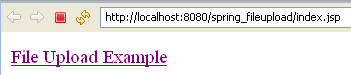
When click hyperlink "File Upload Example" display output as :
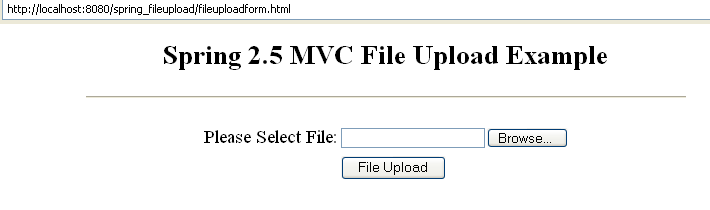
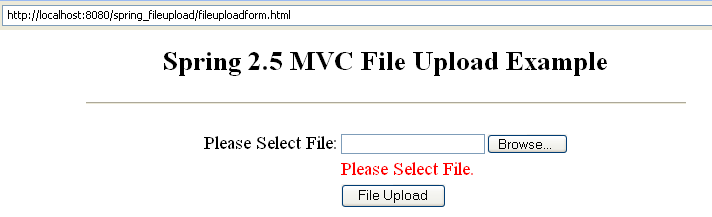
When click button "File Upload" without select any file display
error message as
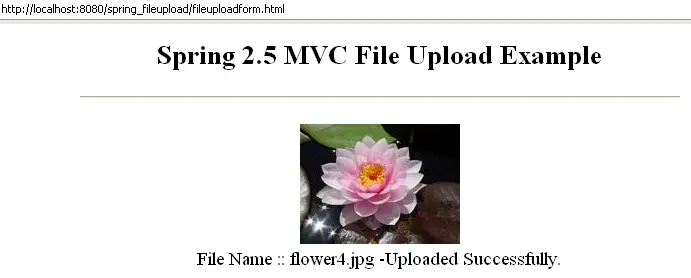
If select any image file as *.png or *.
jpg or *.jpeg or *.gif and click button "File Upload" , then
display uploaded file as :
Download Code
Download example code