Insert data in database by using sql tag of JSTL SQL library


Here in this section we are going to create application that update database by inserting data given by user. To update database first create a data source and then execute insert sql query for that data source.
| <sql:setDataSource> : This tag is used to create data source for specified driver, user name and password of database, url etc. | ||||||||||||||
Attributes of
the tag <sql:setDataSource>
|
After creating connection to database, now we are explaining how to execute insert sql query. To update database we have used a sql tag <sql:update>, it executes update sql queries.
| <sql:update> : This tag is used to create data source for specified driver, user name and password of database, url etc. | ||||||||
Attributes of
the tag <sql:update>
|
Before run this code first create a database named 'mahendra'
and table named 'employee_master' in same database by the sql query given below:
Query to create table:
CREATE TABLE `employee_master` (
         `emp_id` int(10) NOT NULL auto_increment,
         `firstName` varchar(20) default NULL,
         `lastname` varchar(20) default NULL,
         `salary` double default NULL,
         `tonus` double default NULL,
          PRIMARY KEY  (`emp_id`)
        )
|
Structure of the table: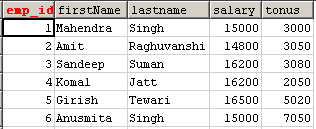 |
insert_data_SqlJstlTag.jsp
<%@ taglib uri="http://java.sun.com/jstl/core" prefix="c"%>
<%@ taglib uri="http://java.sun.com/jstl/sql" prefix="sql"%>
<html>
<head>
<title>Updating a database using the sql:update tag</title>
<sql:setDataSource var="dataSource" driver="com.mysql.jdbc.Driver"
url="jdbc:mysql://localhost:3306/mahendra" user="root" password="root"
scope="session" />
</head>
<body>
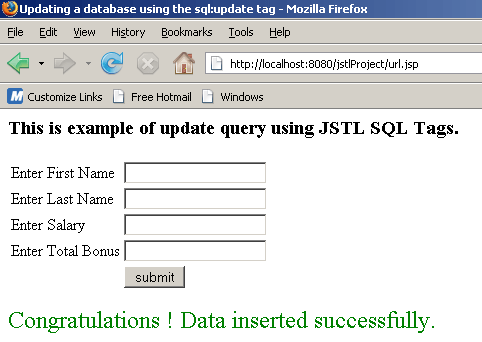
<h3>This is example of update query using JSTL SQL Tags.</h3>
<form method="post">
<table>
<tr>
<td>Enter First Name</td>
<td><input type="text" name="fname"></td>
</tr>
<tr>
<td>Enter Last Name</td>
<td><input type="text" name="lname"></td>
</tr>
<tr>
<td>Enter Salary</td>
<td><input type="text" name="salary"></td>
</tr>
<tr>
<td>Enter Total Bonus</td>
<td><input type="text" name="bonus"></td>
</tr>
<tr>
<td></td>
<td><input type="submit" value="submit"></td>
</tr>
</table>
</form>
<c:if test="${pageContext.request.method=='POST'}">
<c:catch var="exception">
<sql:update dataSource="${dataSource}" var="updatedTable">
INSERT INTO employee_master (firstname,lastname,salary,tonus) VALUES (?, ?, ?, ?)
<sql:param value="${param.fname}" />
<sql:param value="${param.lname}" />
<sql:param value="${param.salary}" />
<sql:param value="${param.bonus}" />
</sql:update>
<c:if test="${updatedTable>=1}">
<font size="5" color='green'> Congratulations ! Data inserted
successfully.</font>
</c:if>
</c:catch>
<c:if test="${exception!=null}">
<c:out value="Unable to insert data in database." />
</c:if>
</c:if>
</body>
</html>
Steps to run this example :
1: Download the zip file of code and unzip this
file, you will get a folder named 'insert_data_SqlJstlTag'.
2: Paste this folder in 'Apache Tomcat 6.0.16-->webapps' or generally
in directory 'C:\apache-tomcat-6.0.16\webapps'.
3: Start tomcat server by click on startup.bat file in
'C:\apache-tomcat-6.0.16\bin'.
4: Open browser and type url 'http://localhost:8080/insert_data_SqlJstlTag/insert_data_SqlJstlTag.jsp'
or click on this link.
Output of the program
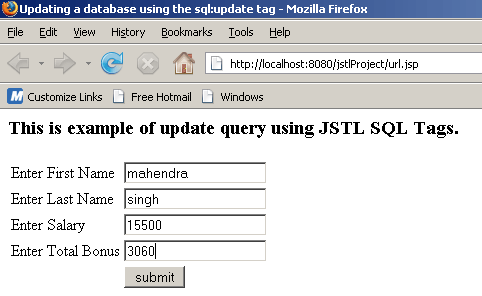
When user enter all information in the text boxes and click on submit button, response will be.....