Use of <x:forEach> tag of JSTL


Standard Syntax : <%@ taglib prefix="x" uri="http://java.sun.com/jsp/jstl/xml" %>
| Attributes: | |
| var | Defines variable for the current item. |
| select | Defines xPath expression. |
| begin | Iteration begins at the item located at the specified index. |
| end | Iteration ends at the item located at the specified index. |
| step | Iteration will process after defined value in step attribute. |
| varStatus | Name of the variable used for the status of the iteration. |
forEach_xmlJstlTag.jsp
<%@ taglib prefix="c" uri="http://java.sun.com/jsp/jstl/core" %>
<%@ taglib prefix="x" uri="http://java.sun.com/jsp/jstl/xml" %>
<html>
<head>
<title>Example of x:forEach JSTL Tag</title>
</head>
<body>
<c:import var="docString" url="employee.xml"/>
<x:parse var="doc" doc="${docString}"/>
<table border=1 width="50%">
<tr>
<td valign="top"><pre><c:out value="${docString}"/></pre></td>
<td>
<table border=1>
<tr>
<th>Result of forEach var="item" select="$doc//emp"
begin="0" end="3" step="1" varStatus="status></th>
</tr>
<x:forEach var="item" select="$doc//emp"
begin="0" end="3" step="1" varStatus="status">
<tr>
<td>
<x:out select="$item/name" /><br>
<x:out select="$item/age" /><br>
<x:out select="$item/designation" /><br>

</td>
</tr>
</x:forEach>
</table>
</td>
</tr>
</table>
</body>
</html>
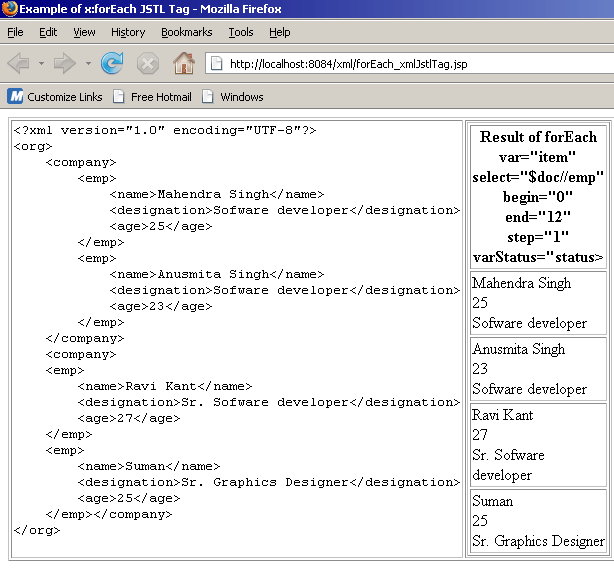
Output :
Download Source Code