HTML tags in JSP


In jsp we have the facility provided to use the html tag inside the JSP code.
In this example we have used the html tag inside the println() method of the out implicit object which is used to write the content on the browser.
The code of the program is given below:
<html>
<head>
<title>Use of html tag in jsp code</title>
</head>
<body>
<center>
<FONT SIZE="5" COLOR="#660033">Use of html tag in jsp code</FONT>
<table bgcolor="#CFE7E7" border="1">
<tr><td>
<%@ page session="false" %>
<%
   out.println("<code>out</code> is an <b>");
   out.println(out.getClass().getName());
   out.println("</b> object.");
%>
</td></tr>
</table>
</center>
<body>
<html>
|
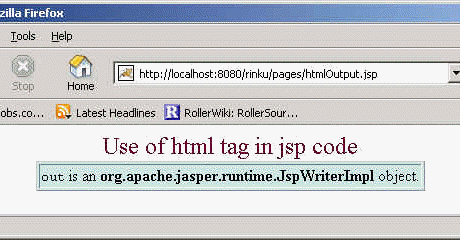
Output of the program: