Page directive attributes


A directive is a way to give special instructions to the container at page translation time. The directive comes in three forms:
The page directive is written on the top of the jsp page. Some of the attributes of the page directive are given below:
autoFlush : It empty the buffer.
buffer: It sets the buffer size. By default the buffer size is 8kb.
contentType : It tells which
errorPage: It tells which page will handle the exception if arises.
import: In this we tells the container which package of file needs to be
imported.
info: If we have to send some information with the jsp page.
language: By default it is java.
session: In this we tells the container if we want the session or not. By
default it is true.
The other directives are :The include directive and the taglib directive
The code of the program is given below:
<%@ page autoFlush="true"
         buffer="23kb"
         contentType="text/html"
         errorPage="errorPage.jsp"
         extends="org.apache.jasper.runtime.HttpJspBase"
         import="java.util.*"
         info="Jsp page directive attributes Example"
         language="java"
         pageEncoding="UTF-8"
         session="false"
%>
<HTML>
  <HEAD><TITLE>Page directive attributes Example</TITLE></HEAD>
    <BODY>
<center>
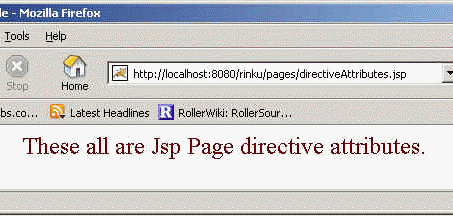
   <FONT SIZE="5" COLOR="#660000">These all are Jsp Page directive attributes.</FONT>
   </center>
  </BODY>
</HTML>
Output of the Program: