Comments in Jsp


In a jsp we should always try to use jsp- style comments unless you want the comments to appear in the HTML. Jsp comments are converted by the jsp engine into java comments in the source code of the servlet that implements the Jsp page. The jsp comment don't appear in the output produced by the jsp page when it runs. Jsp comments do not increase the size of the file, jsp page are useful to increase the readability of the jsp page.
In Jsp two types of comments are allowed in the Jsp page:
1) Hidden comment: This comment will not appear in the output.
<%-- Hidden comment --%>
2) Output comment: This type of comment will appear in the output.
<!-- Output comment>
If we have to pass the comment inside the directive then there we use a single line comment i.e. //
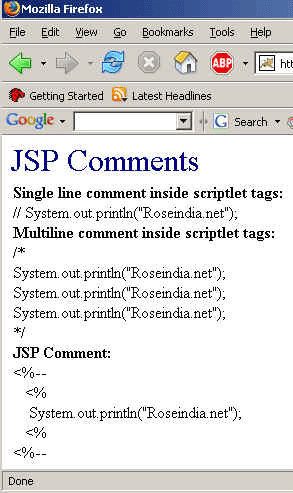
Code of the program is given below:
<HEAD>
    <TITLE> </TITLE>
  </HEAD>
  <BODY>
  <font  size="6" color ="#000080">JSP Comments</font><br>
	<%
 // System.out.println
      ("This is Single line comment inside scriptlet tags");
       /*
 System.out.println
      ("This is multiline comment inside scriptlet tags");
 System.out.println
      ("This is multiline comment inside scriptlet tags");
 System.out.println
      ("This is multiline comment inside scriptlet tags");
	   */
	%>
<%--
<%
if (Math.random() > .5) {
out.println("<b>You win!</b>");
} else {
out.println("Sorry, you lose. Try again.");
}
%>
<%=userName %> --%> <!--
this is HTML tag
-->
<table>
<tr>
<td>
<b>Single line comment inside scriptlet tags:</b> </br> // System.out.println("Roseindia.net");</br>
      <b> Multiline comment inside scriptlet tags:</b></br>
       /*</br>
		   System.out.println("Roseindia.net");</br>
		   System.out.println("Roseindia.net");</br>
		   System.out.println("Roseindia.net");</br>
*/</br> <b>JSP Comment:</b> </br> <%-- <br>
<%<br>
System.out.println
("Roseindia.net");<br>
<%<br>
<%-- </td> </tr> <tr> <td></td> </tr> </table> </BODY> </HTML> |