Core Java| JSP| Servlets| XML| EJB| JEE5| Web Services| J2ME| Glossary| Questions?


Search Tutorials:
 

Software Solutions and Services


  JDO Tutorials
  EAI Articles
  Struts Tutorials
  Java Tutorials
  Java Certification
  Java Applet
Questions
Comments
 
Task Scheduling in JAVA 
 

In some applications some task need to run periodically, for example a application of report generating checks for new database entry after one day and make reports according to the entries then save all entries in company's permanent record.
 

Task Scheduling in JAVA


In some applications some task need to run periodically, for example a application of report generating checks for new database entry after one day and make reports according to the entries then save all entries in company's permanent record.

Java provide facility to schedule tasks as per requirement. This is example given below to schedule a simple task to display a message after 3 seconds.

Methods and classes used in this example :

java.util.TimerTask class specifies a task that can be scheduled to run once or after scheduled time. We can define action to be performed by this timer task. by using run() method of java.util.TimeTask. This is protected method.

java.util.Timer class provides facility to schedule tasks for future execution in a background thread. In this example we have used schedule() method of this class that specifies task for execution after the specified delay. It takes time delay as a parameter in milliseconds.

Note : Use ctrl + C to exit from this program.

TaskScheduling.java

import java.util.*;
class Task extends TimerTask {
  
    int count = 1;
    // run is a abstract method that defines task performed at scheduled time.
    public void run() {
        System.out.println(count+" : Mahendra Singh");
	    count++;
    }
}
class TaskScheduling {
   public static void main(String[] args) {
       Timer timer = new Timer();
   
       // Schedule to run after every 3 second(3000 millisecond)
       timer.schedule( new Task(), 3000);	
   }
}

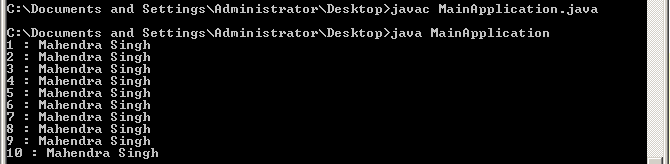
Output of the program :
Download Source Code


» View all related tutorials
Related Tags: java c case cas example to exam e uppercase pe as m ca j ase rc pp xa xamp s

Leave your comment:

Name:

Email:

URL:

Title:

Comments:


Enter Code:

Audio Version
Reload Image
 

Note: Emails will not be visible or used in any way, and are not required. Please keep comments relevant. Any content deemed inappropriate or offensive may be edited and/or deleted.

No HTML code is allowed. Line breaks will be converted automatically. URLs will be auto-linked. Please use BBCode to format your text.

Add This Tutorial To:
  Del.icio.us   Digg   Google   Spurl   Blink   Furl   Simpy   Y! MyWeb 

Current Comments

2 comments so far (
post your own) View All Comments Latest 10 Comments:

sample program given for Taskscheduling is not giving the expected output. It just prints only once instead of printing every 3 sec..TaskScheduling.java

Posted by senthilvel on Friday, 04.10.09 @ 11:01am | #86699

yeah it's good

i just wnt the code of Task Scheduling in java
whre I need to collect data from network and compute that date and generate the alerts based on that data
so wll u help on solving that task
i hope u may give positive output

Posted by krishna on Thursday, 08.7.08 @ 12:59pm | #71540

Training Courses
Tell A Friend
Your Friend Name
Website Designing Services
 
Web Designing Packages From $150!
 
Website Designing Company Web Hosting
 
Website Designing Quotation
 
Search Tutorials:


Home | JSP | EJB | JDBC | Java Servlets | WAP  | Free JSP Hosting  | Search Engine | News Archive | Jboss 3.0 tutorial | Free Linux CD's | Forum | Blogs

About Us | Advertising On RoseIndia.net  | Site Map

India News

Indian Software Development Company | iPhone Development Company in India | Flex Development Company in India | Java Training Delhi | Java Training at Noida |

Send your comments, Suggestions or Queries regarding this site at roseindia_net@yahoo.com.

Copyright © 2008. All rights reserved.