
What is PATH and CLASSPATH variables?

Java ClassPath


Question: What is the meaning of PATH and CLASSPATH ? How it is set in environment variable?.
ANS:- Significance of searching class path
Java is an OOP language. In java programming language for compiling the program we use the compiler that converts the source code into the byte code after that, that byte code is interpreted by JVM that converts the bytecode into the machine independent code. In java how the Java compiler and the JVM use the class search path to locate classes when they are referenced by other Java code. Searching class path is important for all Java developers.Many development tools have their own ways of manipulating the class path, which vary from product to product.For doing this we will use only simple command-line tools to carry out the compile operations. No difference, between the way that the Java compiler searches for classes, and the way that the JVM does it at run time. The compiler has the ability to compile classes from source code, where the JVM does not. We will use the compiler, but similar issues apply at run time.
Searching of multiple class directories
- javac(compiler)search the files in only one directory at a time.
- But, class search path will contain numerous directories and JAR archives. The -classpath option to javac and java allows multiple entries to be specified, but the syntax is different for Unix and Windows systems.
For Unix like this
javac -classpath dir1:dir2:dir3 ...
For Windows like this
javac -classpath dir1;dir2;dir3 ...
( I ). For running a simple program we need to set the java path on command prompt(for temporary )& in Environment variable using PATH variable & CLASSPATH variable :
PATH variable
In JDK the PATH variable contains directories where binary files (e.g. EXE files in Windows) will be looked for.We set the PATH variables like this i.e path C:\Java\jdk1.6.0_03\bin
(i)on command prompt
C:\>set path=%path;C:\Java\jdk1.6.0_03\bin%
When you open a command prompt and type "javac", you're supposed to have the "bin" directory of your sdk into the PATH, otherwise you'll get an infamous "Command not found" error message.
CLASSPATH
In JDK the CLASSPATH contains directories (or JAR files), from where your java compiler/runtime will look for .class files (and some others).
For example, "java Hello.class" will not work unless you set the directory (or JAR file) Hello.class is in, into your
CLASSPATH.
i.e.classpath C:\Java\jdk1.6.0_03\lib
For setting CLASSPATH using command prompt
Java class path can be set using either the -classpath option when calling an SDK tool (the preferred method) or by setting the CLASSPATH environment variable. The -classpath option is preferred because you can set it individually for each application without affecting other applications and without other applications modifying its value.
(ii)on command prompt
C:\>set classpath=%classpath;C:\Java\jdk1.6.0_03\lib%
JARs on the classpath
Java compiler and run-time can search for classes not only in separate files, but also in `JAR' archives. A JAR file can maintain its own directory structure, and Java follows exactly the same rules as for searching in ordinary directories. Specifically, `directory name = package name'. Because a JAR is itself a directory, to include a JAR file in the class search path, the path must reference the JAR itself, not the directory that contains the JAR. This is a very common error. Suppose I have a JAR jarclasses.jar in directory /jarclasses. The Java compiler look for classes in this jar, we need to specify:javac -classpath /jarclasses/jarclasses.jar ...
and not merely the directory jarclasses.For the CLASSPATH use CLASSPATH Environment Variable
In java programming language we use the following packages such as java.io.*; java. util.*;These packages are just a set of classes, you will want to store them in one place, separate from the directory where you are developing your program. Sometimes these libraries have a set of files stored in a single jar file ( with a .jar extension). From where the Java compiler and run programs must be able to find any of these. This is done for command line use of Java and for some editors and IDEs by setting an environment variable called CLASSPATH. For Windows, the CLASSPATH environment variable should look like this :
c:\MyJavaLib;c:\MyJavaLib\myutils.jar;c:\MyJavaLib\blackboxclasses.jar;.
At the end " . " includes the current directory in the search for classes.
- Suppose we have a directory MyJavaLib on the C-drive that contains some utility classes or the directories that correspond to some packages.
This is the part before the first semi-colon.
- Second part indicates that we have some classes stored in a file myutils.jar
- Third part indicates that we have a jar file blackboxclasses.jar.
Finally, after the last semi-colon we have the period( . ), indicating that the current directory is on the CLASSPATH. If some things are stored in directories that are subdirectories, the complete path, starting with "c:\" should be in the CLASSPATH.
(2) For setting CLASSPATH & PATH variable in environment variable by using the following steps:
(i) right click on my computer icon on desktop
(ii) click on properties
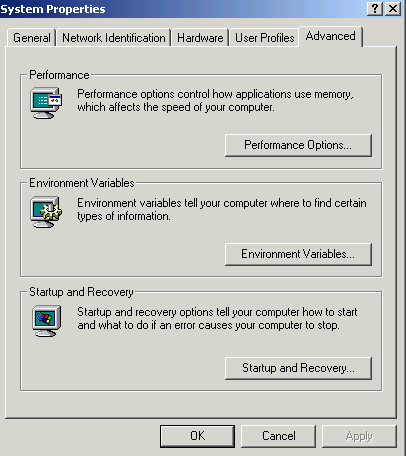
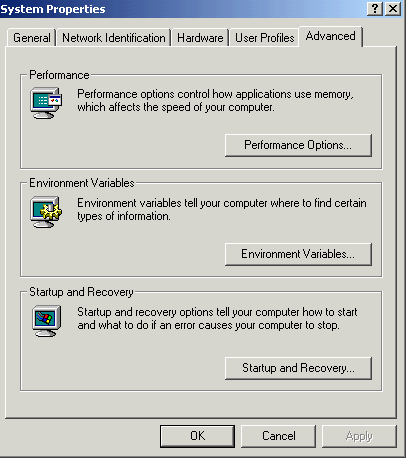
(iii) click on advanced
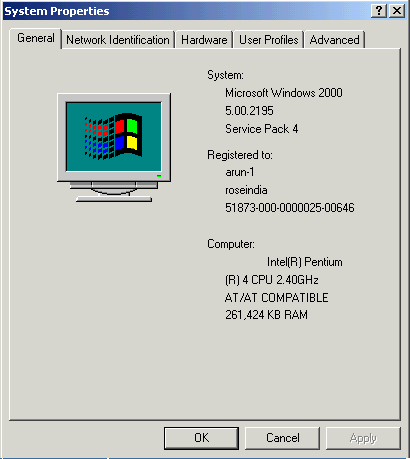 0
0
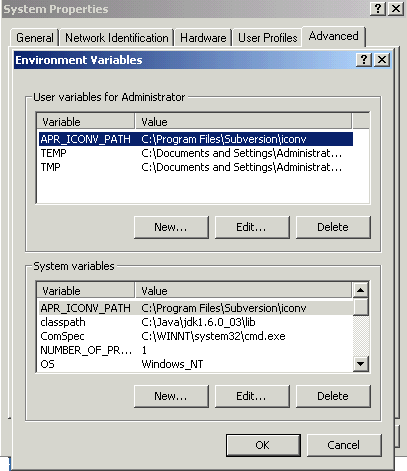
(iv) click on Environment variables
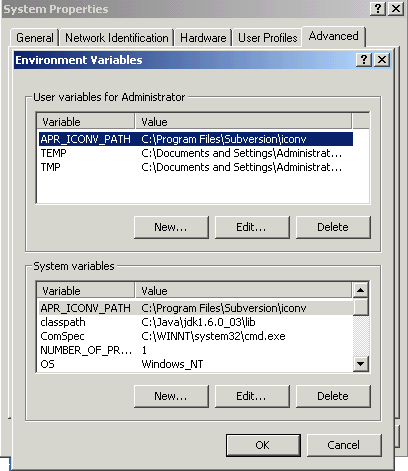
(v) system varables click on new 1
(vi) in ( variable name) write ----- path
in ( variable value) paste the path till bin directory i.e.------- c:\java\jdk1.6.0_03\bin click on ok 2
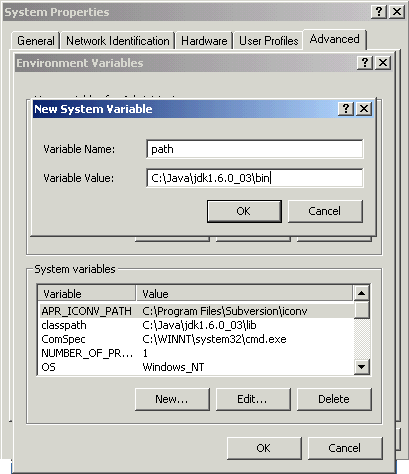
(vii) in system varables again click on new
 3
3
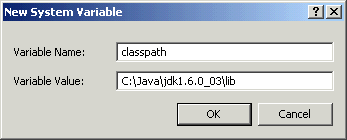
(viii) in ( variable name) write ----- classpath
in ( variable value) paste the path till lib directory i.e.------- c:\java\jdk1.6.0_03\lib click on ok
 4
4
(ix) after finished click on ok
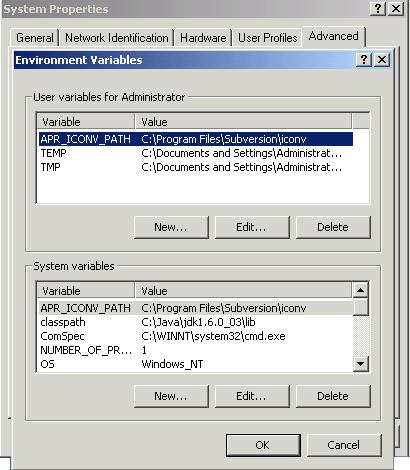
(x) finished click on ok 5
How to set System Classpath :
Java class path is set for including the various files during program
execution & compilation.After setting class search path on the javac command line, we
set `system' class path. This class path will be used by both the Java compiler and the JVM
. In both Unix and Windows systems, this is done by setting an environment variable. For example, in Linux with the bash shell:
CLASSPATH=/jarclasses/jarclasses.jar;export CLASSPATH
for Windows:
set CLASSPATH=c:\jarclasses\jarclasses.jar
6
We use this procedure for setting short-term changes to the system CLASSPATH, but if you want these changes to be persistent you will need to arrange this yourself.For different - 2 system this path is different . On a Linux system, we put the commands in the file .bashrc in my home directory. On Windows 2000/NT there is a `Control Panel' page for this.
Setting the system CLASSPATH is a useful procedure if you have JARs full of classes that you use all the time.