New to Java technology and you want to learn Java from scratch. Here is the updated guide for learning Java programming from scratch in 2026.
New to Java? Complete Beginner's Guide to Learning Java in 2026


If you are new to Java and decided to learn Java as your first or second programming language then this decision is the best decision for you. Java has been one of the most popular programming languages for decades and still remains as top programming languages. Java remains the powerhouse, which is powering enterprise backend systems, cloud applications, Android applications, high-frequency trading platforms and big data engines.
If you are new to the Java programming language and you want to learn Java and make a career in Java technology then this page is for you. Here we have explained how to learn Java and master the Java technologies. Java is a vast language and it requires a lot of effort to learn and master the necessary Java technology to start your real life projects.
Here at RoseIndia.Net, we have developed hundreds of tutorials, examples and articles to help you learn Java quickly and easily. We have created examples related to each Java technology that will help you master the concepts. These tutorials and examples are arranged in a sequence, so that you can learn Java step by step and master the Java and JEE technologies.
Basics of Java Technology
This section provides an overview of Java technology as programming language and a platform. Java technology is a simple, secure, robust, complete object oriented and platform independent high level programming language. It is also portable, high performance, multithreaded and networksavy that enable it in constructing software that can run along in small machines. The whole technology is based on the concept of Java Virtual Machine (JVM) that acts as a translators of byte code into machine language. In other words JVM converts the java byte codes into platform specific machine language.
Understanding the Java Technology
Java technology is high-level, object-oriented, very robust programming language. Java is platform independent programming language and you can run your compiled code on any operating system without recompiling your source code. Java technology is based on the concept of a single Java virtual machine (JVM) -- a translator between the language and the underlying software and hardware. All implementations of the programming language must emulate the JVM, enabling Java programs to run on any system that has a version of the JVM.
If you want to start java programming then you need to use a text editor to create and edit the source code. By using the Java complier, you can change the source code into byte code. The byte code can be run on any platform having Java interpreter that can convert the byte code into codes suitable for the operating system.
Why Java Technology is so important?
This high-level powerful programming language provides a powerful software platform as the JVM installed on different platform understand the same byte code. This is ideal for server side web programming and runs in a secured manner over internet. It enhance the computing power of the users by taking merely from desktop to the resource of the web. It contains JVM and Java Application Programming Interface (API) that are kinds of readymade software components, and for using any component, the need is just to import a related package in your program use the functionality. It offers development tools that can be used in compiling, running, debugging and documenting the application, making the Java programming fun and easy. The automatic garbage collection mechanism helps in avoiding memory leaks and its coding takes less development time than other programming languages like C++.
This roadmap helps you navigate your first step without getting overwhelmed.
- What Is Java?
- Why Learn Java in 2026?
- Java Editions (SE, EE, ME)
- Installing JDK 26
- Setting Up IntelliJ IDEA, Eclipse, and VS Code
- Understanding JDK, JRE, and JVM
- Writing Your First Java Program
- Java Syntax Basics
- Variables and Data Types
- Operators
- Control Statements
- Loops
- Methods
- Arrays
- Object-Oriented Programming
- Strings
- Exception Handling
- Collections Framework
- Lambda Expressions and Stream API
- Modern Java Features (Records, Sealed Classes, Virtual Threads, Pattern Matching)
- Maven and Gradle
- Java Project Structure
- Best Practices for Beginners
- Common Mistakes to Avoid
- Java Learning Roadmap
- Career Opportunities
- What to Learn Next
Let's understand what you should learn as a beginner in Java programming language. Since you are new to Java you should spend considerable amount of time in learning Java. Let's get started with the Java.
1. What Is Java?
Java is object-oriented, class-based, high level, general purpose programming language used for development of console based, server side, cloud native and enterprise applications. Java has been a popular choice for developing enterprise applications for over two decades and still continues to grow. Millions of applications run on the Java platform today. Java is a fast, secure and efficient programming language for coding everything from mobile applications to large scale enterprise applications and cloud native applications. Check out our tutorial: What Is Java? A Complete, Up-to-Date Guide for 2026.
2. Why Learn Java in 2026?
First of all you should understand why you want to learn Java in 2026 and beyond. Java has been in the market for more than 2 decades and remains one of the most used programming languages for enterprise application development.
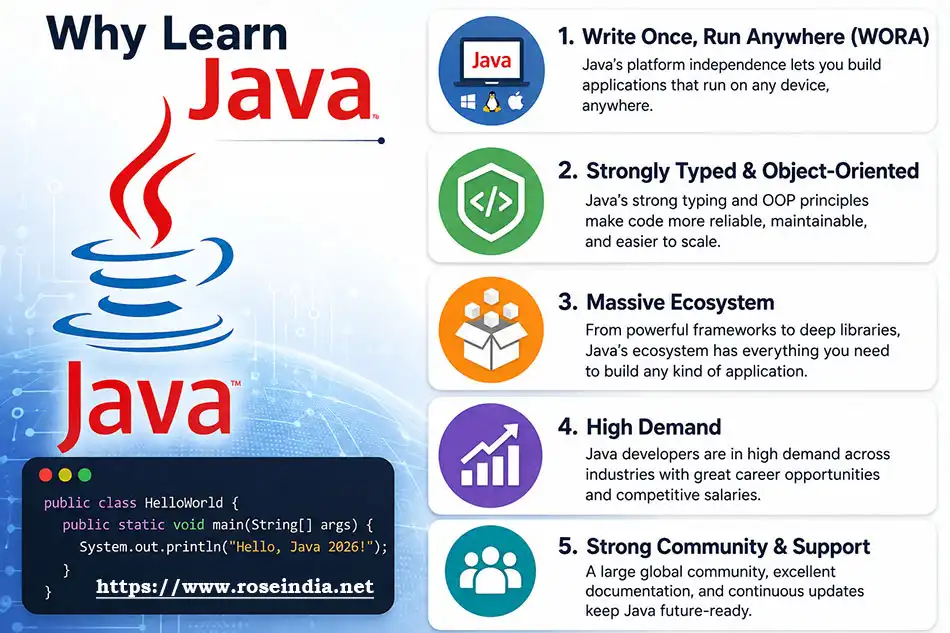
Before actually starting with the coding and application development you should understand why Java has maintained its spot at the top of the software industry for so long:
- Write Once, Run Anywhere (WORA): Java programs are compiled into bytecodes which can run on any platform without modification and this is possible due to Java Virtual Machine (JVM). This makes development, packaging and deployment of applications easier.
- Strongly Typed & Object-Oriented: Java is a strongly typed and object-oriented programming language which enforces structure. This makes it easier to catch errors early at compile time rather than during runtime.
- Massive Ecosystem: In Java millions of open-source libraries, frameworks (like Spring Boot) are available which makes programming much easier. There is large community support that helps programmers, most probably you will be able to find a solution for your problem/errors.
- High Demand: Java is in high demand as enterprises, financial institutions, and tech giants use Java for their application development. So, making career in Java is a wise choice for the developers.
Learn why you should learn Java at:
- Top 10 Reasons to Learn Java in 2026
- How to Master Java in 2026: A Complete Roadmap for beginners
- Java Certification Roadmap 2026: Which Oracle Certs Matter
3. Java Editions (SE, Jakarta EE)
Different Editions of Java Technology
a) Java SE - Java SE or Java Standard Edition provides tools and API's that you can use to create server applications, desktop applications, and console applications. These programs developed using Java SE can be run on almost every popular operating system, including Linux, Macintosh, and Windows.
b) Jakarta JEE - Based on the foundation framework of the standard edition, Java Enterprise Edition helps in web application service, component model and enterprise class service oriented architecture (SOA).
Components of each edition
JSE Components
JavaBeans - It is the component architecture for JSE platform and one can develop and assemble these software programs for better web application. It is a reusable software component that can be manipulated visually in a builder tool. This software assists visual builder tools in using reflection, introspection, and also analyze and customize JavaBeans.
JavaHelp - It is a platform independent and a feature oriented software system that offers developer an automated help component. JavaHelp API is useful while building online documentation and presenting online information to the application users.
Java Database Connectivity (JDBC) - JDBC API is a part of Java Standard Edition that helps in accessing data from a SQL based database. Besides, it also process the result and allows in using the programming language with "Write Once, Run Anywhere" feature. Some of its key features are like full access to metadata, no special installation and database identification.
Jakarta JEE - Components:
Enterprise JavaBeans (EJB) - This technology is a server side component of Java platform used for the construction of enterprise application. It is one of the Java APIs attached with the enterprise edition. By using Java technology, EJB helps in quick development of small, distributed, transactional and secure application.
JavaMail - This JavaMail API technology allows to build mails and messaging application in a platform independent and protocol independent framework. It is both a part of JSE and JEE platform. Thus, JavaMail uses an extensible platform for transferring all kinds of Multimedia Internet Mail Extension (MIME).
Java Message Service (JMS) - Developed under Java community process, JMS technology is used for sending messages between users. Basically, it is an enterprising messaging tool used for building enterprising application. The JMS API is a combination of Java technology and enterprising messaging that provides facilities for building small message based application. It functions under two models: Point-to-Point and Publishing & Subscribing model.
JavaServer Pages (JSP) - The JSP technology enables web developers in developing and maintaining web content pages in formats like HTML and XML. With the help of JSP, it becomes very easy to build server and platform independent web based application. This uses HTML and XML tags that offers logical solution for the content. This separately user interface and content development from each other, which allows the designer to change page layout without changing the content.
Java Servlets - This enables a developer in adding content to a web server by using Java platform. This provides the mechanism for enhancing the functionality of web server. In short, servlets provides platform independent and component based web based application without the performance limitation.
4. Installing JDK 26
To start writing Java, you only need two main tools:
0Step 1: Install the Java Development Kit (JDK)
The JDK includes the tools needed to compile and run Java programs. Check the tutorial Install JDK 26: A Complete Beginner's Guide (2026) for installing and using Java on your operating system.
Step 2: Choose an Integrated Development Environment (IDE)
It is possible to write Java in a basic text editor, while an IDE provides code completion, debugging, and syntax highlighting. So, learning IDE is very important for Java developers. You can use any of the following IDE for your application development:
- IntelliJ IDEA (Community Edition): The industry standard for Java development. Free and feature-packed.
- VS Code: Lightweight and versatile if you install the Java Extension Pack.
- Eclipse: A classic, open-source IDE still widely used in corporate environments. Eclipse is a very popular IDE among developers for developing, building and packing Java projects.
5. Setting Up IntelliJ IDEA, Eclipse, and VS Code
It is possible to work in a notebook and create Java programs and run it in command prompt. But this is not very effective. You have a big project and you are working on 100s of Java classes, in this case you should use an IDE for your application development. IDEs such as IntelliJ IDEA, Eclipse, and VS Code can be used for Java project development. It is advised for the developers to at least learn one IDE for application development. IDE?s comes as packaged distribution and you can easily download the installer. After downloading the installer you can install and configure it on your system.
16. Understanding JDK, JRE, and JVM
There are three components of the Java platform, These are JDK, JRE, and JVM; and are structured as concentric layers where the JDK contains the JRE, and the JRE contains the JVM.
To put it simply:
- JDK is for writing and compiling code.
- JRE is for running the code.
- JVM is the engine that actually executes the code line-by-line
7. Writing Your First Java Program
Your First Program: "Hello, World!"
2Create a file named Main.java and paste the following code:
public class Main {
   public static void main(String[] args) {
      System.out.println("Hello, World!");
   }
}
Here is the output of the above code:
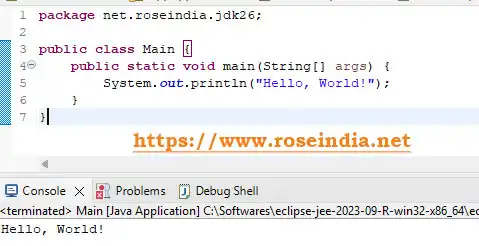
Breakdown of the Code:
- public class Main: Every line of code in Java must sit inside a class. The class name must match the filename (Main.java). This rule is very important and if you make any mistake then your program won’t compile.
- public static void main(String[] args): This is the entry point of any Java application. The JVM looks for this exact method to start execution. Without this method JVM won’t be able to run your program.
- System.out.println(...): Prints text to the console screen.
Core Concepts to Master First
3When learning Java, focus on these fundamental building blocks in order:
- Variables & Types: Understand primitive types (int, double, boolean, char) versus reference types (String, objects).
Check tutorials: Variables
and Data Types.
- Control Flow: Learn how to use conditionals (if-else, switch) and loops (for, while, for-each).
- OOP Principles: (Classes, Inheritance, Polymorphism) Master the four pillars of OOP:
- Encapsulation: Hiding internal details using access modifiers (private, public).
- Inheritance: Reusing code from parent classes (extends).
- Polymorphism: Allowing methods to behave differently based on the object calling them.
- Abstraction: Hiding complex implementation details using interface and abstract classes.
- Collections & Errors: (ArrayList, HashMap, Try-Catch). Move beyond basic arrays and learn how to use ArrayList, HashSet, and HashMap. Use try-catch blocks to handle errors gracefully without crashing your program.
8. Java Syntax Basics
It is necessary to understand the Java syntax before writing working code in the Java program. Java is a strictly typed, case-sensitive, and object-oriented programming language that follows the OOPs concepts. Java code must be in a class and all the methods and variables should be within the class.
The above HelloWorld programs show how to write Java program using the correct syntax in Java.
49. Variables and Data Types
Check these tutorials Variables in Java and Data Types.
10. Operators
Check this tutorial Operators in Java.
11. Control Statements
Control statements are very important in Java as it determines the execution flow of the program. Based on the business logic you can control the flow of your program using the control statements. The example of control statements are if, else, loops, decision making and branching. You can find more details at the Java Control Statement Tutorial section.
512. Loops
Loops in Java are control flow statements which are used to execute a blog of code repeatedly till the loop statement remains true. In Java there are four main types of loops:
- The for loop
- The for-each loop
- The while loop and
- The do-while loop
13. Methods
In the Java programming language learning method is very important as it allows you to organize a blog of code that performs a specific task. It is also called “functions” in other programming languages. The method is only executed when it is called from the object of the class. You can write a set of code that performs a specific task in a method and then call it any number of times to run that specific code. You can learn more at Fields and Methods in Java.
14. Arrays
Array is a data-structure in Java that works as a homogeneous container for objects of similar type. In an array you can store any number of objects of similar type and then manipulate these data using the Array API. Here you can use a single variable to store multiple objects of similar type which makes programming easy. Check the tutorial Introduction to Java arrays.
615. Object-Oriented Programming
The Object-Oriented Programming System or OOPs for short is a programming paradigm in Java programming language that is designed around classes and objects rather than functional programming. The objective of OOPs programming in Java is to bind the data and the functions that operate on the data into a single unit. Check more tutorials at OOPs and Its Concepts in Java.
16. Strings
In Java, String is very frequently used and it's a full non-primitive reference type defined in java.lang.String class. String represents a sequence of characters and is used to store a sequence of characters. Check the tutorial How To Read String From Command Line In Java?
17. Exception Handling
Check tutorial Exception handling in Java.
718. Collections Framework
Java Collections Framework (JCF) contains the ready-made data structures and various algorithms to store, manipulate, and manage groups of objects very efficiently. The collection framework is organized in the java.util package. Developers should learn Java Collection Framework in very detail. Check the tutorial Java Collection Framework.
19. Lambda Expressions and Stream API
Lambda Expressions and Stream API are very important for Java developers and its used in the modern Java application development. As a developer you should learn these.
20. Modern Java Features (Records, Sealed Classes, Virtual Threads, Pattern Matching)
Developer should learn these Modern Java Features (Records, Sealed Classes, Virtual Threads, Pattern Matching).
821. Maven and Gradle
Maven and Gradle are project management tools for the Java developer. You should learn it very well.
22. Java Project Structure
If you are using Maven for building the Java project then it follows the well defined structure. You should learn project development with maven.
23. Best Practices for Beginners
You should master the Java best practices early in your Java development path. These best practices help you in writing clean, readable, and highly maintainable code. You should also avoid the common mistakes made by beginners. Check tutorial How to Master Java in 2026: A Complete Roadmap for beginners?
924. Common Mistakes to Avoid
- Forgetting Java is Case-Sensitive: Main and main are completely different identifiers.
- Mismatching File and Class Names: If your public class is named App, your file must be App.java.
- Ignoring NullPointerExceptions: Always check if an object reference is null before calling methods on it.
- Tutorial Hell: Don't just watch videos—write code every single day. Build small tools like a calculator, a simple todo list, or a text-based game.
25. Java Learning Roadmap
You should complete these tutorials and example given at Beginners Java.
26. Career Opportunities
Java is a very popular programming language and it offers robust career opportunities as enterprise backend developer, cloud microservices and full-stack engineer. Salaries are running from ₹3 LPA for freshers to over ₹30–45 LPA for senior architects. Check Java Certification Roadmap 2026: Which Oracle Certs Matter.
27. What to Learn Next
What should be my learning path:
0- Learn Core Java
- The Core Java Technology is the foundation of Java Platform of JSE. It is
used in all classes of Java programming from desktop to Java Enterprise
Edition. This include Java APIs, Java Application, JVM, JavaBeans,
JavaScript, JSP etc.
- Learn JSP
- JSP technology assists developers in generating HTML, XML web pages. It
uses Java code and some predefined actions while creating web content. This
helps in the creation of JSP tag libraries that acts as extensions to HTML
and XML tags.
-
Learn Servlets
- In a Java Platform, Servlets assists developers in adding content to a web
server. Servlets with Java server pages acts as a competitor to various
dynamic web content technologies like CGI, ASP.NET, JavaScript
etc.
- Learn about Tomcat and other servers
- Developed by Apache Software Foundation Tomcat is a Java based web
application server used to run Servlet and JSP. It is not merely limited to
application server and provides an open platform to develop extensible web
and content management service.
- Learn Open Source technologies (Hibernate,
Spring) -
Basically in Java there are three open source technologies known as
frameworks; these are Spring, Hibernate and Struts. These open source
application frameworks solves many problems related to JSE and Jakarta EE, and
helps in effective development of web application.
- Learn about Database Management System - It is a software designed to manage and run a database. Generally, it is used in company back office work, accounting, customer support system and several other purposes.
Last Modified: 16-Aug-2026