Clip is an art which can be an image, graphics, picture, photograph, video or any illustration. We are providing you an example where we will show you the clippings.
Show Clippings


In this section, you will study how to show the clip.
Clip is an art which can be an image, graphics, picture, photograph, video or
any illustration.
We are providing you an example where we will show you the clippings.
In the example, we have defined buttons to call the action. The FontRenderContext
class is used to measure the text. The Font class represents fonts, which
are used to render text. We have defined a font 'Monotype
Corsiva' for a clip. The class GeneralPath is defined to show the clip in
the specified shape. To give the styled character data for the graphics
representation, we have used the class TextLayout. The AffineTransform class
allows translations, scales,
flips, rotations, and shears.
The method getTranslateInstance(0,90) returns a transform representing a
translation transformation. The method getOutline() returns the shape.
Following code draw the 90 lines:
final int LINES = 90;
Point2D point1 = new Point2D.Double(2, 2);
for (int k = 0; k < LINES; k++) {
double x = (2 * getWidth() * k) / LINES;
double y = (2 * getHeight() * (LINES - 1 - k)) / LINES;
Point2D point2 = new Point2D.Double(x, y);
g2.draw(new Line2D.Double(point1, point2)); |
Here is the code of ClipExample.java
import java.awt.*;

import javax.swing.*;

import java.awt.geom.*;

import java.awt.event.*;

import java.awt.font.TextLayout;

import java.awt.font.FontRenderContext;


public class ClipExample {

  public static void main(String[] args) {

  JFrame f = new Clipping();

  f.show();

  }

}

class Clipping extends JFrame implements ActionListener {

  public Clipping() {

  setTitle("Show clippings");

  setSize(350, 300);

  addWindowListener(new WindowAdapter() {

  public void windowClosing(WindowEvent event) {

  System.exit(0);

  }

  });

  Container contentPane = getContentPane();

  panel = new ClipPanel();

  contentPane.add(panel, "Center");

  JPanel buttonPanel = new JPanel();

  ButtonGroup group = new ButtonGroup();

  button1 = new JButton("No Clip");

  buttonPanel.add(button1);

  group.add(button1);

  button1.addActionListener(this);

  button2 = new JButton("Show Clip");

  buttonPanel.add(button2);

  group.add(button2);

  button2.addActionListener(this);

  contentPane.add(buttonPanel, "North");

  }

 public void actionPerformed(ActionEvent e) {

  Object object = e.getSource();

  if (object == button2)

  panel.setClip(true);

  else if (object == button1)

  panel.setClip(false);

  }

  private JButton button1;

  private JButton button2;

  private ClipPanel panel;

}

class ClipPanel extends JPanel {

  public void paint(Graphics graphics) {

  super.paint(graphics);

  Graphics2D g2 = (Graphics2D) graphics;

  if (clip) {

  FontRenderContext fontRendContext = g2.getFontRenderContext();

  Font font = new Font("Monotype Corsiva", Font.BOLD, 100);

  GeneralPath path = new GeneralPath();


  TextLayout layout = new TextLayout("Welcome", font,

         fontRendContext);


      AffineTransform affineTransform = AffineTransform.

        getTranslateInstance(0,90);

  Shape outline = layout.getOutline(affineTransform);

  path.append(outline, false);

  g2.draw(path);

  g2.clip(path);

  }

  final int LINES = 90;

  Point2D point1 = new Point2D.Double(2, 2);

  for (int k = 0; k < LINES; k++) {

  double x = (2 * getWidth() * k) / LINES;

  double y = (2 * getHeight() * (LINES - 1 - k)) / LINES;

  Point2D point2 = new Point2D.Double(x, y);

  g2.draw(new Line2D.Double(point1, point2));

  }

  }

 public void setClip(boolean c1) {

  clip = c1;

  repaint();

  }

  private boolean clip;

}
|
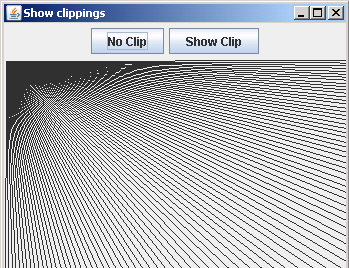
Output will be displayed as:
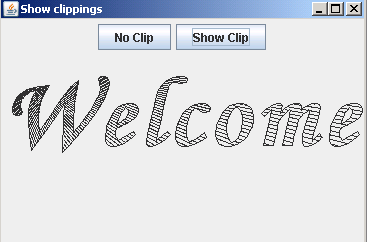
After clicking the button show clip, the clip will be shown as:
Download Source Code