In this section, you will studied the composition of color.
Color Composite Example


In this section, you will studied the composition of color.
Composition is the process of combining two images. We are providing you an
example. The Ellipse2D.Float class provides an ellipse defining
values of float type.
Following code shows the slider:
| slider = new JSlider(JSlider.HORIZONTAL, 0, 100,
65) |
A ChangeEvent class changed the state in the event source.
Following code
shows the value for the slider.
| value = (float) (tempSlider.getValue()/ 100.0) |
The method Float.toString(value) converts the float value into
String. The AlphaComposite provides the blending and
transparency effects with graphics and images implementing the basic alpha compositing
rules to combine source and destination. The image exists called destination and the image on being rendered on it is
the source. Alpha Composite class adds another element to the composting rules i.e. the alpha value for the source and destination. The SRC_OVER
is one of the rule, which is used when the destination image is opaque, the alpha applies a source image. An alpha value of 0.0f
makes the source disappear and 1.0f make it completely opaque. The setStroke()
method sets the stroke settings. We have defined four oval shapes oval1,
oval2,oval3,oval4. The GradientPaint class fill a shape with a linear
color gradient pattern.
Here is the code of ColorCompositeExample.java
import java.awt.*;

import java.awt.event.*;

import java.awt.geom.Ellipse2D;

import java.awt.image.BufferedImage;

import javax.swing.*;

import javax.swing.event.*;


public class ColorCompositeExample extends JFrame {

  Canvas1 canvas;

  JTextField textField;

  JPanel panel;

  JSlider slider;

  JLabel label;

  float value = 0.65f;


  public ColorCompositeExample() {

  super("Color-composite Example");

  Container container = getContentPane();

  canvas = new Canvas1();

  container.add(canvas);

 panel = new JPanel();

 label = new JLabel("Color-Composite Slider: ");

 slider = new JSlider(JSlider.HORIZONTAL, 0, 100, 65);

 slider.addChangeListener(new ChangeListener() {

 public void stateChanged(ChangeEvent e) {

  JSlider tempSlider = (JSlider) e.getSource();

  value = (float) (tempSlider.getValue() / 100.0);

  textField.setText(Float.toString(value));

  canvas.repaint();

  }

  });

  textField = new JTextField("0.70", 4);

  panel.add(label);

  panel.add(slider);

  panel.add(textField);

  container.add(BorderLayout.NORTH, panel);

  addWindowListener(new WindowAdapter() {

  public void windowClosing(WindowEvent e) {

  System.exit(0);

  }

  });

  setSize(450,400);

  setVisible(true);

  }

 public static void main(String arg[]) {

  new ColorCompositeExample();

  }

 class Canvas1 extends JLabel {

 Ellipse2D.Float oval1, oval2, oval3, oval4;


  Canvas1() {

  oval1 = new Ellipse2D.Float(155, 60, 120, 150);

  oval2 = new Ellipse2D.Float(75, 125, 120, 50);

  oval3 = new Ellipse2D.Float(225, 125, 125, 75);

  oval4 = new Ellipse2D.Float(120, 35, 120, 80);

 setBackground(Color.white);

 setSize(350, 300);

  }

 public void paint(Graphics g) {

  Graphics2D g2D = (Graphics2D) g;

  AlphaComposite alphaComp = AlphaComposite.getInstance(

  AlphaComposite.SRC_OVER, value);

  g2D.setComposite(alphaComp);

  g2D.setStroke(new BasicStroke(6.0f));

 GradientPaint gp = new GradientPaint(120f, 20f, Color.yellow, 220f,

  120f, Color.blue);

  g2D.setPaint(gp);

  g2D.fill(oval1);


  BufferedImage image=  new BufferedImage(5, 5,

  BufferedImage.TYPE_INT_RGB);

  Graphics2D g2 = image.createGraphics();

  g2.fillOval(0, 0, 5, 5);

  g2D.setColor(Color.yellow);

  g2D.fill(oval2);

  g2D.setColor(Color.green);

  g2D.fill(oval3);

  g2D.setColor(Color.red);

  g2D.fill(oval4);

  }

  }

}
|
If the alpha value is 0.3f, output will be:
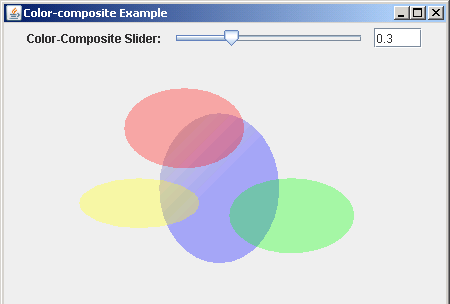
If the alpha value is 0.88,output will be:

Download Source Code